CORAA
Features/Reporting/সময়সূচী III
Companies Act · রিপোর্টিং

সময়সূচী III

Division I, II, III (NBFC), LLP or non-corporate. Eight tabs. Lock & generate.

CORAA সময়সূচী III সহ নোট cross-references

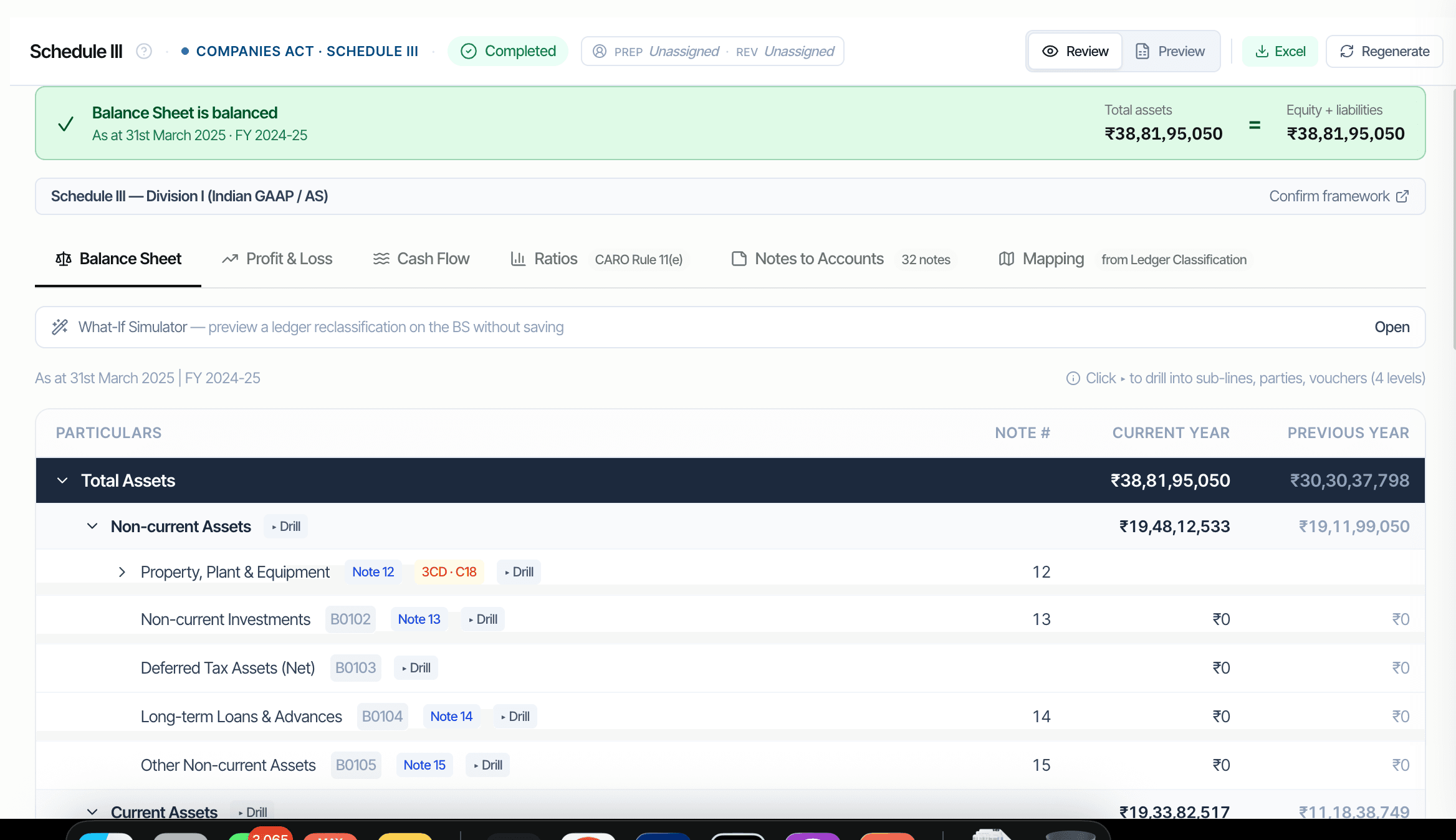
Schedule III is the heart of the financial statements — Balance Sheet, P&L, Cash Flow, ratios, depreciation, Notes and Mapping in one Working Paper. CORAA drafts every line from the books via Ledger Mapping. The framework stays a setting until you lock: switch Divisions and the faces re-render. When the equation ties, Lock & generate seals the statements and produces the Notes from the locked figures — so a note can never disagree with the face above it.

  • Eight tabs: BS / P&L / Cash Flow / Ratios / Schedule II Depreciation / Notes / Disclosures / Mapping
  • Framework selector: Division I (AS), Division II (Ind AS), Division III (NBFC), LLP and non-corporate formats
  • Every figure recomputed from the mapped ledgers — nothing keyed by hand
  • CY vs PY columns with variance highlight
  • Lock & generate — statements seal, Notes generate from the locked faces
  • Mapping tab read-only; pulls from Ledger Mapping
Two paths, one ledger

The old way, and ours.

Two paths to the same audit conclusion. One leaves traces; the other doesn't.

Traditional

The old way

  • -Senior partner composes BS and P&L in Excel from trial balance
  • -Notes drafted from a firm template, line by line, every audit
  • -Sch III amendment 2021 ageing buckets computed manually
  • -Mapping decisions repeated every year
  • -Reclassifications require redoing the BS by hand to test impact
দুই পর্যন্ত তিন দিন এর পার্টনার সময় প্রতি এনগেজমেন্ট. ম্যাপিং সিদ্ধান্ত নয় reused বছরের পর বছর.
CORAA

On the Ledger

  • BS, P&L, Cash Flow auto-drafted from the Ledger Mapping
  • Notes auto-drafted from the locked statements, with CY vs PY and version history
  • The 11 Schedule III ratios auto-computed with variance flagging over 25%
  • Sch III amendment 2021 ageing buckets composed automatically
  • Drill any face line to its ledgers, parties and vouchers before you lock
  • Mapping decisions persist year-on-year via Ledger Mapping
সময়সূচী III প্রস্তুত জন্য পার্টনার পর্যালোচনা এ 30 মিনিট এ প্রথম অডিট. পরবর্তী অডিট: মিনিট.
How it works

Three steps. Every trace logged.

Step 01

Ledger Mapping feeds Schedule III

Every ledger carries a Sch III line code from the 4-dim Ledger Mapping setup. BS and P&L compose via SUMIFS over Trial Balance, aggregating by Sch III line. Cash Flow derives from BS movement plus P&L non-cash adjustments.

Step 02

Review eight tabs

BS, P&L, Cash Flow (indirect method), Ratios (the 11 Schedule III ratios with 25% variance flagging), Notes (32 disclosures with CY vs PY), Mapping (read-only view of classification).

Step 03

Lock & generate

The framework choice is a setting until you lock — switch Divisions and the faces re-render; move a grouping and the statements recompute. When the placements are confirmed and the equation ties, Lock & generate seals the statements and produces the Notes from the locked figures. Unlock, adjust, re-lock — version history keeps every generated set.

Inside the module

What you actually get.

Eight tabs in one Working Paper

Balance Sheet, P&L, Cash Flow (indirect), Ratios, Schedule II Depreciation, Notes to Accounts, Disclosures, and Mapping (read-only from Ledger Mapping). Every figure recomputes from the mapped ledgers — re-map and regenerate; nothing is keyed by hand.

  • Balance Sheet with three-level drill: line → ledgers → vouchers
  • P&L with disaggregation per Sch III Part II
  • Cash Flow per AS 3 / Ind AS 7
  • The 11 Schedule III ratios with variance flagging
  • Notes with CY vs PY toggle
  • Mapping read-only from Ledger Mapping

Division I vs Division II

Most companies use Division I (Indian GAAP / AS); listed and large unlisted entities use Division II (Ind AS); NBFCs follow Division III; LLPs and non-corporate entities get their own formats. The framework selector switches the template, line names and disclosures — and stays switchable until you lock.

  • Division I (AS): Tangible Assets, Intangible Assets header
  • Division II (Ind AS): PPE, Right-of-Use Assets, Intangibles
  • Note templates differ per framework
  • Ratios computed per framework guidance

Drill, don't guess

Any face line opens to the groupings and ledgers behind it, then the parties, then the vouchers. Marginal placement calls get decided on evidence — and the Mapping tab records where every rupee landed.

  • Preview reclassification impact across BS, Notes, ratios
  • No save without confirmation
  • Useful for marginal classification calls
  • Audit trail captures the preview event

Schedule III ratios with variance flagging

CARO 2020 requires reporting on 11 financial ratios. CORAA computes them automatically and flags any ratio with more than 25% variance vs prior year, requiring auditor disclosure of the reason for variance.

  • Current ratio, Debt-equity, DSCR
  • ROE, Inventory turnover, Receivable turnover
  • Payable turnover, Net capital turnover
  • Net profit ratio, ROCE, Return on investments
  • Variance flagging at 25%
Frequently asked

Answers, up front.

Everything stays editable until you lock — move a group and the faces recompute; switch the Division and the template re-renders. Nothing is final until Lock & generate, and unlocking reopens the worksheet with version history keeping each generated set.
The auditor sets the Division at setup and can switch it any time before lock — the faces re-render. Division I (Indian GAAP / AS), Division II (Ind AS), Division III (NBFC), and LLP / non-corporate formats each load their own template, note set and disclosure checklist.
Schedule III (2021 amendment) requires disclosure of 11 financial ratios with an explanation for any variance over 25% vs prior year. CORAA computes the ratios from BS and P&L, flags variances over 25%, and prompts for the auditor's explanation. The explanation goes into the Ratios note. No re-keying.
Yes. BS, P&L, Cash Flow, Ratios and the Schedule II depreciation working all recompute from the mapped ledger data. Re-map a ledger in Ledger Mapping and regenerate — every tab recomputes, and the Notes regenerate from the locked faces on re-lock.
See it on a real ledger

Run সময়সূচী iii on one of your engagements.

Bring a Trial Balance and a General Ledger. We'll walk through reporting end-to-end on your data, not a sandbox.

Run your first audit free →
Schedule III Balance Sheet & P&L, AI Auto-Drafted | CORAA