CORAA
AI Modules/Reporting/Notes to Accounts
Schedule III · 32 Notes· प्रतिवेदन

Notes to Accounts

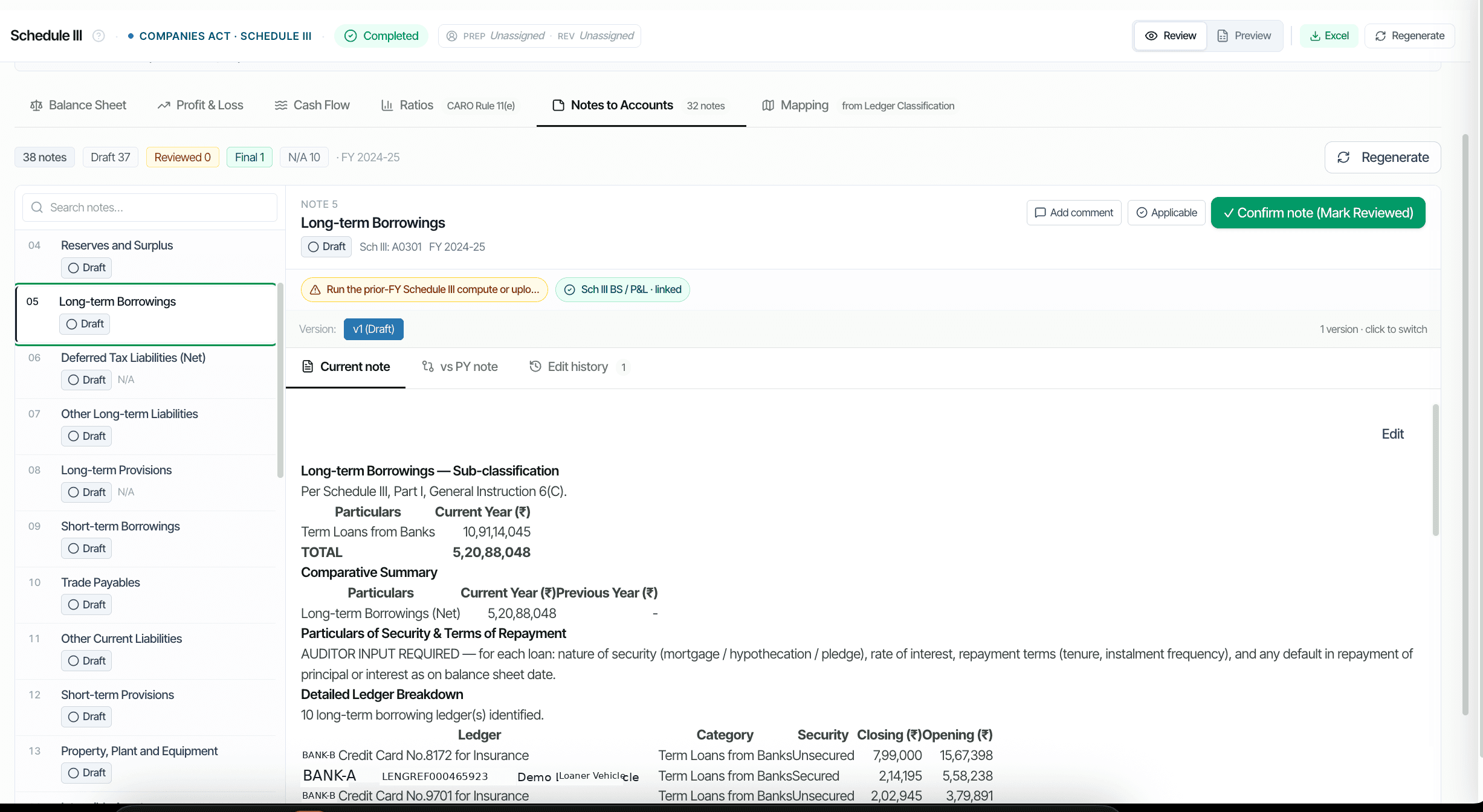
32 disclosures auto-drafted from UAL. CY vs PY toggle, version history per Note.

Notes to Accounts with CY vs PY toggle

Companies Act 2013 Schedule III requires extensive Notes to Accounts: 32 in Division I, more in Division II for Ind AS. CORAA composes every Note automatically from the Universal Audit Ledger. Each Note shows CY versus PY side by side, preserves version history per edit, and supports inline drill to constituent ledgers. Note 5 Long-term Borrowings, Note 8 Trade Payables MSME, Note 11 PPE, Note 23 Contingent Liabilities, Note 30 RPT, and 27 more.

  • 32 Notes auto-drafted from UAL data
  • CY vs PY toggle per Note (side-by-side comparison)
  • Version history captures every edit with reason
  • Ledger-level breakdown beneath each Note
  • Reviewed and Final state lock per Note
  • Direct cross-reference to Schedule III BS / P&L line
Two paths, one ledger

The old way, and ours.

Two paths to the same audit conclusion. One leaves traces; the other doesn't.

Traditional

The old way

  • -Notes drafted manually in Word every audit
  • -CY figures pulled from current trial balance; PY from prior-year audit file
  • -Cross-references to Schedule III line manually maintained
  • -Reviewer comments left as track-changes in the Word file
Notes drafting: 1-2 days. Re-drafting after BS changes: common.
CORAA

On the Ledger

  • Every Note auto-drafted from UAL with structured fields
  • CY and PY pulled from current and prior-year UAL respectively
  • Reclassify a ledger and the dependent Note recomposes automatically
  • Reviewer comments captured inline with versioning
  • Reviewed and Final state machine prevents post-sign-off edits
Notes drafting: 30 minutes review per Note for Year 1, minutes for Year 2.
How it works

Three steps. Every trace logged.

Step 01

Composition from UAL

Each Note has a template tied to its Schedule III line. The template specifies which UAL data populates which field. Example: Note 5 Long-term Borrowings pulls from ledgers classified as Schedule III Line A3, with sub-classification by Secured / Unsecured.

Step 02

Review per Note

The Notes to Accounts tab on the Schedule III Working Paper lists all 32 Notes. Click any Note to see Current Note, vs PY Note, and Edit History. Reviewer adds comments inline, accepts the figures, and marks the Note Reviewed.

Step 03

Mark Final and lock

When all Notes are Reviewed, the partner marks the entire Notes pack Final. Further edits after Final require a documented re-evaluation note per SA 230 and create a new version.

Inside the module

What you actually get.

32 ਨੋਟ ਟੈਮਪਲੇਟ

Every Schedule III Note has a structured template that maps to UAL data. Examples below.

  • Note 1 Corporate Information
  • Note 5 Long-term Borrowings (with security terms)
  • Note 8 Trade Payables (MSME split)
  • Note 11 PPE roll-forward
  • Note 19 Trade Receivables (ageing buckets)
  • Note 23 Contingent Liabilities
  • Note 30 Related Party Disclosures

CY vs PY side-by-side

Every Note carries a CY vs PY toggle. The disclosure is rendered for both years simultaneously so the reviewer compares without switching files.

  • Same Note template for both years
  • Variance highlight inline
  • PY pulled from prior-year audit
  • Reclassification adjustments captured

Version history per Note

Every edit creates a new version of the Note. The Edit History tab shows who changed what, when, and the reason. Reverts supported until Final state.

  • Per-edit versioning
  • Edit reason captured
  • Revert supported pre-Final
  • Audit log preserves all versions

Reviewed and Final state machine

Notes flow through Draft → Reviewed → Final. Articles draft, partner reviews and marks Reviewed, partner finally marks the pack Final. Post-Final edits require documented re-evaluation per SA 230.

  • Draft, Reviewed, Final states
  • State transitions logged
  • Post-Final edit requires re-evaluation note
  • Final state lockable per Note or pack
Frequently asked

Answers, up front.

The auditor marks the Note as 'N/A' with a brief reason. The Note still appears in the Notes pack but renders with 'Not Applicable' instead of figures. Some Notes (e.g., RPT for entities with no related parties) are auto-marked N/A based on UAL data.
Division II (Ind AS) has additional Notes not in Division I: ECL on Trade Receivables (Ind AS 109), Right-of-Use Assets (Ind AS 116), Financial Instruments classification (FVTPL / FVOCI). The Framework selector at Engagement Setup loads the appropriate Division-II templates.
Yes. Each Note supports inline reviewer comments visible to the audit team. Comments flow into the Engagement Log and are accessible to peer reviewers. Resolved comments are archived but not deleted.
See it on a real ledger

Run notes to accounts on one of your engagements.

Bring a Trial Balance and a General Ledger. We'll walk through reporting end-to-end on your data, not a sandbox.

Start the free trial →Book a walk-through
Notes to Accounts AI for Schedule III Statutory Audit | CORAA | CORAA