CORAA
AI Modules/Scrutiny/ఇంటెలిజెన్స్ స్టుడియో
Graph-based ఆడిట్· परख

ఇంటెలిజెన్స్ స్టుడియో

Money flow as a graph. Drill from any node or edge to source వౌచర్‌లు.

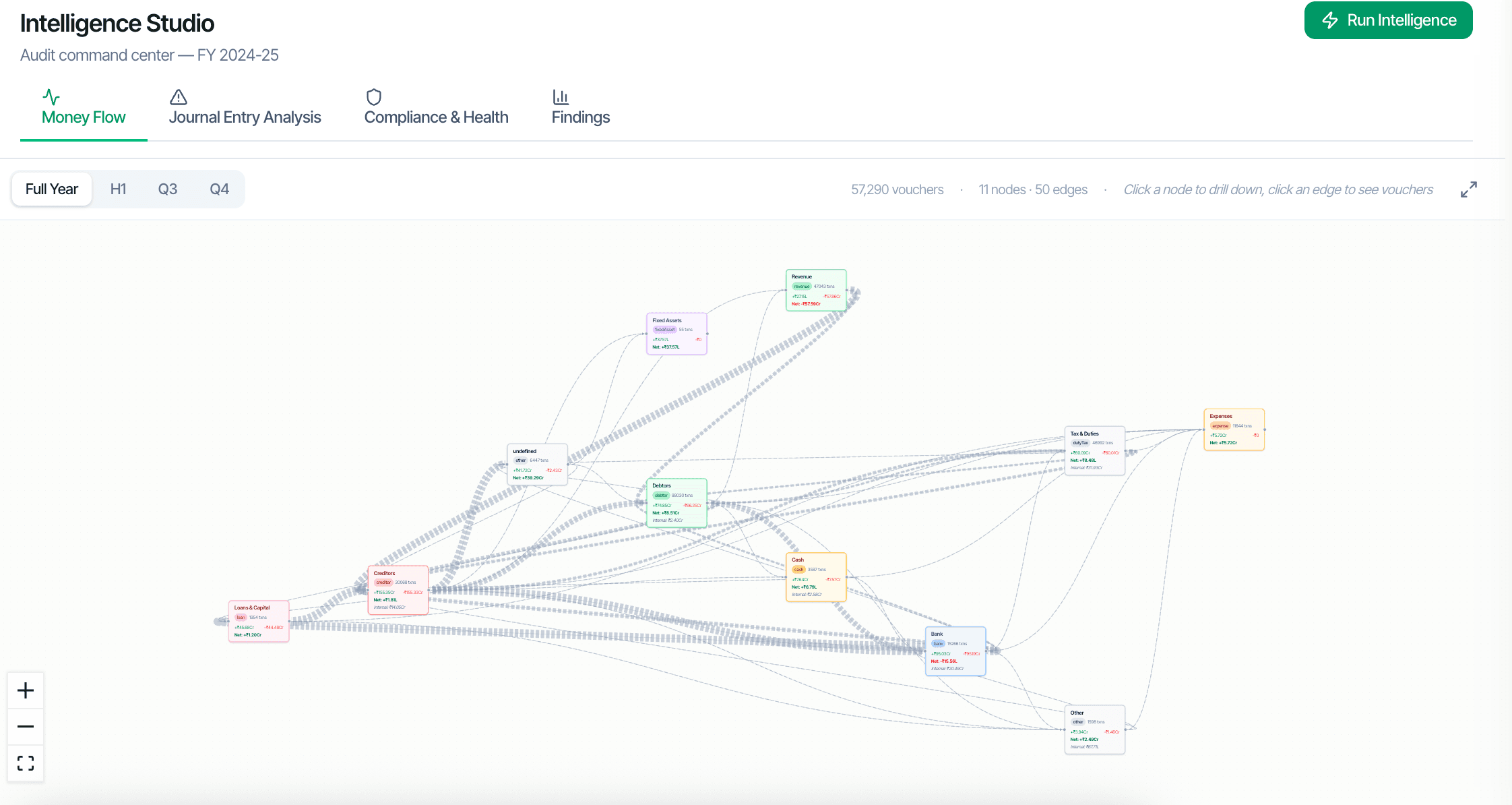
CORAA ఇంటెలిజెన్స్ స్టుడియో money flow graph

ఆడిటర్s don't think in tables; they think in relationships. ఇంటెలిజెన్స్ స్టుడియో shows the entire entity as a graph: లెడ్జర్‌లు, parties, and వౌచర్‌లు as nodes and edges. Four tabs cover the major ఆడిట్ questions: Money Flow (where does cash come from and go?), Journal Entry Analysis (SA 240 testing), కంప్లయన్స్ & Health (statutory dues, regulatory flags), and ఫలితాలు (the engagement review queue).

  • Four tabs: Money Flow, Journal Entry Analysis, కంప్లయన్స్ & Health, ఫలితాలు
  • 57,000+ వౌచర్ engagement renders as a 50-edge / 11-node graph
  • Click any node to drill into its లెడ్జర్ or party
  • Click any edge to see the వౌచర్‌లు between two parties
  • Filter by quarter, amount, or anomaly band
  • SA 240 జర్నల్ ఎంట్రీ టెస్టింగ్ built into the workflow
Two paths, one ledger

The old way, and ours.

Two paths to the same audit conclusion. One leaves traces; the other doesn't.

Traditional

The old way

  • -ఆడిట్ data viewed in Excel tables, one లెడ్జర్ at a time
  • -Cross-party flows require manual VLOOKUPs across multiple sheets
  • -Money flow patterns rarely surface unless an article explicitly looks
  • -కంప్లయన్స్ status assembled by reading separate reports
Pattern recognition: depends on the article's seniority. Cross-party visibility: low.
CORAA

On the Ledger

  • Entity rendered as a single navigable graph
  • Top money-flow paths surface automatically
  • SA 240 sub-requirements layered on the graph as filter modes
  • కంప్లయన్స్ flags visible per node
  • ఫలితాలు inbox accessible from the same canvas
Pattern recognition: visual and immediate. Cross-party visibility: complete.
How it works

Three steps. Every trace logged.

Step 01

Money Flow tab

Shows the dominant money flows across the entity. Top suppliers (highest outflow), top customers (highest inflow), top inter-party transactions. Filter by quarter to see seasonality.

Step 02

Journal Entry Analysis tab

Layers the SA 240 sub-requirements on the graph: highlight last-minute manual JEs (red nodes), unusual debit-credit pairings (orange edges), related-party rings (closed loops in green).

Step 03

కంప్లయన్స్ & Health tab

Per-లెడ్జర్ కంప్లయన్స్ status. Statutory dues outstanding, GST mismatch flags, TDS variance flags, MSMED interest accrual. Click any flagged node to see the underlying issue.

Step 04

ఫలితాలు tab

The engagement's ఫలితాలు inbox, filtered to the current graph view. Resolve, dismiss, or pin ఫలితాలు without leaving ఇంటెలిజెన్స్ స్టుడియో.

Inside the module

What you actually get.

Graph rendering

కాదుdes are లెడ్జర్‌లు and parties; edges are aggregated వౌచర్‌లు between them. Edge thickness scales with transaction value. కాదుde colour shifts to indicate flag severity.

  • Auto-layout via force-directed graph
  • Edge weights by aggregate transaction value
  • కాదుde colour by severity (red/orange/green)
  • Zoom and pan supported

Drill-down

Click any node to drill into that లెడ్జర్'s transactions or that party's వౌచర్ list. Click any edge to see the specific వౌచర్‌లు between two parties.

  • కాదుde click: లెడ్జర్ or party detail
  • Edge click: వౌచర్ list between two parties
  • Three levels deep: graph, వౌచర్ list, source వౌచర్
  • వెనుకకు to graph in one click

SA 240 layered view

Apply SA 240 filters to the graph: only last-minute manual JEs visible, or only unusual debit-credit pairings, or only related-party rings. Each filter modifies the graph in place.

  • Last-minute manual JE filter
  • Unusual debit-credit pairing filter
  • Related-party ring filter
  • Layered combinations supported

ఆడిట్-trail aware

Every drill, every filter, every flag in ఇంటెలిజెన్స్ స్టుడియో is logged to the engagement log per SA 230. Peer reviewers can re-run the same view by replaying the log.

  • Every action logged
  • Filter state preserved
  • Replay supported for peer review
  • SA 230 కంప్లయన్స్
Frequently asked

Answers, up front.

లెడ్జర్ స్క్రుటినీ and ట్రాన్సాక్షనల్ స్క్రుటినీ generate the ఫలితాలు; ఇంటెలిజెన్స్ స్టుడియో visualizes them. The four tabs surface different cuts of the same underlying data. ఆడిటర్s typically run scrutiny first (which auto-populates ఫలితాలు), then open ఇంటెలిజెన్స్ స్టుడియో to investigate patterns visually.
కాదు. The standard scrutiny report is a tabular వర్కింగ్ పేపర్ for the ఆడిట్ file. ఇంటెలిజెన్స్ స్టుడియో is a review interface for the ఆడిట్ బృందం. Both are produced from the same data; they serve different needs.
అవును. Each tab exports as PDF showing the graph state, applied filters, and a summary table of nodes and edges. The export is dated and stamped for inclusion in the ఆడిట్ పనిing paper file.
See it on a real ledger

Run ఇంటెలిజెన్స్ స్టుడియో on one of your engagements.

Bring a Trial Balance and a General Ledger. We'll walk through scrutiny end-to-end on your data, not a sandbox.

Start the free trial →Book a walk-through
Intelligence Studio | Graph-based Audit Command Centre | CORAA | CORAA