CORAA
AI Modules/Reporting/Schedule III
Companies Act · Reporting· प्रतिवेदन

Schedule III

Division I or Division II. Six tabs. What-If reclassifications.

CORAA Schedule III with Notes cross-references

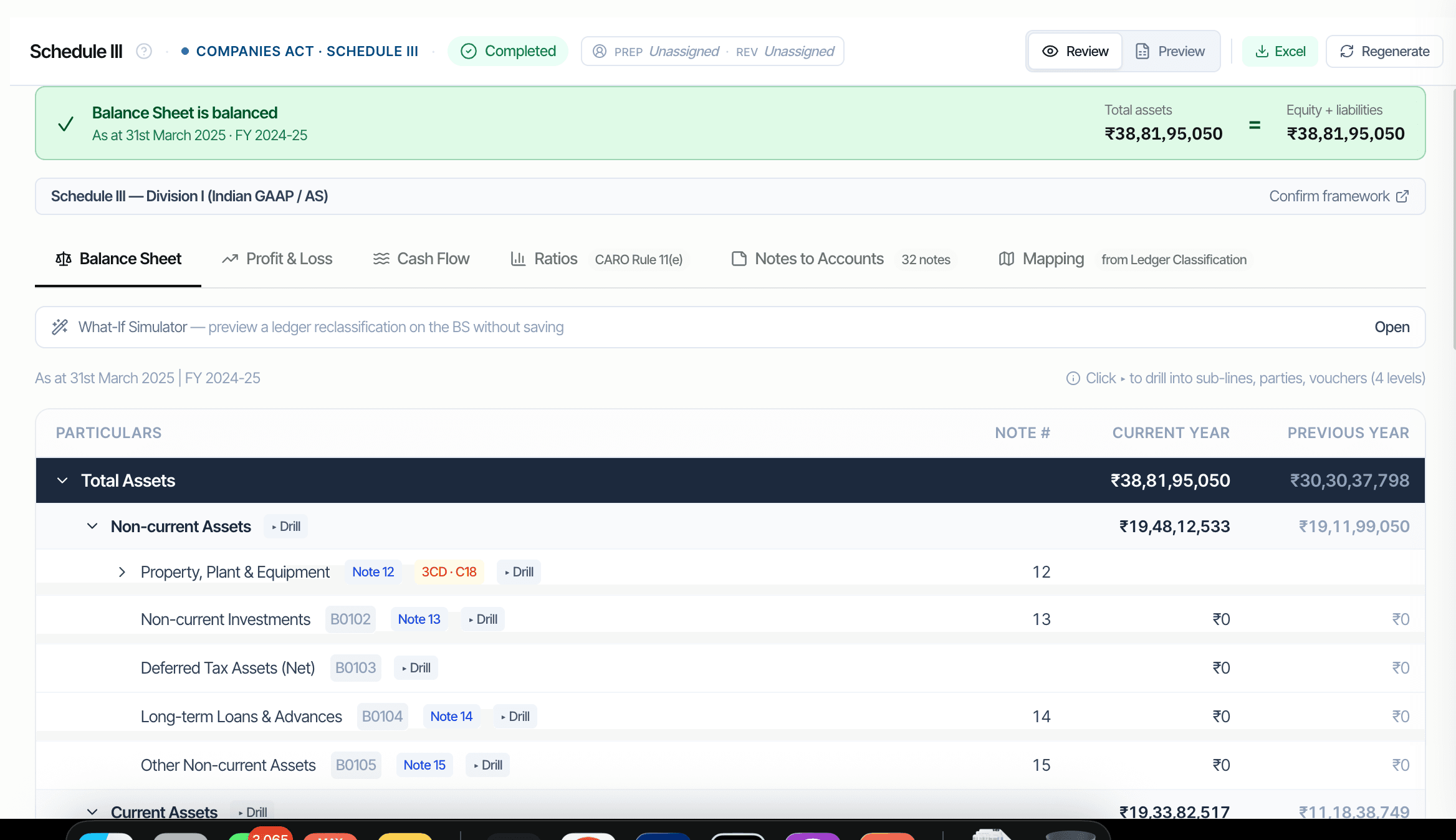
Schedule III is the heart of the financial statements, Balance Sheet, P&L, Cash Flow, ratios, Notes, and Mapping all in one Working Paper. CORAA auto-drafts every line from books via the 4-dimensional ledger classification. Framework selector switches between Division I (Indian GAAP / AS) and Division II (Ind AS). The What-If Simulator lets the auditor preview a reclassification on the BS without saving.

  • Six tabs: BS / P&L / Cash Flow / Ratios (CARO 11(e)) / Notes (32 disclosures) / Mapping
  • Framework selector: Division I (AS) or Division II (Ind AS), templates adapt
  • All figures live-formula against the Universal Audit Ledger
  • CY vs PY columns with variance highlight
  • What-If Simulator, preview a reclassification without saving
  • Mapping tab read-only; pulls from Ledger Classification
Two paths, one ledger

The old way, and ours.

Two paths to the same audit conclusion. One leaves traces; the other doesn't.

Traditional

The old way

  • -Senior partner composes BS and P&L in Excel from trial balance
  • -32 Notes drafted from a firm template, line by line, every audit
  • -Sch III amendment 2021 ageing buckets computed manually
  • -Mapping decisions repeated every year
  • -Reclassifications require redoing the BS by hand to test impact
Two to three days of partner time per engagement. Mapping decisions not reused year-on-year.
CORAA

On the Ledger

  • BS, P&L, Cash Flow auto-drafted from ledger classification at first ingest
  • 32 Notes auto-drafted with CY vs PY toggle and version history
  • CARO Rule 11(e) ratios auto-computed with variance flagging over 25%
  • Sch III amendment 2021 ageing buckets composed automatically
  • What-If Simulator previews reclassification impact across BS, Notes, ratios
  • Mapping decisions persist year-on-year via Ledger Classification
Schedule III ready for partner review in 30 minutes at first audit. Subsequent audits: minutes.
How it works

Three steps. Every trace logged.

Step 01

Ledger Classification feeds Schedule III

Every ledger carries a Sch III line code from the 4-dim Ledger Classification setup. BS and P&L compose via SUMIFS over Trial Balance, aggregating by Sch III line. Cash Flow derives from BS movement plus P&L non-cash adjustments.

Step 02

Review six tabs

BS, P&L, Cash Flow (indirect method), Ratios (CARO Rule 11(e), 11 ratios with 25% variance flagging), Notes (32 disclosures with CY vs PY), Mapping (read-only view of classification).

Step 03

Use What-If for marginal calls

When a partner asks 'what if we treat this as Long-term Borrowing instead of Short-term?', the What-If Simulator renders the BS impact, ratio impact, and Note impact immediately, without committing. Commit only on explicit confirmation.

Inside the module

What you actually get.

Six tabs in one Working Paper

Balance Sheet, P&L, Cash Flow (indirect), Ratios (CARO 11(e)), 32 Notes to Accounts, and Mapping (read-only from Ledger Classification). Every figure cross-references with the others, change a classification, every dependent figure updates.

  • Balance Sheet with three-level drill: line → ledgers → vouchers
  • P&L with disaggregation per Sch III Part II
  • Cash Flow per AS 3 / Ind AS 7
  • CARO Rule 11(e) 11 ratios with variance flagging
  • 32 Notes with CY vs PY toggle
  • Mapping read-only from Ledger Classification

Division I vs Division II

Most companies use Division I (Indian GAAP / AS). Listed and large unlisted entities use Division II (Ind AS). CORAA's framework selector switches the template, line item names, disclosure requirements, ratio computations all adapt to the chosen framework.

  • Division I (AS): Tangible Assets, Intangible Assets header
  • Division II (Ind AS): PPE, Right-of-Use Assets, Intangibles
  • Note templates differ per framework
  • Ratios computed per framework guidance

What-If Simulator

Preview a ledger reclassification on the BS without saving. When the partner asks 'what if this is Long-term Borrowing instead of Short-term', CORAA renders BS impact, ratio impact, and Note impact immediately. Commit only on explicit confirmation.

  • Preview reclassification impact across BS, Notes, ratios
  • No save without confirmation
  • Useful for marginal classification calls
  • Audit trail captures the preview event

CARO Rule 11(e) ratios with variance flagging

CARO 2020 requires reporting on 11 financial ratios. CORAA computes them automatically and flags any ratio with more than 25% variance vs prior year, requiring auditor disclosure of the reason for variance.

  • Current ratio, Debt-equity, DSCR
  • ROE, Inventory turnover, Receivable turnover
  • Payable turnover, Net capital turnover
  • Net profit ratio, ROCE, Return on investments
  • Variance flagging at 25%
Frequently asked

Answers, up front.

The What-If Simulator previews a ledger reclassification on the Balance Sheet without saving. When a partner asks whether a balance should be classified as Long-term Borrowing rather than Short-term, CORAA renders the BS impact, ratio impact, and Note impact immediately. The change commits only on explicit confirmation. The Mapping tab itself is read-only and pulls from Ledger Classification, which remains the canonical source.
The auditor selects Division I (Indian GAAP / AS) or Division II (Ind AS) once during Engagement Setup. CORAA loads the appropriate Sch III template, Note templates, and disclosure checklist. Division II adds Right-of-Use Assets (Ind AS 116), changes 'Tangible Fixed Assets' to 'Property, Plant and Equipment', and adjusts several Note templates including Note 19 (ECL on receivables) and Note 28 (employee benefits disclosure).
CARO 2020 requires reporting on 11 financial ratios with explanation for any variance over 25% vs prior year. CORAA computes the ratios from BS and P&L, flags variances over 25%, and prompts for the auditor's explanation. The explanation goes into the CARO 2020 report at Clause 3(xi)(e). No re-keying.
Yes. BS, P&L, Cash Flow, Ratios, and Notes are all live formulas against the Universal Audit Ledger. Reclassifying a ledger via Ledger Classification triggers automatic recomputation across all six tabs. The recompute event is captured in the audit trail per SA 230.
See it on a real ledger

Run schedule iii on one of your engagements.

Bring a Trial Balance and a General Ledger. We'll walk through reporting end-to-end on your data, not a sandbox.

Start the free trial →Book a walk-through
Schedule III Balance Sheet & P&L, AI Auto-Drafted | CORAA | CORAA