CORAA
AI Modules/Findings/ಫಲಿತಾಂಶಗಳು Inbox
ಎಂಗೇಜ್‌ಮೆಂಟ್ Review Queue· निष्कर्ष

ಫಲಿತಾಂಶಗಳು Inbox

Auto-classified by ಪ್ರಾಮುಖ್ಯತೆ band. ಲೇಖನಗಳು triage, partners review.

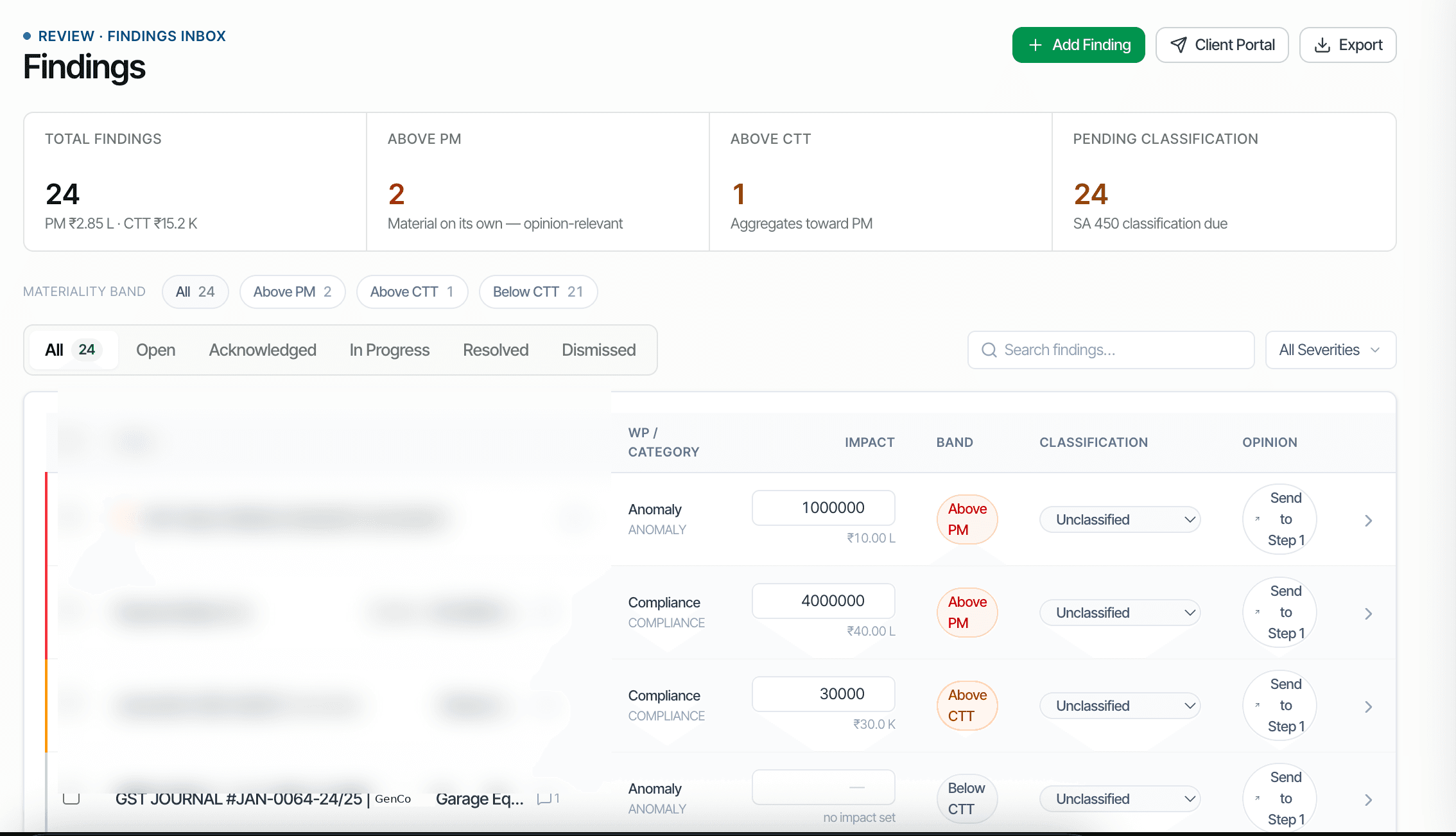
CORAA ಫೈಂಡಿಂಗ್ಸ್ ಇನ್‌ಬಾಕ್ಸ್ ನೊಂದಿಗೆ ಪ್ರಾಮುಖ್ಯತೆ-band classification

Every ವೌಚರ್ anomaly, every Schedule III mismatch, every threshold breach surfaces in the ಫೈಂಡಿಂಗ್ಸ್ ಇನ್‌ಬಾಕ್ಸ್. CORAA auto-classifies each ಫಲಿತಾಂಶ by ಪ್ರಾಮುಖ್ಯತೆ band using the locked ಪ್ರಾಮುಖ್ಯತೆ memo: Above Performance ಪ್ರಾಮುಖ್ಯತೆ (must resolve before sign-off), Above Clearly Trivial Threshold (review required), Below CTT (informational). ಲೇಖನ assistants triage the lower bands; partners review the material ones.

  • Auto-classified by band: Above PM, Above CTT, Below CTT
  • ಲೇಖನ-level filter for triage; partner-level filter for review
  • Above-PM ಫಲಿತಾಂಶಗಳು block Opinion sign-off until resolved
  • Each ಫಲಿತಾಂಶ: description, notes, attachments, linked ವೌಚರ್‌ಗಳು, comments, version history
  • Resolve, Dismiss, Dismiss-family, Pin for partner attention
  • ಫಲಿತಾಂಶಗಳು flow into Opinion & ವರದಿ ಹಂತ 1 for classification
Two paths, one ledger

The old way, and ours.

Two paths to the same audit conclusion. One leaves traces; the other doesn't.

Traditional

The old way

  • -Anomalies tracked in an Excel sheet per ಆಡಿಟ್
  • -Classification by ಪ್ರಾಮುಖ್ಯತೆ done manually at sign-off
  • -Partner reviews ಎಲ್ಲವೂ because triage isn't structured
  • -Resolved ಫಲಿತಾಂಶಗಳು noted as 'cleared' without documented rationale
ಫಲಿತಾಂಶಗಳು management: ad-hoc. Partner review burden: 100% of all flags.
CORAA

On the Ledger

  • ಫಲಿತಾಂಶಗಳು auto-classified the moment they are created
  • ಲೇಖನ triages Below-CTT ಫಲಿತಾಂಶಗಳು without partner review
  • Partner reviews only Above-PM and Above-CTT ಫಲಿತಾಂಶಗಳು
  • Each ಫಲಿತಾಂಶ's full history preserved: who, when, what, why
  • Dismiss-family suppresses the pattern ಆ ಎಂಗೇಜ್‌ಮೆಂಟ್‌ಗಾಗಿ permanently
ಫಲಿತಾಂಶಗಳು management: structured. Partner review burden: 5-20% of flags.
How it works

Three steps. Every trace logged.

Step 01

Auto-classification on creation

Every ಫಲಿತಾಂಶ ಇಂದ ಪರಿಶೀಲನೆ, ಸಮನ್ವಯ, or ಆಡಿಟರ್ flagging carries an amount. CORAA classifies it against the locked ಪ್ರಾಮುಖ್ಯತೆ memo: amounts above Performance ಪ್ರಾಮುಖ್ಯತೆ go to Above-PM; above Clearly Trivial Threshold but below PM go to Above-CTT; below CTT go to Below-CTT (informational only).

Step 02

Triage and review

ಲೇಖನಗಳು open the ಫೈಂಡಿಂಗ್ಸ್ ಇನ್‌ಬಾಕ್ಸ್ filtered to Below-CTT. They review each ಫಲಿತಾಂಶ's source ವೌಚರ್, accept or dismiss, document the rationale. Partners filter to Above-PM and Above-CTT for their review.

Step 03

Reಪರಿಹಾರ ಮತ್ತು sign-off

Above-PM ಫಲಿತಾಂಶಗಳು must be resolved (or formally accepted as Uncorrected Misstatement per SA 450) before Opinion sign-off proceeds. The ಫೈಂಡಿಂಗ್ಸ್ ಇನ್‌ಬಾಕ್ಸ್ surfaces unresolved Above-PM ಫಲಿತಾಂಶಗಳು as Opinion sign-off blockers.

Inside the module

What you actually get.

Three ಪ್ರಾಮುಖ್ಯತೆ bands

Bands derived from the locked ಪ್ರಾಮುಖ್ಯತೆ memo. Configurable via SA 320 percentages.

  • Above PM: material misstatement candidate
  • Above CTT: warrants disclosure or correction
  • Below CTT: informational; no action required
  • Drill from band to individual ಫಲಿತಾಂಶಗಳು

ಫಲಿತಾಂಶ as structured record

Each ಫಲಿತಾಂಶ is more than a flag. It carries description, ಆಡಿಟರ್ notes, attachments (invoices, emails, screenshots), linked ವೌಚರ್‌ಗಳು, comments thread, and version history.

  • Description and ಆಡಿಟರ್ notes
  • Attachments (drag-drop upload)
  • Linked ವೌಚರ್‌ಗಳು (1+)
  • Comments thread for team discussion
  • Version history per edit

Actions

Five primary actions per ಫಲಿತಾಂಶ.

  • Resolve: client provided evidence, issue cleared
  • Dismiss: not a ಫಲಿತಾಂಶ (false positive)
  • Dismiss-family: suppress pattern permanently ಆ ಎಂಗೇಜ್‌ಮೆಂಟ್‌ಗಾಗಿ
  • Pin: flag for partner attention
  • ಕಳುಹಿಸಿ to Client: convert to Client Portal question

Sign-off blocker integration

Unresolved Above-PM ಫಲಿತಾಂಶಗಳು block Opinion & ವರದಿ ಹಂತ 1 from completing. The ಫೈಂಡಿಂಗ್ಸ್ ಇನ್‌ಬಾಕ್ಸ್ surfaces this as 'X ಫಲಿತಾಂಶಗಳು above PM, must classify before sign-off'.

  • Above-PM blocker count
  • Direct link to unresolved ಫಲಿತಾಂಶಗಳು
  • Block enforced on UDIN issuance
  • SA 450 disposition per ಫಲಿತಾಂಶ required
Frequently asked

Answers, up front.

Three sources: (1) automatically from ಪರಿಶೀಲನೆ rules firing on ವೌಚರ್‌ಗಳು, (2) automatically from ಸಮನ್ವಯ variances exceeding tolerance, (3) manually by the ಆಡಿಟರ್ flagging a ವೌಚರ್ with the Flag-for-Review modal. Each source preserves attribution in the ಫಲಿತಾಂಶ record.
Suppresses the underlying pattern ಆ ಎಂಗೇಜ್‌ಮೆಂಟ್‌ಗಾಗಿ permanently. Example: dismissing a 'Sunday cash transaction' ಫಲಿತಾಂಶ as a family for an automobile dealer (because Sunday is a sales day in that business) prevents Sunday-cash flags for that client thereafter. The rule continues running on other clients; the dismissal is ಎಂಗೇಜ್‌ಮೆಂಟ್-scoped. The dismissal reason is logged and reversible.
Opinion & ವರದಿ ಹಂತ 1 requires classification of every ಫಲಿತಾಂಶ per SA 450: Resolved (issue cleared), Caveat (disclosed in IAR), Uncorrected Misstatement (ಆಡಿಟರ್ agrees disposition but client did not correct), Material Weakness (significant internal control issue). Above-PM ಫಲಿತಾಂಶಗಳು must reach one of these classifications before ಹಂತ 1 advances. ಫಲಿತಾಂಶಗಳು below CTT are auto-classified Resolved and don't block.
See it on a real ledger

Run ಫಲಿತಾಂಶಗಳು inbox on one of your engagements.

Bring a Trial Balance and a General Ledger. We'll walk through findings end-to-end on your data, not a sandbox.

Start the free trial →Book a walk-through
Audit Findings Inbox AI | Materiality Band Classification | CORAA | CORAA