CORAA
AI Modules/Reconciliation/ವೌಚಿಂಗ್
OCR-based ವೌಚಿಂಗ್· मिलान

ವೌಚಿಂಗ್

OCR extracts invoice data, matches to ಲೆಡ್ಜರ್ entries, flags mismatches.

CORAA ವೌಚಿಂಗ್ with OCR-based invoice extraction

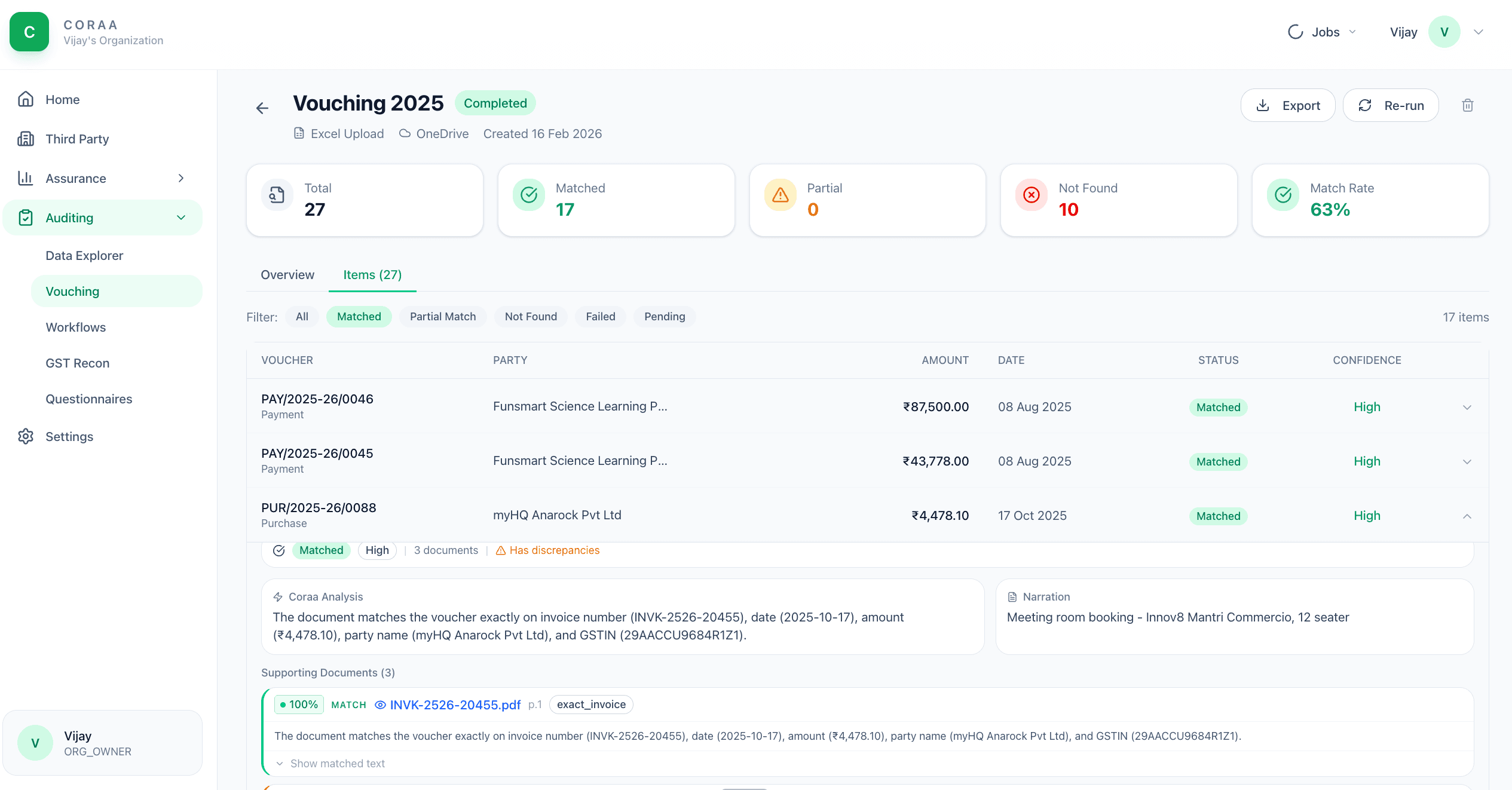
ವೌಚಿಂಗ್ means matching every booked transaction to its underlying invoice or supporting document. The traditional approach is three articles, six hours, a thousand ವೌಚರ್‌ಗಳು. CORAA's ವೌಚಿಂಗ್ agent uses OCR to extract amount, date, vendor GSTIN, invoice number, and TDS deducted from uploaded PDFs and images. The extracted data matches against the ಲೆಡ್ಜರ್ entry; mismatches above tolerance get flagged with the source image attached.

  • OCR handles scanned PDFs, photographic images, digital PDFs
  • Extracts amount, date, vendor GSTIN, invoice number, TDS deducted
  • Matches against ಲೆಡ್ಜರ್ entry on amount, party, date
  • Mismatch detection with configurable tolerance
  • Missing-support flagging for ವೌಚರ್‌ಗಳು without uploaded invoices
  • Source image attached to every flag
Two paths, one ledger

The old way, and ours.

Two paths to the same audit conclusion. One leaves traces; the other doesn't.

Traditional

The old way

  • -ಲೇಖನಗಳು vouch 100-200 sample ವೌಚರ್‌ಗಳು manually
  • -Each invoice opened, amount read, ಲೆಡ್ಜರ್ checked
  • -Mismatches noted on a printed register
  • -Missing invoices chased through email with the client
ವ್ಯಾಪ್ತಿ: 2-5% of ವೌಚರ್‌ಗಳು. Time: 6-8 hours per ಆಡಿಟ್. Mismatches missed: typical.
CORAA

On the Ledger

  • Bulk upload all invoices the client provides
  • OCR extracts structured data from every page automatically
  • Matches against the GL in seconds
  • Mismatches flagged with both the invoice image and the ಲೆಡ್ಜರ್ entry shown ಅಕ್ಕಪಕ್ಕ
  • Missing-support list generated for client follow-up
ವ್ಯಾಪ್ತಿ: every invoice uploaded. Time: 10-15 minutes runtime, 30 minutes review. Mismatches: every one caught.
How it works

Three steps. Every trace logged.

Step 01

Upload invoices

Bulk upload PDFs and images. CORAA accepts ZIP archives, folder uploads, or drag-and-drop. Files can come from the client's email, scanned cabinet, or accounting system attachments.

Step 02

OCR extracts and matches

OCR reads every page. Extracted fields: amount, invoice number, date, vendor GSTIN, vendor name, TDS deducted, GST split (CGST / SGST / IGST). The extracted data matches against the GL on amount + party + date within configurable tolerances.

Step 03

Review mismatches

Mismatches surface in the ವೌಚಿಂಗ್ ವರ್ಕಿಂಗ್ ಪೇಪರ್. Each row shows the source image, the OCR extraction, the matched ಲೆಡ್ಜರ್ entry, and the variance. The ಆಡಿಟರ್ accepts the match, flags for client clarification, or rejects.

Inside the module

What you actually get.

OCR field extraction

Trained on Indian invoice formats: GST invoices, Bill of Supply, debit notes, credit notes. Extracts the standard 7-8 fields per invoice with high accuracy.

  • Amount, invoice number, date
  • Vendor GSTIN, vendor name
  • TDS deducted (where applicable)
  • GST split: CGST, SGST, IGST
  • Bill of Supply detection (non-GST invoices)

Three-way match

Invoice amount, ಲೆಡ್ಜರ್ entry amount, and PO amount (if Bill register loaded) matched three ways. Variances surface at any leg.

  • Invoice vs ಲೆಡ್ಜರ್ amount
  • ಲೆಡ್ಜರ್ vs PO amount
  • Invoice vs PO amount
  • Configurable tolerance per leg

Missing-support detection

For every ಲೆಡ್ಜರ್ entry without a matched invoice in the upload set, CORAA lists it as missing-support. The ಆಡಿಟರ್ sends this list to the client through Client Portal as a single questionnaire.

  • Per-ವೌಚರ್ missing-support flag
  • Bulk client request via Client Portal
  • Magic-link delivery to client
  • Client response tracked back to the ವೌಚರ್

ಆಡಿಟ್-trail per ವೌಚರ್

Every ವೌಚರ್ carries its match history: who uploaded the invoice, when OCR ran, what was extracted, who accepted the match, who flagged it. Preserved per SA 230.

  • Upload timestamp + user
  • OCR extraction snapshot
  • ಆಡಿಟರ್ acceptance / flag
  • Source image versioned
Frequently asked

Answers, up front.

ಹೌದು. The OCR handles scanned PDFs (300 DPI or above), photographic images from phone cameras, and digital PDFs. Quality varies with input: a well-scanned PDF achieves >95% field accuracy; a low-light phone photo achieves 75-85%. Flagged matches always show the source image so the ಆಡಿಟರ್ can verify.
The ಆಡಿಟರ್ can edit any extracted field inline before accepting the match. Corrections are logged and used to improve OCR confidence on future invoices from the same vendor. Vendor invoice ಟೆಂಪ್ಲೇಟ್‌ಗಳು are learned per ಎಂಗೇಜ್‌ಮೆಂಟ್.
ಹೌದು, this is the recommended ಕಾರ್ಯಪ್ರವಾಹ. Once ವೌಚಿಂಗ್ is run, the matched ಲೆಡ್ಜರ್ entries flow into TDS and GST ಸಮನ್ವಯ as 'invoice-supported' transactions. Unmatched entries flow as 'pending invoice' and surface in Form 3CD Clause 21 or Clause 44 if appropriate.
See it on a real ledger

Run ವೌಚಿಂಗ್ on one of your engagements.

Bring a Trial Balance and a General Ledger. We'll walk through reconciliation end-to-end on your data, not a sandbox.

Start the free trial →Book a walk-through
AI Vouching for Audit | OCR Invoice Matching for CA Firms | CORAA | CORAA