CORAA
Engagement Setup

Engagement Setup

Connect the ERP. Classify the ledgers. Carry the work forward, every audit after just goes faster.

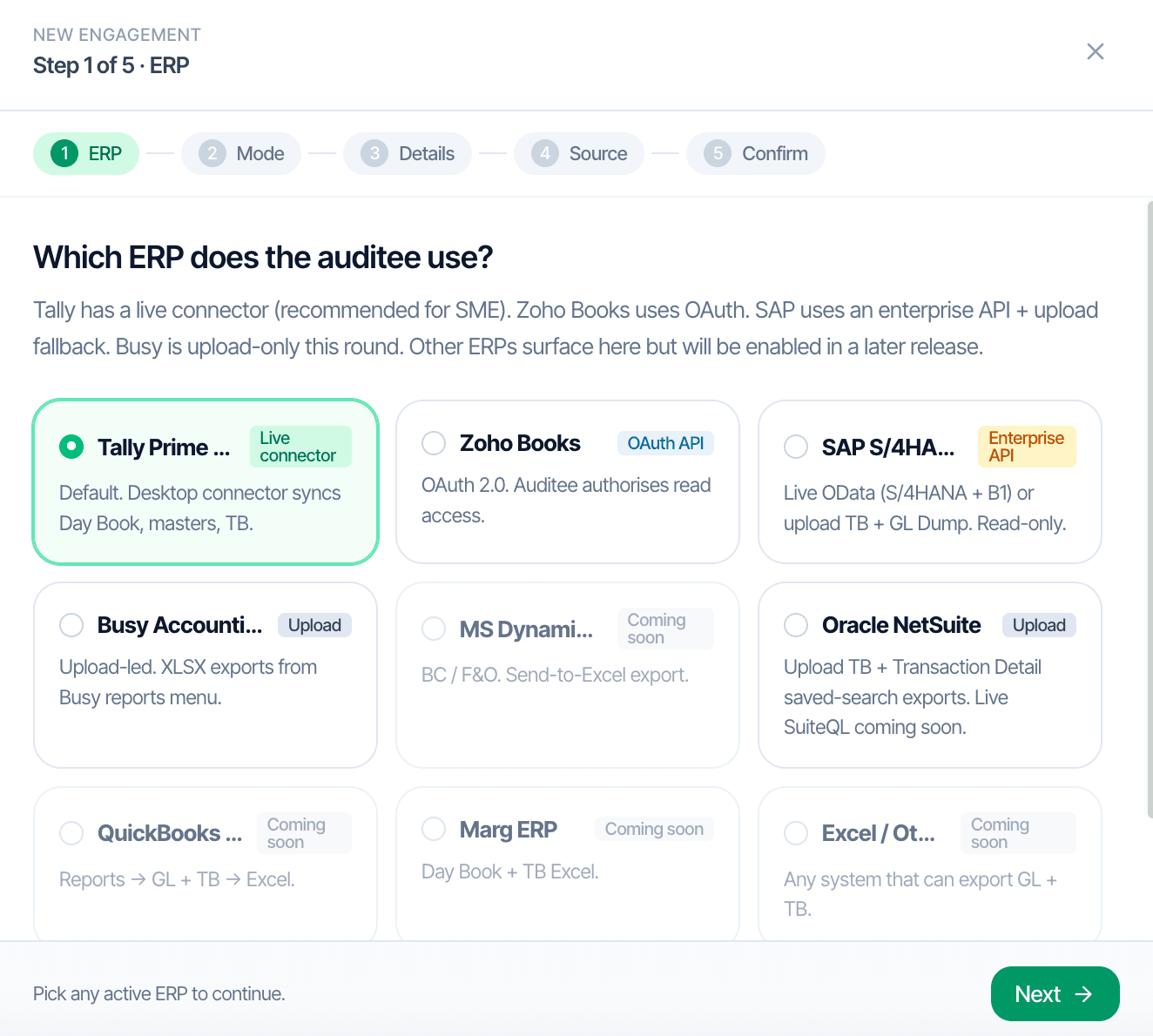
CORAA Engagement Setup, Step 1 of 5, ERP picker
01·5-step setup

Pick the ERP. Once.

Every engagement begins with three decisions: which ERP, which financial year, which accounting standard. A guided five-step setup captures them. Live connector for Tally, OAuth for Zoho, XLSX upload for SAP, NetSuite, Busy, and Marg, same downstream workflow regardless of ingestion path.

  • Tally Prime, desktop connector, live sync over LAN, no manual exports
  • Zoho Books, OAuth, fully zero-upload
  • SAP S/4HANA, SAP B1, NetSuite, Busy, Marg, XLSX upload
  • MS Dynamics, QuickBooks coming soon
  • Engagement details, CIN, FY, accounting standard, captured once, reused every year

Ingest time: 15-20 minutes for a 500-crore turnover company. Under one hour at 1,000 crore.

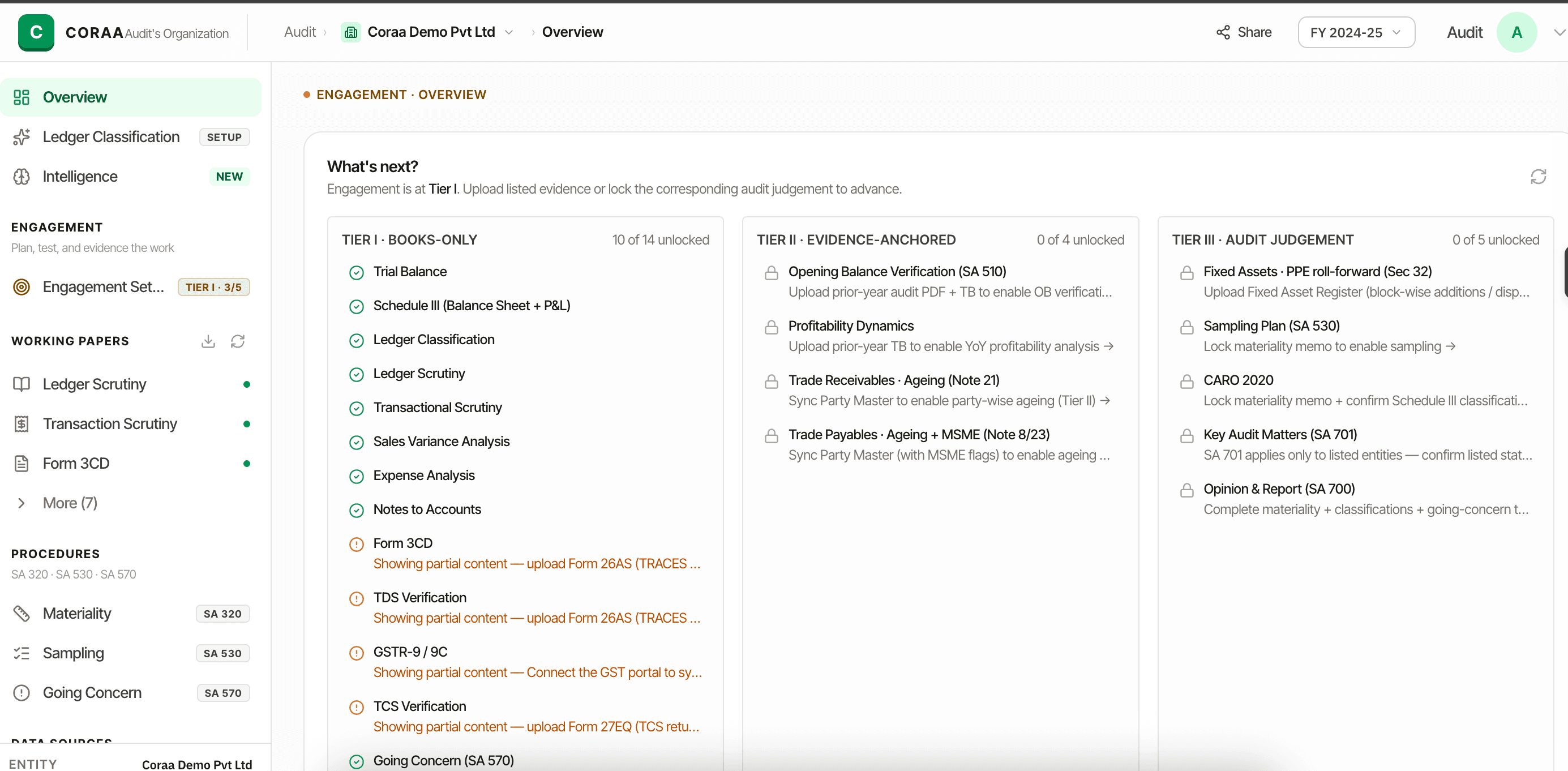
CORAA engagement overview — working papers completing as evidence arrives
02·No waiting on data

The audit progresses as evidence arrives.

Every engagement starts from just the trial balance and general ledger — no waiting for a complete data room. As the client hands over more, party ledgers, prior-year audit, fixed asset registers, more of the working paper file completes automatically, without disrupting what's already done.

  • Work begins immediately from the books alone, never a blocked engagement
  • More evidence handed over completes more of the working paper file automatically
  • CORAA flags exactly what's missing the moment a paper needs it
  • Auditor never waits, work begins with what the client can hand over today

No auditor is forced to wait. Every engagement starts from the same baseline; the rest completes as evidence arrives.

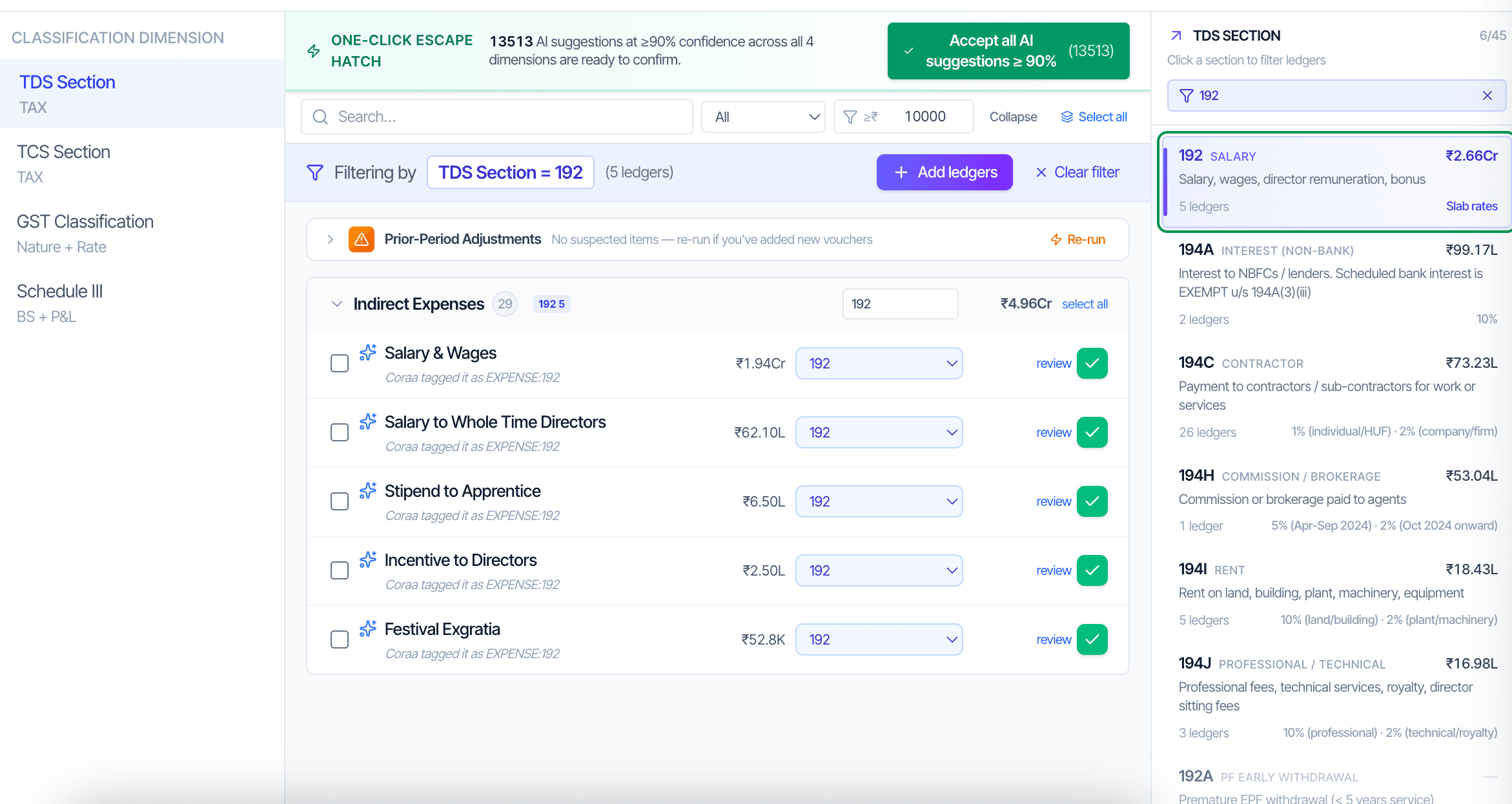
CORAA Ledger Mapping — Schedule III buckets and PF/ESI/PT applicability
03·4-dimensional classification

Classify every ledger once. Year 2 picks up where Year 1 left off.

Every ledger gets classified across four dimensions: the Schedule III bucket (Balance Sheet + P&L) and PF, ESI, and PT applicability. CORAA pre-classifies roughly 80 percent on first ingest using group hierarchy and narration patterns. The auditor confirms the residual. TDS, TCS, and GST need no ledger tag at all — those verification papers read the tax leg, amount, and direction structurally from the vouchers themselves. Mappings persist; Year 2 typically opens with zero ledgers requiring reclassification.

  • Four dimensions, one exercise: Schedule III (BS + P&L) plus PF · ESI · PT applicability
  • 80 percent auto-classified on first ingest
  • One-click acceptance for AI suggestions with ≥90 percent confidence
  • Mappings persist year-on-year, Year 2 review is typically zero ledgers
  • Rule weights adapt per client

Each client in its own isolated workspace. Role-based access scopes article-clerks, partners, and reviewers.

Inside Engagement Setup

Inside Engagement Setup

Two building blocks that turn the first engagement into a template for every audit after.

Module
ERP Connectors
Tally live connector. Zoho OAuth. SAP, NetSuite, Busy, Marg via XLSX upload. One model per ERP, picked once per client.
Read more →
4-DIM
Ledger Mapping
AI maps ~80% of ledgers on first ingest across four statutory dimensions. Auditor confirms the residual. Persists year-on-year.
Read more →
Frequently asked

Answers, up front.

For a 500-crore-turnover company on Tally, ingest completes in 15-20 minutes. The AI then takes 30-35 minutes to produce a first-pass classification. For a 1,000-crore engagement, allow an additional 10 minutes for ingest. Total setup is under an hour. Reviewer confirmation of the AI's residual classifications is typically 10-15 minutes at first audit and under five for subsequent audits because mappings persist.
The Tally connector runs locally on the audit team's machine and reads from the auditee's Tally database directly. Auditees on SAP, NetSuite, Busy, or Marg export Day Book, Trial Balance, and Account Master, then upload to CORAA. The interface and every downstream working paper are identical; only the ingestion layer differs.
No. Each engagement is a separate, isolated workspace. Two Tally engagements for different clients can run concurrently on the same auditor laptop without crossover. Role-based access scopes team members to specific clients.
Not yet — both are scheduled for upcoming releases. Today CORAA supports Tally Prime (live connector), Zoho Books (OAuth), and SAP, NetSuite, Busy and Marg via Excel upload.
No. Those verification papers read the tax leg, amount and direction structurally from the vouchers themselves, so there's no ledger-level tag to set or maintain for TDS, TCS or GST.
Mappings persist year-on-year. Year 2 typically opens with zero ledgers requiring reclassification — the auditor reviews only what changed since the prior FY.
Yes. Every engagement starts from just the trial balance and general ledger — CORAA never waits for a complete data room. As the client hands over more (party ledgers, prior-year audit, fixed asset registers), more of the working paper file completes automatically without disrupting what's already done.
Take it for a spin

Run a live audit. See the working.

Connect one client. Walk through the full audit lifecycle, classification through UDIN sign-off. No decks masquerading as demos.

Run your first audit free →
Engagement Setup, Connect Tally, Zoho, SAP & More | CORAA