CORAA
AI Modules/Working Papers/Lead Schedules
Schedule III Balance Heads· पत्र

Lead Schedules

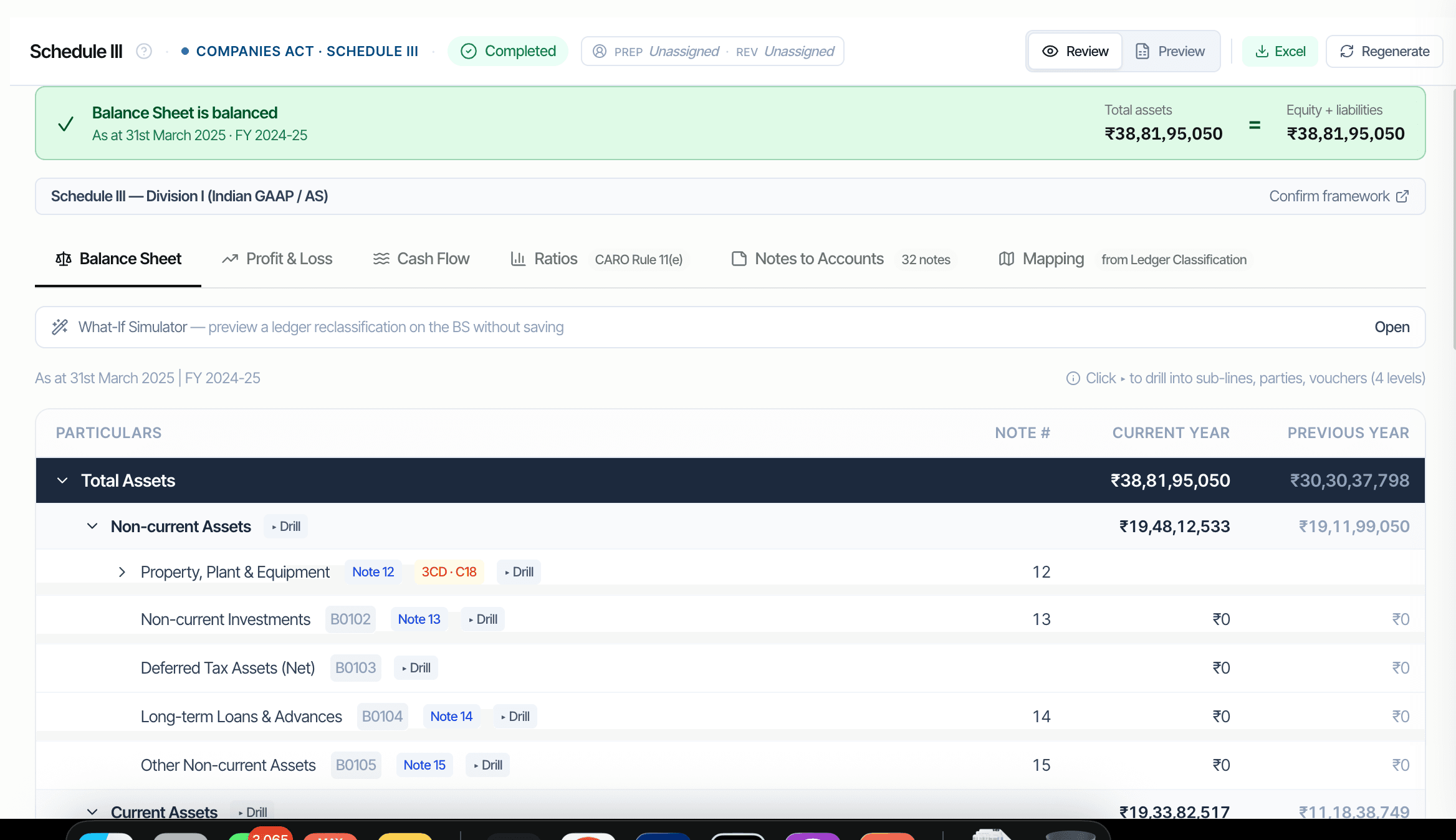
Per Schedule III balance head with three-level drill to source వౌచర్‌లు.

CORAA Schedule III Balance Sheet with three-level drill

Lead schedules are the ఆడిటర్'s primary వర్కింగ్ పేపర్ for every Balance Sheet and P&L head. CORAA composes them automatically from the Universal ఆడిట్ లెడ్జర్. Each schedule shows CY and PY columns with variance analysis. Three-level drill: balance head, లెడ్జర్‌లు under it, parties under the లెడ్జర్, వౌచర్‌లు under the party. Tie-out enforced at composition: Total Assets must equal Total Equity plus Total Liabilities.

  • Per Schedule III balance head, Division I or Division II
  • Three-level drill: line, లెడ్జర్‌లు, parties, వౌచర్‌లు
  • CY and PY columns with variance flag at 25%
  • Tie-out invariant: Assets = Equity + Liabilities (re-checked on every change)
  • Exports to firm's Excel template in OneDrive
  • లైవ్ formulas: change లెడ్జర్ Classification, lead schedules recompute
Two paths, one ledger

The old way, and ours.

Two paths to the same audit conclusion. One leaves traces; the other doesn't.

Traditional

The old way

  • -Lead schedules built by article assistants in Excel
  • -Each schedule a separate workbook with manual VLOOKUPs to the trial balance
  • -PY figures copy-pasted from prior-year వర్కింగ్ పేపర్ file
  • -Tie-out checked at the end and reworked if BS doesn't balance
Build time: 2-3 days per ఆడిట్. Errors: typical. Tie-out failures caught late.
CORAA

On the Ledger

  • Lead schedules composed from UAL via live formulas
  • PY figures pulled from prior-year ఆడిట్ed closing automatically
  • Three-level drill from any line for evidence
  • Tie-out enforced before composition; BS cannot fail to balance
  • Reclassify a లెడ్జర్ and every dependent schedule recomputes
Build time: instant. Errors: arithmetic-impossible. Tie-out: enforced.
How it works

Three steps. Every trace logged.

Step 01

Schedule III mapping drives composition

Once లెడ్జర్ Classification's Schedule III dimension is set, every లెడ్జర్ has a Sch III line code. Lead schedules aggregate లెడ్జర్‌లు by line code using SUMIFS over the Trial Balance.

Step 02

Three-level drill

Click any Sch III line to expand to its constituent లెడ్జర్‌లు. Click any లెడ్జర్ to see the parties contributing to it. Click any party to see the source వౌచర్‌లు. Read-only at all three levels; corrections happen via లెడ్జర్ Classification.

Step 03

Variance analysis built in

CY and PY columns side by side. Variances above 25% flagged for explanation (CARO Rule 11(e) trigger). The variance note feeds CARO 2020 Clause 3(xi)(e) directly.

Inside the module

What you actually get.

Schedule III balance head coverage

Every line code from A1 Equity Share Capital through F7 Other Current Assets, plus P1 Revenue through P9 Other Expenses. Division I for AS; Division II for Ind AS.

  • Division I: Indian GAAP / AS
  • Division II: Ind AS
  • ~90 line codes covered
  • Auto-classification from లెడ్జర్ Classification

Three-level drill-down

Three levels deep, all read-only. Corrections happen at the లెడ్జర్ Classification screen, which propagates back to every dependent lead schedule.

  • Level 1: Sch III line totals
  • Level 2: constituent లెడ్జర్‌లు
  • Level 3: parties under each లెడ్జర్
  • Level 4: source వౌచర్‌లు under each party

Tie-out invariant enforced

Total Assets must equal Total Equity plus Total Liabilities. CORAA refuses to mark a lead schedule 'ready' if the tie-out fails by more than ₹1. Same for the P&L bottom line feeding Reserves & Surplus.

  • BS tie-out: Assets = Equity + Liabilities
  • P&L tie-out: bottom line feeds Reserves
  • Cash Flow tie-out: closing cash matches BS
  • Tie-out re-checked on every change

Firm-template Excel export

Lead schedules export to standard Excel in the firm's own template format. OneDrive integration means the Excel lives in the firm's cloud, not CORAA's.

  • Drop firm template once, used thereafter
  • Per balance head export
  • Bundled export for full lead schedule pack
  • OneDrive / SharePoint / local drive
Frequently asked

Answers, up front.

లెడ్జర్ Classification supports percentage-allocated mapping. For example, an accrual లెడ్జర్ that's 40% current and 60% non-current gets allocated accordingly; the lead schedule renders both portions on their respective Schedule III lines with the percentage shown in the drill.
Three sources, in priority order: (1) prior-year ఆడిట్ నివేదిక uploaded at ఎంగేజ్‌మెంట్ సెటప్, OCR-extracted; (2) prior-year Trial Balance Excel uploaded; (3) prior-year CORAA engagement, if it exists in your workspace. The source is shown next to the PY figure for verification.
అవును. Every line supports inline ఆడిటర్ notes that flow into the ఆడిట్ పనిing paper file. కాదుtes are versioned per the engagement log and visible to peer reviewers.
See it on a real ledger

Run lead schedules on one of your engagements.

Bring a Trial Balance and a General Ledger. We'll walk through working papers end-to-end on your data, not a sandbox.

Start the free trial →Book a walk-through
Audit Lead Schedules AI | Schedule III Balance Heads with Drill | CORAA | CORAA