CORAA
Features/Scrutiny/Transactional Scrutiny
84 Rules · 13 Modules

Transactional Scrutiny

Every voucher tested against 84 ICAI-aligned rules across 13 modules.

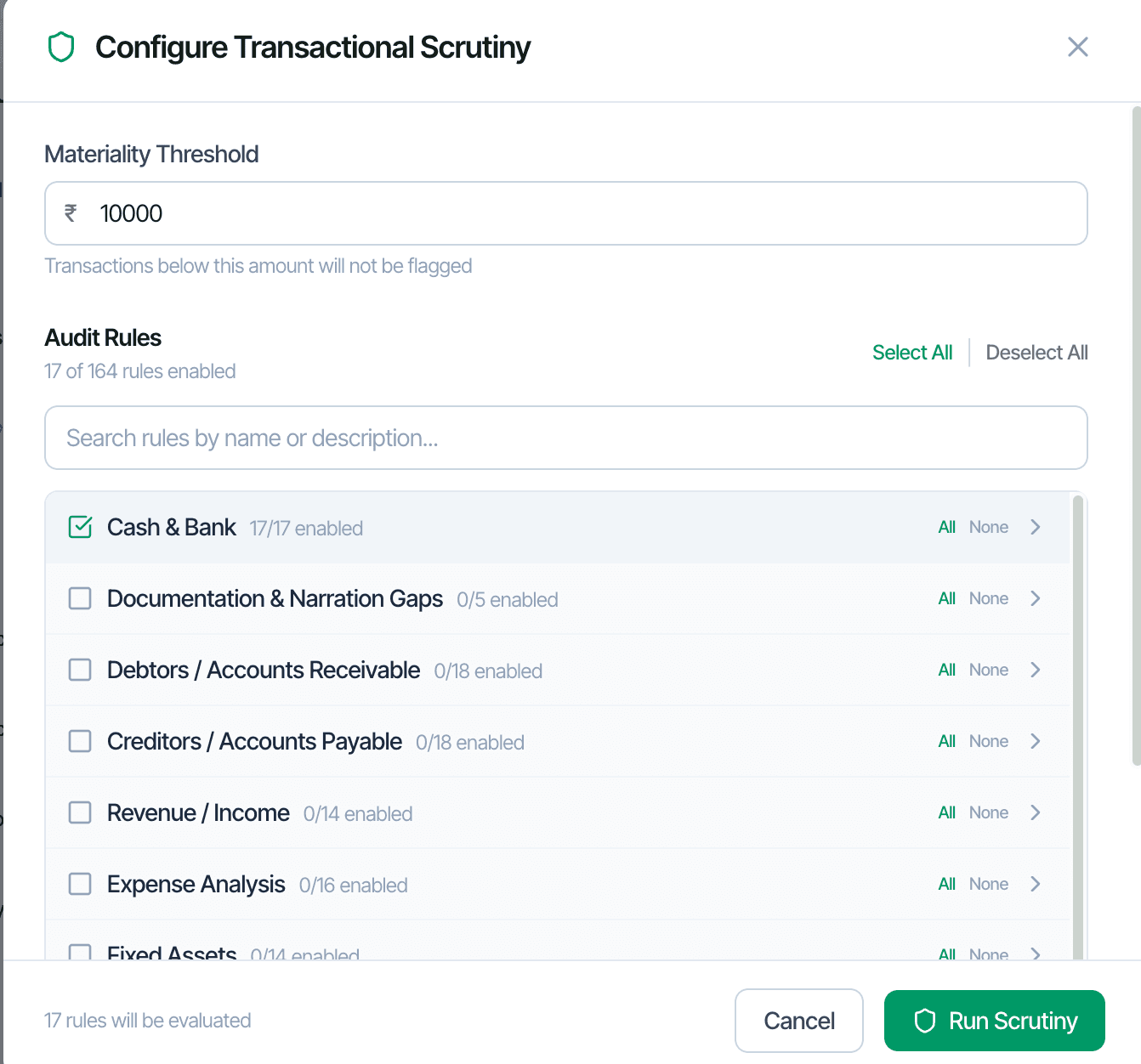
Configure Transactional Scrutiny, 84 rules across 13 modules

Audit firms historically sampled 2-5 percent of vouchers because that was all human review could cover. CORAA's Transactional Scrutiny tests every voucher against 84 rules organized into 13 thematic modules. Each rule is anchored to an ICAI Standard on Auditing, an Income Tax Act section, or a GST Act provision. Rules can be disabled, reweighted, or rethresholded per engagement, with configuration persisting for that client.

  • 84 rules across 13 thematic modules
  • Every voucher tested: typically 50,000 to 200,000 per engagement
  • Each rule anchored to ICAI SA, IT Act section, or GST Act provision
  • Materiality floor read from the locked SA 320 memo (turnover-based fallback), rules configurable per engagement
  • Per-client rule disable, reweight, rethreshold
  • Configuration persists for that client across financial years
Two paths, one ledger

The old way, and ours.

Two paths to the same audit conclusion. One leaves traces; the other doesn't.

Traditional

The old way

  • -Senior article picks 100-200 vouchers using judgment sampling
  • -Reviews each voucher manually against an internal checklist
  • -Anomalies flagged in a Word document or Excel sheet
  • -Rule application varies between audit team members
Coverage: 2-5% of vouchers. Time: 4-6 hours per engagement. Consistency: depends on the reviewer.
CORAA

On the Ledger

  • 84 rules applied to every voucher uniformly
  • Severity Dashboard ranks anomalies by rule contribution and ledger impact
  • Noise falls audit over audit: disabled rules and family dismissals persist per engagement
  • Each anomaly drills to its source voucher with one click
  • Findings auto-classified by materiality band
Coverage: 100%. Time: 10-15 minutes runtime, 30-45 minutes review. Consistency: deterministic.
How it works

Three steps. Every trace logged.

Step 01

Configure the rule set

Open the Configure Transactional Scrutiny modal. Set the materiality threshold below which transactions are not flagged. Enable rule modules relevant to the engagement (Cash & Bank, Debtors, Creditors, etc.). The configuration persists for this client.

Step 02

Run scrutiny

CORAA tests every voucher against the enabled rules in 5-10 minutes for a 50,000-voucher engagement. Anomalies surface in the Anomaly Register with severity bands (High, Medium, Low) and rule attribution.

Step 03

Review and resolve

Open the Severity Dashboard for top contributing rules cross-referenced with top affected ledgers. Drill to any voucher in three clicks. Flag for review, dismiss, or dismiss-family (suppress the pattern permanently for that client).

Inside the module

What you actually get.

13 thematic modules

Rules organized by audit domain. Cash & Bank covers cash transactions above ₹2 lakh (Sec 269ST), weekend payments, Sunday transactions, threshold breaches. Documentation & Narration Gaps covers missing narrations and vague entries.

  • Cash & Bank, Documentation & Narration Gaps
  • Debtors / AR, Creditors / AP
  • Revenue / Income, Expense Analysis, Fixed Assets
  • TDS, GST, Working Capital
  • Other Income, Statutory Dues, Document Trail

Statutory anchors per rule

Every rule references the underlying regulation. Sec 40A(3) cash above ₹10K, Sec 269SS/T cash loans, Sec 17(5) GST blocked credits, Rule 36(4) ITC limit, etc.

  • IT Act sections cited inline
  • Companies Act sections (Sec 188, Sec 197)
  • GST Act and Rules
  • MSMED Act 2006
  • ICAI Standards on Auditing

Severity Dashboard

Three severity bands with anomaly counts and value at risk. Top contributing rules ranked by volume and value. Top affected ledgers ranked by anomaly count. Click any cell to drill.

  • High / Medium / Low bands
  • Top rules × top ledgers cross-reference
  • Value-at-risk per band
  • Drill from rule to vouchers, or ledger to vouchers

Per-client rule customization

Disable rules that don't apply (weekend transactions for an automobile dealer). Reweight severity. Reset thresholds. Configuration locks to the engagement; reused next year automatically.

  • Disable per-client
  • Reweight severity
  • Custom thresholds
  • Year-on-year persistence
  • Audit log captures every config change
Frequently asked

Answers, up front.

Cash & Bank, Documentation and Narration Gaps, Debtors / Accounts Receivable, Creditors / Accounts Payable, Revenue / Income, Expense Analysis, Fixed Assets, TDS, GST, Working Capital, Other Income, Statutory Dues, and Document Trail. Each module groups related rules.
Ledger Scrutiny works at the ledger level, profiling each ledger's normal behaviour and surfacing deviations. Transactional Scrutiny works at the voucher level, applying 84 rules to every entry. Both run together; audit teams typically begin with Ledger Scrutiny to scope review effort and drill into Transactional anomalies.
Custom rules will be supported in a future release. Today, the 84 rules cover what Indian statutory audit, tax audit, and GST audit require. Firms can request additions via support.
Three mechanisms: disable rules that don't apply to a client, dismiss findings as a 'family' to suppress the pattern for that engagement, and tune thresholds. The configuration persists for the client, so the second audit starts quieter than the first — deterministic settings, not opaque weight adaptation.
See it on a real ledger

Run transactional scrutiny on one of your engagements.

Bring a Trial Balance and a General Ledger. We'll walk through scrutiny end-to-end on your data, not a sandbox.

Run your first audit free →
Transactional Scrutiny AI | Law, Guidance & Inference for Statutory Audit | CORAA