CORAA
Features/Reconciliation/Vouching
OCR-based Vouching

Vouching

OCR extracts invoice data, matches to ledger entries, flags mismatches.

CORAA Vouching with OCR-based invoice extraction

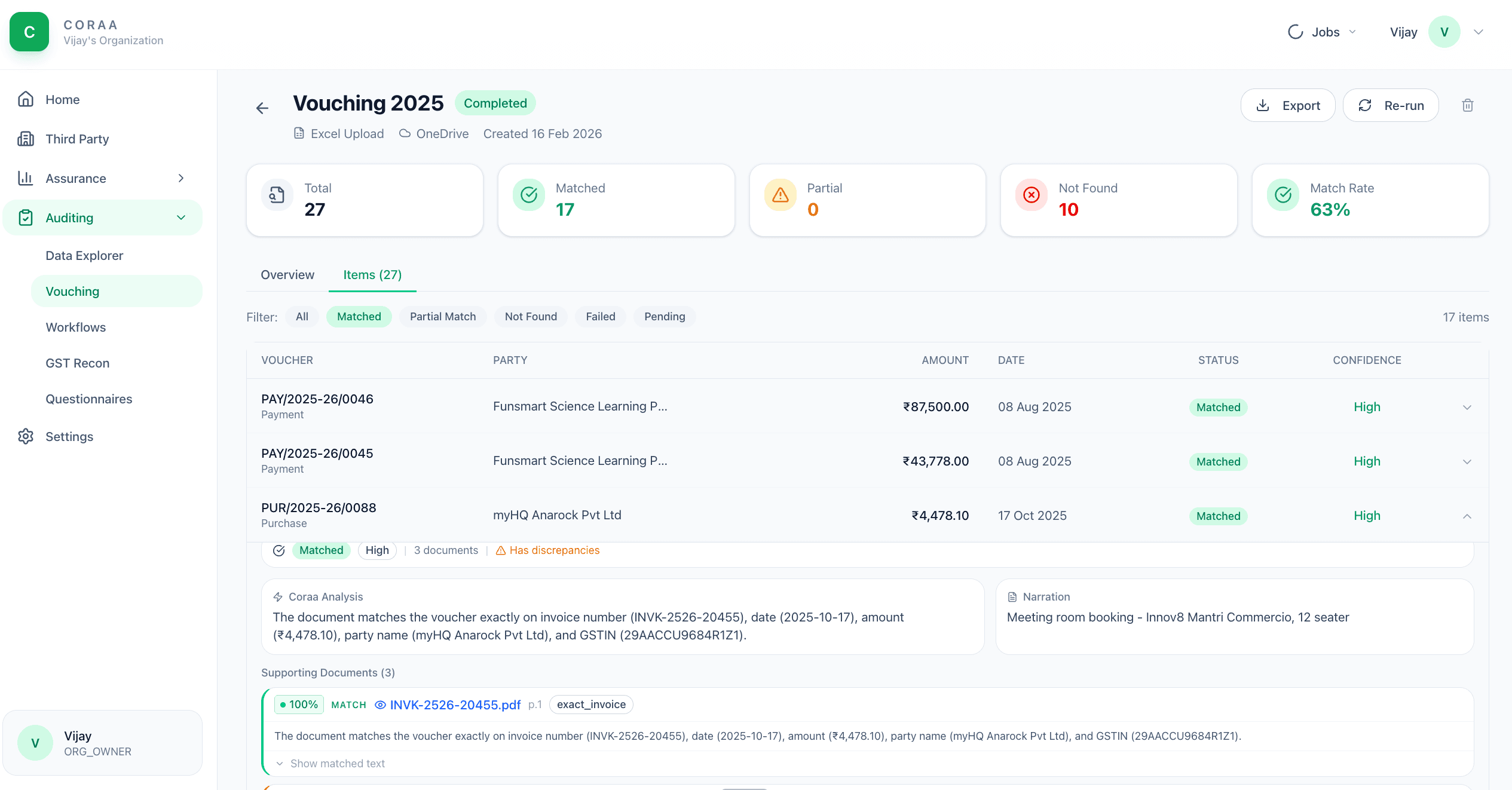
Vouching means matching a booked transaction to its underlying invoice or supporting document. The traditional approach is three articles, six hours, a thousand tick-marks. CORAA seeds the voucher list from this year's locked SA 530 sampling plan, OCRs and indexes the documents you upload, then matches each sampled voucher to its best supporting candidate by vector search and AI reasoning — with a Matched / Partial / Not Matched status, a confidence level, and any discrepancy stated with the source image attached.

  • OCR handles scanned PDFs, photographic images, digital PDFs
  • Extracts amount, date, vendor GSTIN, invoice number, TDS deducted
  • Matches against ledger entry on amount, party, date
  • Discrepancies stated per match, with the source image attached
  • Missing-support flagging for vouchers without uploaded invoices
  • Source image attached to every flag
Two paths, one ledger

The old way, and ours.

Two paths to the same audit conclusion. One leaves traces; the other doesn't.

Traditional

The old way

  • -Articles vouch 100-200 sample vouchers manually
  • -Each invoice opened, amount read, ledger checked
  • -Mismatches noted on a printed register
  • -Missing invoices chased through email with the client
Coverage: 2-5% of vouchers. Time: 6-8 hours per audit. Mismatches missed: typical.
CORAA

On the Ledger

  • Bulk upload the invoices and bills the client provides
  • OCR extracts structured data from every page automatically
  • Matches against the GL in seconds
  • Mismatches flagged with both the invoice image and the ledger entry shown side by side
  • Missing-support list generated for client follow-up
Coverage: the locked SA 530 sample, every item resolved. Time: minutes of runtime, a focused review. Anything unsupported: flagged to findings.
How it works

Three steps. Every trace logged.

Step 01

Upload invoices

Bulk upload PDFs and images. CORAA accepts ZIP archives, folder uploads, or drag-and-drop. Files can come from the client's email, scanned cabinet, or accounting system attachments.

Step 02

OCR extracts and matches

OCR reads every page; scanned PDFs and images become searchable text. Documents are embedded and indexed, and for each sampled voucher a vector search proposes candidates, reranked, with a model reasoning about whether the candidate genuinely corroborates the voucher — producing the match status, confidence and discrepancy.

Step 03

Review mismatches

Mismatches surface in the Vouching working paper. Each row shows the source image, the OCR extraction, the matched ledger entry, and the variance. The auditor accepts the match, flags for client clarification, or rejects.

Inside the module

What you actually get.

OCR field extraction

Trained on Indian invoice formats: GST invoices, Bill of Supply, debit notes, credit notes. Extracts the standard 7-8 fields per invoice with high accuracy.

  • Amount, invoice number, date
  • Vendor GSTIN, vendor name
  • TDS deducted (where applicable)
  • GST split: CGST, SGST, IGST
  • Bill of Supply detection (non-GST invoices)

Match, with the working shown

Each sampled voucher pairs with its best supporting-document candidate. The match card shows the voucher, the document, the confidence level and the discrepancy the model noticed — accept it, reassign it, or flag the item as unsupported.

  • Voucher-to-document candidate pairing
  • Confidence level per match
  • Discrepancies stated, not buried
  • Unsupported items flag straight to findings

Missing-support detection

For every ledger entry without a matched invoice in the upload set, CORAA lists it as missing-support. The auditor sends this list to the client through Client Portal as a single questionnaire.

  • Per-voucher missing-support flag
  • Bulk client request via Client Portal
  • Magic-link delivery to client
  • Client response tracked back to the voucher

Audit-trail per voucher

Every voucher carries its match history: who uploaded the invoice, when OCR ran, what was extracted, who accepted the match, who flagged it. Preserved per SA 230.

  • Upload timestamp + user
  • OCR extraction snapshot
  • Auditor acceptance / flag
  • Source image versioned
Frequently asked

Answers, up front.

Yes. The OCR handles scanned PDFs (300 DPI or above), photographic images from phone cameras, and digital PDFs. Quality varies with input: a well-scanned PDF achieves >95% field accuracy; a low-light phone photo achieves 75-85%. Flagged matches always show the source image so the auditor can verify.
The auditor can edit any extracted field inline before accepting the match. Corrections are logged as part of the session's audit trail.
Anything the session leaves unsupported is flagged into findings for follow-up with the client — a clean, reviewable missing-support list rather than a spreadsheet side-channel.
See it on a real ledger

Run vouching on one of your engagements.

Bring a Trial Balance and a General Ledger. We'll walk through reconciliation end-to-end on your data, not a sandbox.

Run your first audit free →
AI Vouching for Audit | OCR Invoice Matching for CA Firms | CORAA