CORAA
AI Modules/Scrutiny/Transactional जाँच
164 Rules · 13 मॉड्यूल· परख

Transactional जाँच

Every वाउचर tested against 164 ICAI-aligned rules across 13 मॉड्यूल.

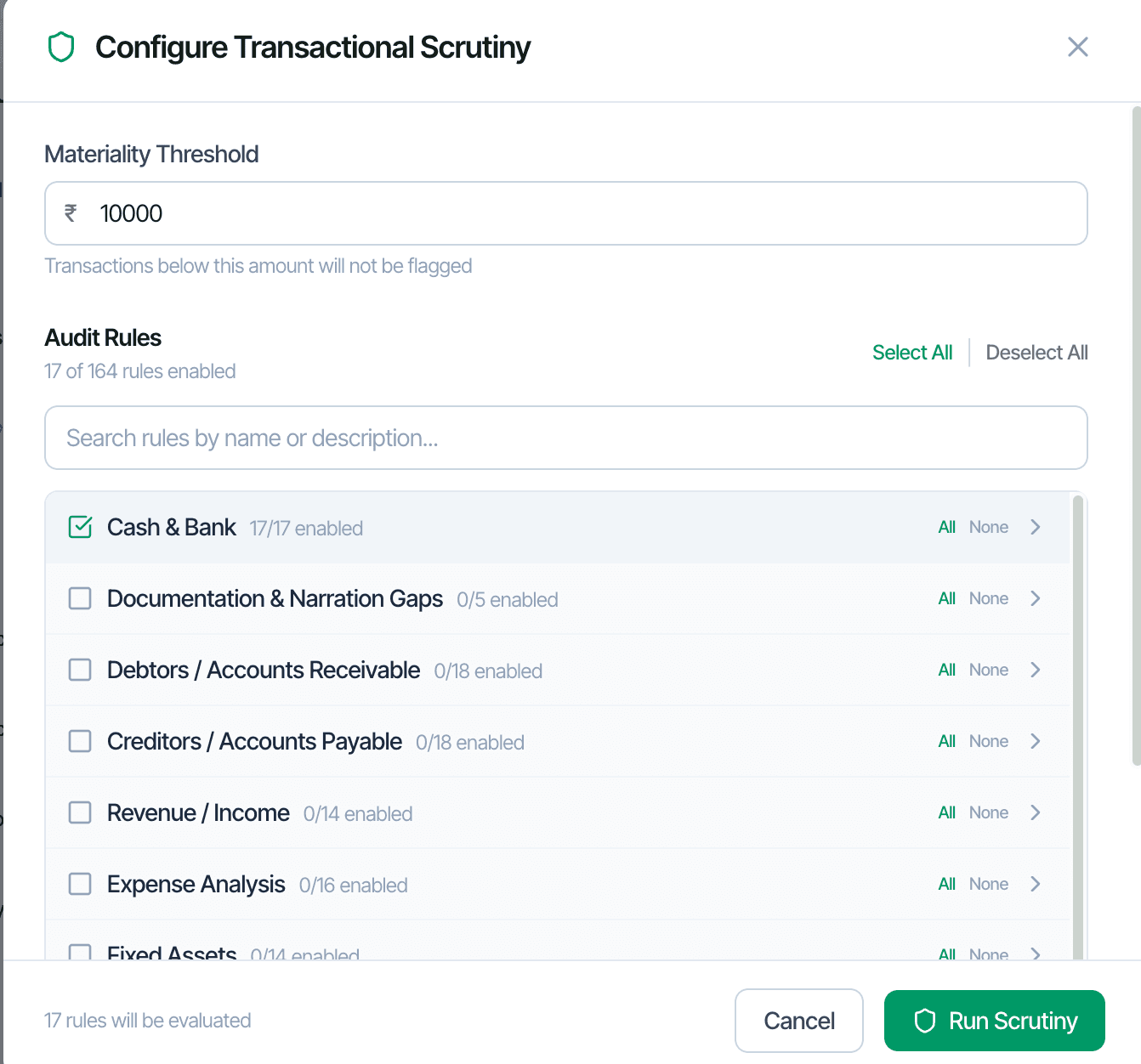
Configure Transactional जाँच, 164 rules across 13 मॉड्यूल

ऑडिट फ़र्म historically sampled 2-5 percent of वाउचर because that was सभी human समीक्षा could cover. CORAA's Transactional जाँच tests every वाउचर against 164 rules organized into 13 thematic मॉड्यूल. Each rule is anchored to an ICAI मानक on Auditing, an Income Tax Act खंड, or a GST Act provision. Rules can be disabled, reweighted, or rethresholded per एंगेजमेंट, with कॉन्फ़िगरेशन persisting for that क्लाइंट.

  • 164 rules across 13 thematic मॉड्यूल
  • Every वाउचर tested: typically 50,000 to 200,000 per एंगेजमेंट
  • Each rule anchored to ICAI SA, IT Act खंड, or GST Act provision
  • मटीरियलिटी threshold configurable per एंगेजमेंट (default ₹10,000)
  • Per-क्लाइंट rule disable, reweight, rethreshold
  • कॉन्फ़िगरेशन persists for that क्लाइंट across वित्तीय वर्ष
Two paths, one ledger

The old way, and ours.

Two paths to the same audit conclusion. One leaves traces; the other doesn't.

Traditional

The old way

  • -Senior लेख picks 100-200 वाउचर using judgment सैम्पलिंग
  • -समीक्षाएँ each वाउचर manually against an internal चेकलिस्ट
  • -Anomalies flagged in a Word document or Excel sheet
  • -Rule application varies between ऑडिट टीम members
Coverage: 2-5% of वाउचर. समय: 4-6 घंटे per एंगेजमेंट. Consistency: depends on the reviewer.
CORAA

On the Ledger

  • 164 rules applied to every वाउचर uniformly
  • Severity Dashboard ranks anomalies by rule contribution and लेजर impact
  • False-flag rate drops below 5% by the second ऑडिट चक्र as rule weights adapt
  • Each anomaly drills to its source वाउचर with one click
  • निष्कर्ष auto-classified by मटीरियलिटी band
Coverage: 100%. समय: 10-15 मिनट runtime, 30-45 मिनट समीक्षा. Consistency: deterministic.
How it works

Three steps. Every trace logged.

Step 01

Configure the rule set

खोलें the Configure Transactional जाँच modal. Set the मटीरियलिटी threshold below which transactions are not flagged. Enable rule मॉड्यूल relevant to the एंगेजमेंट (Cash & Bank, Debtors, Creditors, etc.). The कॉन्फ़िगरेशन persists for this क्लाइंट.

Step 02

Run जाँच

CORAA tests every वाउचर against the enabled rules in 5-10 मिनट for a 50,000-वाउचर एंगेजमेंट. Anomalies surface in the Anomaly पंजीकरण करें with severity bands (High, Medium, Low) and rule attribution.

Step 03

समीक्षा and resolve

खोलें the Severity Dashboard for top contributing rules cross-referenced with top affected लेजर. Drill to any वाउचर in three clicks. Flag for समीक्षा, dismiss, or dismiss-family (suppress the pattern permanently for that क्लाइंट).

Inside the module

What you actually get.

13 thematic मॉड्यूल

Rules organized by ऑडिट domain. Cash & Bank covers cash transactions above ₹2 lakh (Sec 269ST), weekend payments, Sunday transactions, threshold breaches. Documentation & Narration Gaps covers missing narrations and vague entries.

  • Cash & Bank, Documentation & Narration Gaps
  • Debtors / AR, Creditors / AP
  • Revenue / Income, Expense Analysis, Fixed Assets
  • TDS, GST, Working Capital
  • Other Income, Statutory Dues, Document Trail

Statutory anchors per rule

Every rule references the underlying regulation. Sec 40A(3) cash above ₹10K, Sec 269SS/T cash loans, Sec 17(5) GST blocked credits, Rule 36(4) ITC limit, etc.

  • IT Act खंड cited inline
  • Companies Act खंड (Sec 188, Sec 197)
  • GST Act and Rules
  • MSMED Act 2006
  • ICAI मानक on Auditing

Severity Dashboard

Three severity bands with anomaly counts and value at जोखिम. Top contributing rules ranked by volume and value. Top affected लेजर ranked by anomaly count. Click any cell to drill.

  • High / Medium / Low bands
  • Top rules × top लेजर cross-reference
  • Value-at-जोखिम per band
  • Drill from rule to वाउचर, or लेजर to वाउचर

Per-क्लाइंट rule customization

Disable rules that don't apply (weekend transactions for an automobile dealer). Reweight severity. Reset thresholds. कॉन्फ़िगरेशन locks to the एंगेजमेंट; reused अगला वर्ष automatically.

  • Disable per-क्लाइंट
  • Reweight severity
  • Custom thresholds
  • वर्ष-on-वर्ष persistence
  • ऑडिट log captures every config change
Frequently asked

Answers, up front.

Cash & Bank, Documentation and Narration Gaps, Debtors / खाते Receivable, Creditors / खाते Payable, Revenue / Income, Expense Analysis, Fixed Assets, TDS, GST, Working Capital, Other Income, Statutory Dues, and Document Trail. Each मॉड्यूल groups related rules.
लेजर जाँच works at the लेजर level, profiling each लेजर's normal behaviour and surfacing deviations. Transactional जाँच works at the वाउचर level, applying 164 rules to every entry. Both run together; ऑडिट टीम typically शुरू करें with लेजर जाँच to scope समीक्षा effort and drill into Transactional anomalies.
Custom rules will be supported in a future release. Today, the 164 rules cover what Indian वैधानिक ऑडिट, टैक्स ऑडिट, and GST ऑडिट require. फ़र्म can request additions via support.
Three mechanisms: disable rules that don't apply to a क्लाइंट, dismiss निष्कर्ष as a 'family' to suppress the pattern permanently for that एंगेजमेंट, and let the इंजन learn from dismissals (rule weights shift down where the ऑडिटर consistently marks a pattern as normal). By the second or third ऑडिट, false-flag rates typically fall below 5%.
See it on a real ledger

Run transactional जाँच on one of your engagements.

Bring a Trial Balance and a General Ledger. We'll walk through scrutiny end-to-end on your data, not a sandbox.

Start the free trial →Book a walk-through
Transactional Scrutiny AI | 164 Rules, 13 Modules for Statutory Audit | CORAA | CORAA