CORAA
AI Modules/Reporting/Form 3CD
ଧାରା 44AB · ଟ୍ୟାକ୍ସ ଅଡିଟ୍· प्रतिवेदन

Form 3CD

44 clauses. TDS and TCS ସମନ୍ୱୟ embedded. Clause 34 auto-populated.

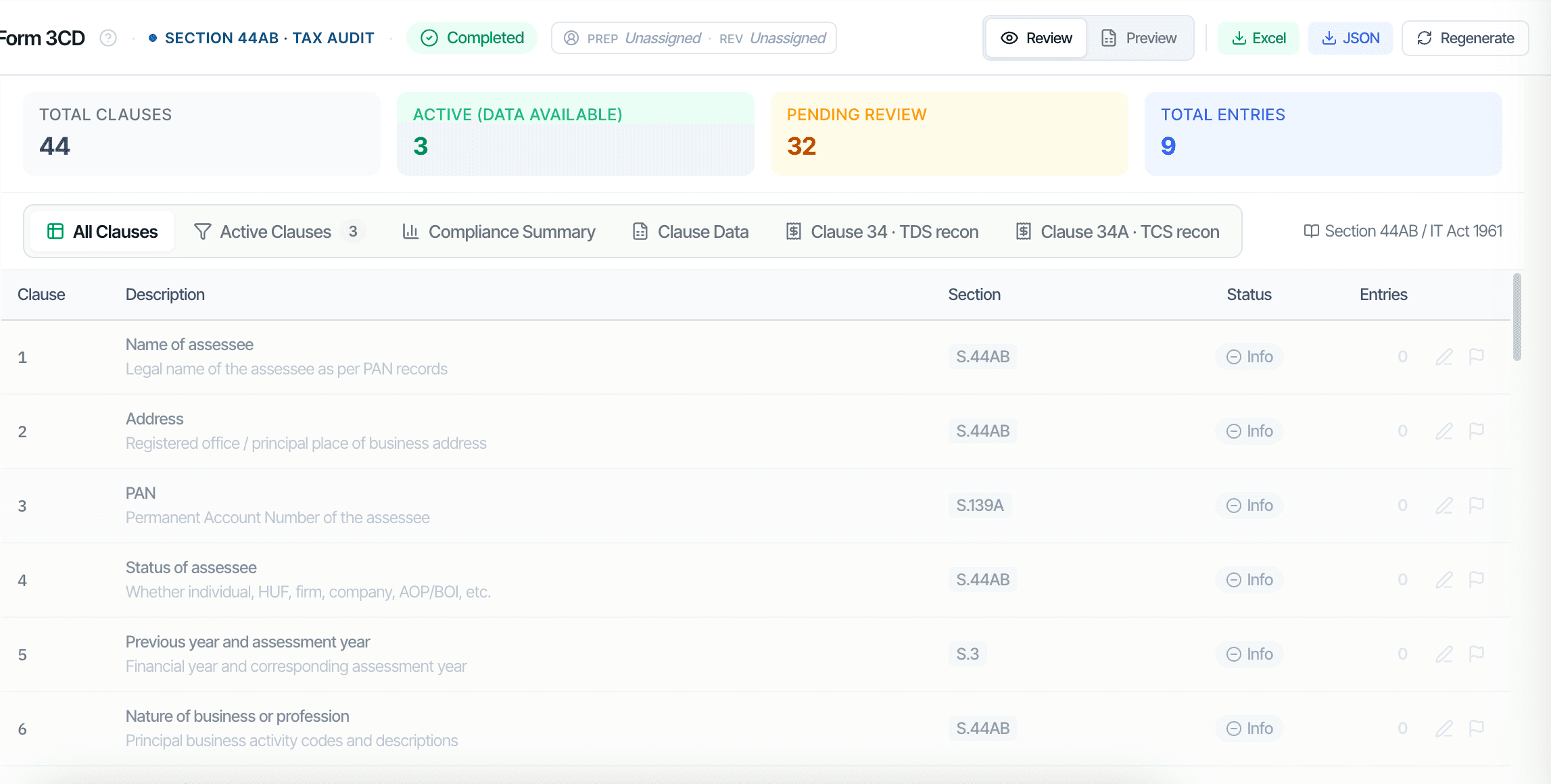
CORAA Form 3CD with all 44 clauses

Form 3CD is the ଧାରା 44AB tax ଅଡିଟ୍ ରିପୋର୍ଟ. CORAA composes all 44 clauses, Entity Identity (1-7), Books and Method (8-13), Disallowable ଖର୍ଚ୍ଚ (21), Sec 43B statutory dues (26), TDS sectional totals (34), Sec 269SS/T cash loans (31), Sec 40A(2)(b) RPT (23), and Sec 50C property transfers (17). TDS and TCS ସମନ୍ୱୟ live as tabs inside Form 3CD; Clause 34(a) auto-populates from the books-vs-26AS recon.

  • 44 clauses with active vs pending status, partner sees only what needs review
  • TDS ସମନ୍ୱୟ embedded as Clause 34 tab
  • TCS ସମନ୍ୱୟ embedded as Clause 34A tab
  • Clause 21 disallowable ଖର୍ଚ୍ଚ, Sec 40A(3) cash > ₹10K, personal ଖର୍ଚ୍ଚ, capital booked to P&L
  • Clause 26 Sec 43B statutory dues outstanding past due date
  • Clause 44 GST-wise ଖର୍ଚ୍ଚ break-up by ଭେଣ୍ଡର୍ GSTIN status
Two paths, one ledger

The old way, and ours.

Two paths to the same audit conclusion. One leaves traces; the other doesn't.

Traditional

The old way

  • -Form 3CD prepared in Excel ଟେମ୍ପ୍ଲେଟ୍, clause by clause
  • -TDS section-wise totals computed manually from books
  • -Clause 21 cash payment > ₹10K filtered by hand from ଭାଉଚର୍ register
  • -Clause 26 statutory dues outstanding chased through TDS, GST, PF, ESI ଲେଜର୍ separately
  • -Clause 44 ଭେଣ୍ଡର୍ GSTIN status verified one at a ସମୟ
Two ସପ୍ତାହ of senior-article work. Clause 34 totals frequently transcribed wrong from TDS ସମନ୍ୱୟ Excel.
CORAA

On the Ledger

  • Clauses 1-7 auto-pulled from MCA21 by CIN
  • Clause 11 method drift detection from ଭାଉଚର୍ patterns
  • Clause 21 Sec 40A(3) cash > ₹10K, auto-flagged from ଭାଉଚର୍ payment mode + amount
  • Clause 26 Sec 43B, statutory dues ଲେଜର୍ ସମନ୍ୱିତ automatically
  • Clause 34(a) TDS sectional totals, populated from embedded TDS recon
  • Clause 34A TCS, populated from embedded TCS recon
Form 3CD draft ready in two ଘଣ୍ଟା. Every clause traceable to the source ଭାଉଚର୍.
How it works

Three steps. Every trace logged.

Step 01

Entity profile pulls from MCA21

Once the CIN is entered at ଏଙ୍ଗେଜମେଣ୍ଟ୍ Setup, Clauses 1-7 (legal name, address, PAN, CIN, status of assessee, previous and assessment year, nature of business) auto-populate from MCA21 master data.

Step 02

Books-derived clauses auto-draft

Clauses 11 (books and method), 14 (ଇନ୍‌ଭେଣ୍ଟରୀ valuation), 21 (disallowable ଖର୍ଚ୍ଚ), 26 (Sec 43B), 27 (CENVAT/ITC), 31 (Sec 269SS/T cash loans), and 40 (ratios) all auto-draft from books data. The ଅଡିଟର୍ reviews and confirms.

Step 03

TDS and TCS recon feed Clauses 34 and 34A

TDS ସମନ୍ୱୟ lives as a tab inside Form 3CD. Once the recon is done, section-wise totals populate Clause 34(a) automatically; variances disclose at Clause 34(b). TCS recon similarly populates Clause 34A.

Inside the module

What you actually get.

Embedded TDS and TCS ସମନ୍ୱୟ

Form 3CD contains TDS and TCS ସମନ୍ୱୟ as tabs, not as separate ୱାର୍କିଂ ପେପର୍. Clause 34 auto-populates from the ସମନ୍ୱୟ. The ଅଡିଟର୍ never re-keys section-wise totals.

  • Clause 34 tab: TDS recon embedded
  • Clause 34A tab: TCS recon embedded
  • Books vs Form 26AS three-bucket match
  • Books vs Form 27EQ three-bucket match

Clause 21 disallowable ଖର୍ଚ୍ଚ

Sec 40A(3) cash payments above ₹10,000 (₹35,000 for transporters), personal ଖର୍ଚ୍ଚ charged to business, capital expenditure booked to P&L, donations not eligible, and other disallowances, all auto-flagged from books with ଭାଉଚର୍ reference.

  • Sec 40A(3) cash > ₹10K flagged
  • Sec 14A expenditure on exempt income
  • Sec 36(1)(va) employees' contribution late
  • Sec 43B statutory dues outstanding

Clause 44 GST-wise ଖର୍ଚ୍ଚ break-up

Each ଖର୍ଚ୍ଚ ଲେଜର୍ × ଭେଣ୍ଡର୍ GSTIN status. CORAA auto-classifies ଭେଣ୍ଡର୍ as Registered, Composition, or Unregistered using the GSTIN check, then breaks each ଖର୍ଚ୍ଚ ଲେଜର୍ by ଭେଣ୍ଡର୍ type.

  • Registered, Composition, Unregistered split
  • Auto-classified using GSTIN status
  • ଅଡିଟର୍ confirms unknown ଭେଣ୍ଡର୍
  • Persists year-on-year

Clauses 1-7 from MCA21

Once CIN is entered at ଏଙ୍ଗେଜମେଣ୍ଟ୍ Setup, the entity profile auto-populates from MCA21, legal name, registered office, PAN, status of assessee, nature of business. The ଅଡିଟର୍ confirms 5-7 fields.

  • CIN-based MCA21 lookup
  • Legal name and registered office
  • PAN and date of incorporation
  • ସ୍ଥିତି of assessee
  • Nature of business activity codes
Frequently asked

Answers, up front.

TDS ସମନ୍ୱୟ lives as a tab inside Form 3CD. The ସମନ୍ୱୟ computes section-wise TDS totals, Sec 192 salary, 194A interest, 194C contractor, 194I rent, 194JB professional, 194Q goods, 194R perquisites. These totals populate Clause 34(a) directly. Books-vs-26AS variances above tolerance disclose at Clause 34(b). ନା re-keying.
ହଁ। Form 3CA applies when the entity is also statutorily audited under another law (କମ୍ପାନୀ ଅଧିନିୟମ, Co-op Society Act, etc). Form 3CB applies when ଟ୍ୟାକ୍ସ ଅଡିଟ୍ is the only ବୈଧାନିକ ଅଡିଟ୍. CORAA's ଅଡିଟରଙ୍କ ରିପୋର୍ଟ workflow asks this at Step 4 (IAR draft) and renders the correct form. The ଅଡିଟର୍ providing the other-law ଅଡିଟ୍ is captured at Form 3CA generation.
Sec 40A(3) disallows cash payments above ₹10,000 (₹35,000 for transporters) made to a single person in a single ଦିନ. CORAA scans every ଭାଉଚର୍ with cash payment mode and flags entries above the threshold. The ଅଡିଟର୍ reviews each flag for exemption eligibility (banking-ଦିନ exemption, etc.) and confirms or accepts the disallowance.
Clause 23 requires disclosure of payments to related parties (directors, KMP, relatives, holding/subsidiary companies). Once the RPT list is set at ଏଙ୍ଗେଜମେଣ୍ଟ୍ Setup (Tier II task), Clause 23 auto-populates with party-wise payments. The ଅଡିଟର୍ reviews each for arm's-length ଅନୁପାଳନ and discloses any disallowance.
See it on a real ledger

Run form 3cd on one of your engagements.

Bring a Trial Balance and a General Ledger. We'll walk through reporting end-to-end on your data, not a sandbox.

Start the free trial →Book a walk-through
Form 3CD AI, Section 44AB Tax Audit with Embedded TDS+TCS Recon | CORAA | CORAA