CORAA
ଏଙ୍ଗେଜମେଣ୍ଟ୍ Setup· सेटअप

ଏଙ୍ଗେଜମେଣ୍ଟ୍ Setup

Connect the ERP. Pick a tier. Classify the ଲେଜର୍. Carry the work forward, every ଅଡିଟ୍ after just goes faster.

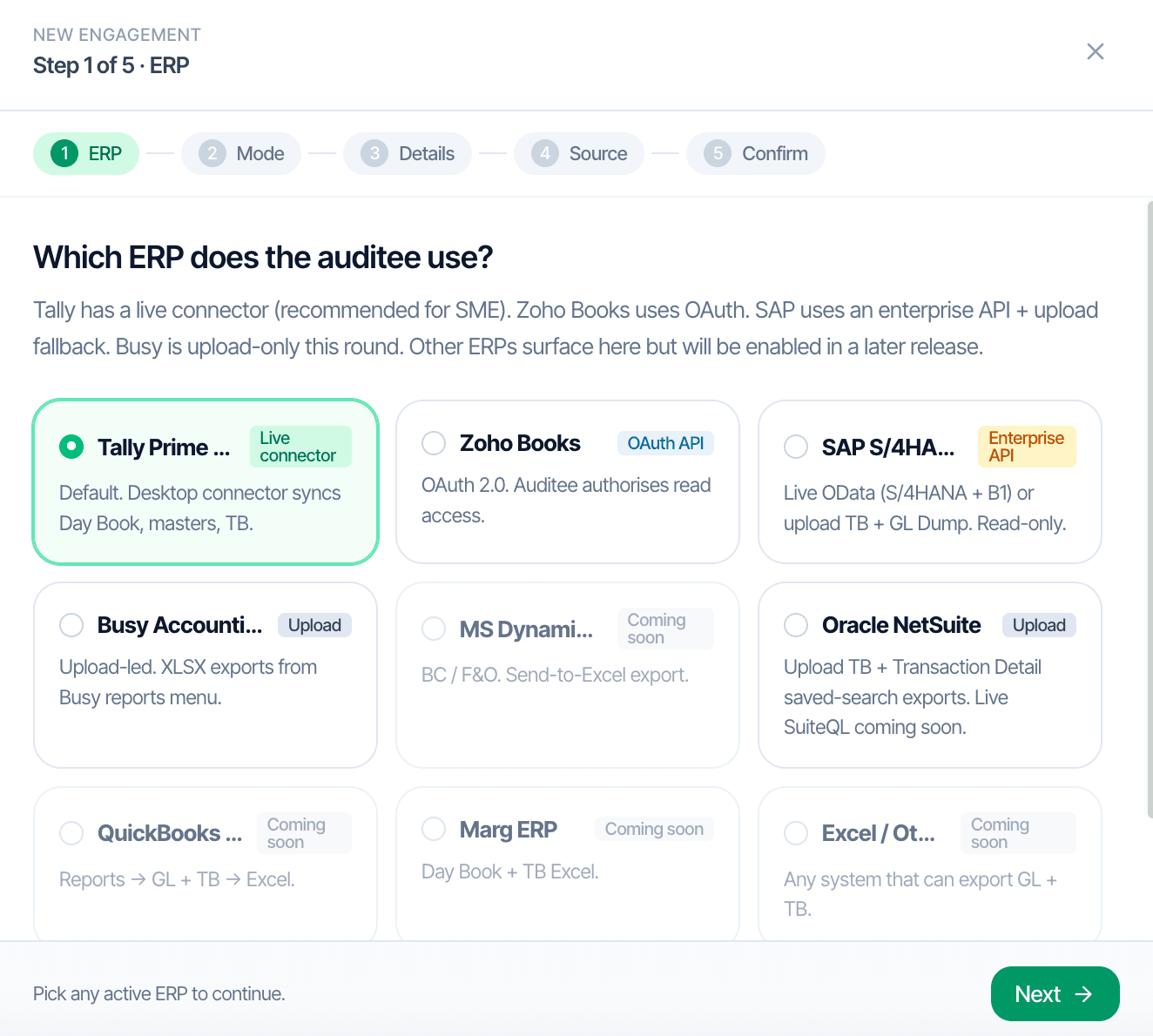
CORAA ଏଙ୍ଗେଜମେଣ୍ଟ୍ Setup, Step 1 of 5, ERP picker
01·5-step setup

Pick the ERP. Once.

Every ଏଙ୍ଗେଜମେଣ୍ଟ୍ begins with three decisions: which ERP, which financial year, which accounting standard. A guided five-step setup captures them. ଲାଇଭ୍ connector for Tally, OAuth for Zoho, XLSX upload for SAP, NetSuite, Busy, and Marg, same downstream workflow regardless of ingestion path.

  • Tally Prime, desktop connector, live sync over LAN, ନା manual exports
  • Zoho Books, OAuth, fully zero-upload
  • SAP S/4HANA, SAP B1, NetSuite, Busy, Marg, XLSX upload
  • MS Dynamics, QuickBooks coming soon
  • ଏଙ୍ଗେଜମେଣ୍ଟ୍ details, CIN, FY, accounting standard, captured once, reused every year

Ingest ସମୟ: 15-20 minutes for a 500-crore turnover company. Under one ଘଣ୍ଟା at 1,000 crore.

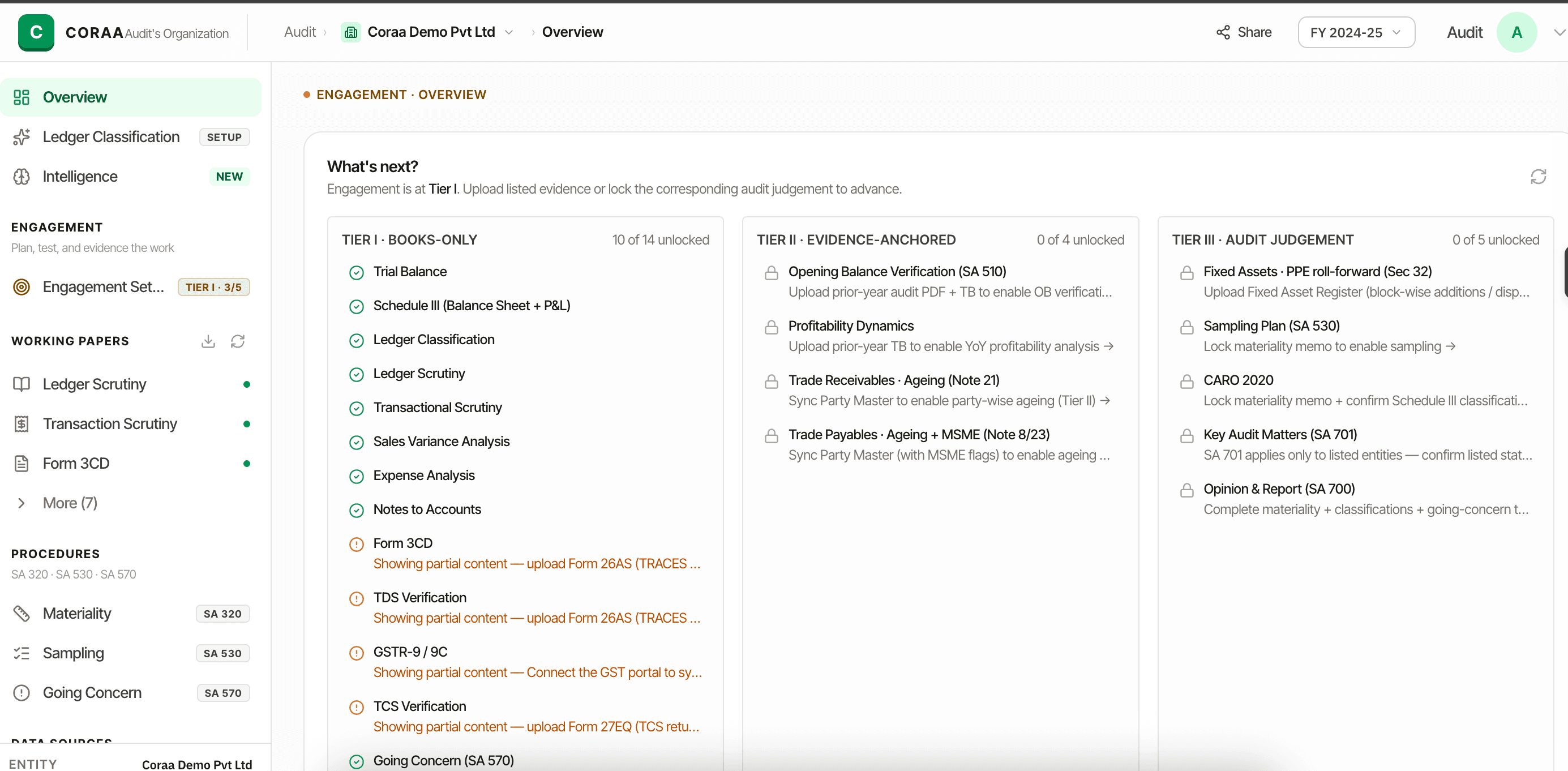
CORAA ଏଙ୍ଗେଜମେଣ୍ଟ୍ overview, Tier I, Tier II, Tier III progression
02·Tier I / II / III

The ଅଡିଟ୍ progresses as evidence arrives.

Tier I begins every ଏଙ୍ଗେଜମେଣ୍ଟ୍, General ଲେଜର୍, Trial Balance, Chart of Accounts. Tier II adds the Party Master and prior-year ଅଡିଟ୍. Tier III adds the Bill register and Fixed Asset register. Each tier unlocks more ୱାର୍କିଂ ପେପର୍ without forcing the ଅଡିଟର୍ to wait for the next.

  • Tier I, Books-only, unlocks 14 ୱାର୍କିଂ ପେପର୍ immediately
  • Tier II, Evidence-anchored, party-wise ageing, MSMED Act bifurcation, RPT
  • Tier III, ଅଡିଟ୍ Judgement, Sec 32 depreciation, PPE roll-forward, bill-wise ageing
  • CORAA flags exactly what's missing the moment a higher-tier output needs it
  • ଅଡିଟର୍ never waits, work begins with what the client can hand over today

ନା ଅଡିଟର୍ is forced to wait. Tier I is the universal baseline; the rest unlocks as evidence arrives.

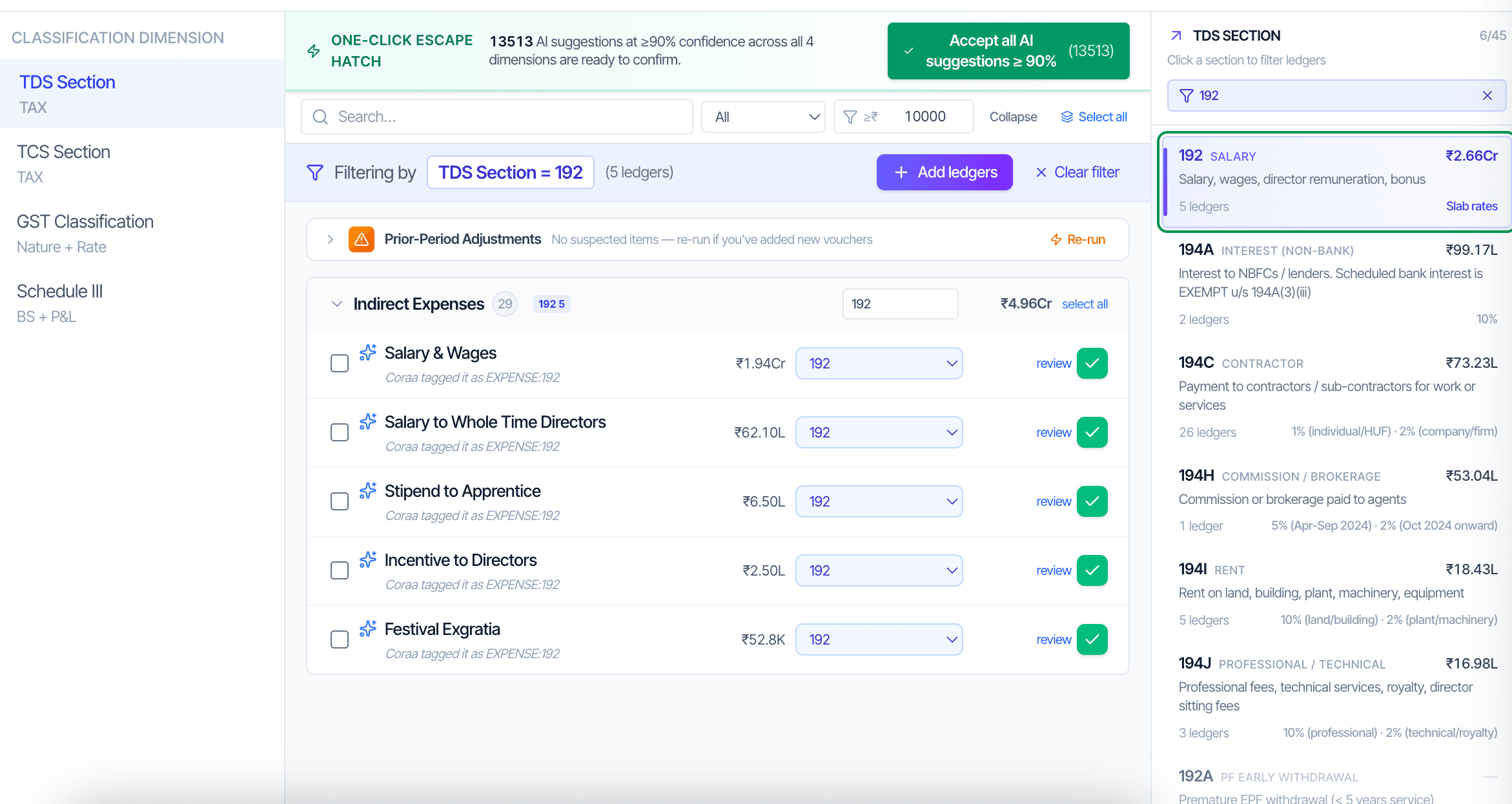
CORAA ଲେଜର୍ Classification across TDS, TCS, GST, and Schedule III
03·4-dimensional classification

Classify every ଲେଜର୍ once. ବର୍ଷ 2 picks up where ବର୍ଷ 1 left off.

Every ଲେଜର୍ gets classified across four statutory dimensions, TDS section, TCS section, GST nature, and Schedule III line. CORAA pre-classifies roughly 80 percent on first ingest using group hierarchy and narration patterns. The ଅଡିଟର୍ confirms the residual. Mappings persist; ବର୍ଷ 2 typically opens with zero ଲେଜର୍ requiring reclassification.

  • Four dimensions, one exercise, TDS · TCS · GST · Schedule III
  • 80 percent auto-classified on first ingest
  • One-click acceptance for AI suggestions with ≥90 percent confidence
  • Mappings persist year-on-year, ବର୍ଷ 2 review is typically zero ଲେଜର୍
  • Rule weights adapt per client

Each client in its own isolated workspace. Role-based access scopes article-clerks, partners, and reviewers.

Inside ଏଙ୍ଗେଜମେଣ୍ଟ୍ Setup

Inside ଏଙ୍ଗେଜମେଣ୍ଟ୍ Setup

Three building blocks that turn the first ଏଙ୍ଗେଜମେଣ୍ଟ୍ into a ଟେମ୍ପ୍ଲେଟ୍ for every ଅଡିଟ୍ after.

Frequently asked

Answers, up front.

For a 500-crore-turnover company on Tally, ingest completes in 15-20 minutes. The AI then takes 30-35 minutes to produce a first-pass classification. For a 1,000-crore ଏଙ୍ଗେଜମେଣ୍ଟ୍, allow an additional 10 minutes for ingest. Total setup is under an ଘଣ୍ଟା. Reviewer confirmation of the AI's residual classifications is typically 10-15 minutes at first ଅଡିଟ୍ and under five for subsequent ଅଡିଟ୍ because mappings persist.
The Tally connector runs locally on the ଅଡିଟ୍ ଟିମ୍'s machine and reads from the auditee's Tally database directly. Auditees on SAP, NetSuite, Busy, or Marg export ଦିନ Book, Trial Balance, and Account Master, then upload to CORAA. The interface and every downstream ୱାର୍କିଂ ପେପର୍ are identical; only the ingestion layer differs.
ନା। Each ଏଙ୍ଗେଜମେଣ୍ଟ୍ is a separate, isolated workspace. Two Tally ଏଙ୍ଗେଜମେଣ୍ଟ୍ for different clients can run concurrently on the same ଅଡିଟର୍ laptop without crossover. Role-based access scopes team members to specific clients.
Take it for a spin

Run a live audit. See the working.

Connect one client. Walk through the full audit lifecycle, classification through UDIN sign-off. No decks masquerading as demos.

Start the free trial →Book a walk-through
Engagement Setup, Connect Tally, Zoho, SAP & More | CORAA | CORAA