CORAA
Features/Engagement Setup/Ledger Mapping
Ledger Mapping

Ledger Mapping

Map ledgers once — Schedule III bucket plus PF / ESI / PT applicability. Year 2 opens with the mapping already done.

CORAA Ledger Mapping — Schedule III buckets and PF/ESI/PT applicability

Every downstream number depends on where each ledger lands. Ledger Mapping is where the auditor confirms, overrides or excludes the system's proposed Schedule III bucket and statutory-applicability tags (PF, ESI, PT) for every material ledger. The engine only ever suggests — it never confirms — so whatever the auditor stamps is the truth every working paper and Schedule III aggregation reads. TDS, TCS and GST need no ledger tag at all: their verification papers read the tax leg, amount and direction structurally from the vouchers themselves.

  • Four dimensions in one worksheet: Schedule III (BS + P&L) plus PF, ESI and PT applicability
  • Three-tier suggestions: deterministic Tally-group rules, then an LLM read of narrations, then cross-entity patterns
  • Auto-mapped ledgers need no attention — only flagged rows ask for your judgment
  • One-click acceptance for AI suggestions at 90%+ confidence, with a confirmation modal showing exactly what it touches
  • Copy confirmed mappings from the prior FY in one action
  • TDS / TCS / GST read structurally from vouchers — no stale ledger tags to maintain
Two paths, one ledger

The old way, and ours.

Two paths to the same audit conclusion. One leaves traces; the other doesn't.

Traditional

The old way

  • -Auditor maps ledgers from scratch every financial year
  • -Schedule III grouping, PF/ESI/PT applicability maintained in separate Excel sheets
  • -Inconsistencies between sheets create reconciliation effort downstream
  • -Senior partner re-explains classification logic to article assistants annually
First audit mapping: 4-6 hours of partner time. Repeats every year.
CORAA

On the Ledger

  • Single Ledger Mapping worksheet captures the Schedule III bucket and every applicability tag
  • Tally GROUP is the spine of every suggestion — names refine, the group decides
  • Year 1: a 30-45 minute review of flagged rows
  • Year 2: copy confirmed mappings from the prior FY, review only what changed
  • Audit log preserves who mapped what and when, per SA 230
Year 1 mapping: under 45 minutes of review. Year 2 onwards: typically under 5 minutes.
How it works

Three steps. Every trace logged.

Step 01

Three-tier suggestions on ingest

After the ERP data ingests, Tier 1 deterministic rules (Tally group + name + standard-group matching) resolve the large majority instantly. Ledgers Tier 1 can't settle go to Tier 2 — an LLM reads a sample of voucher narrations and proposes a value with its reason — and Tier 3 checks how auditors on other entities mapped similar ledgers. Every suggestion arrives with its stated reason.

Step 02

Auditor reviews the flagged rows

The worksheet's stat strip separates auto-mapped ledgers (no attention needed) from rows genuinely asking for judgment. Open a flagged row to see the suggestion, its reason and a confidence badge — accept, override or mark exempt. Bulk actions cover the rest, including an accept-all for high-confidence suggestions that shows exactly how many rows it will touch before committing.

Step 03

Mappings persist year-on-year

Mappings are stored per ledger and financial year, and Copy from prior FY carries confirmed mappings forward. Next year's audit opens with the same ledgers already mapped; the auditor reviews only what changed. Re-suggest re-runs the engine after a re-sync or materiality change.

Inside the module

What you actually get.

Schedule III dimension

Maps every ledger to its Schedule III line — a combined Balance Sheet + P&L bucket view, the default tab on load. Every ledger must land on a line (there is no exempt on this tab), and whatever you stamp is what the statements aggregate.

  • BS and P&L buckets in one tab
  • Framework-aware lines per Division
  • Current vs non-current split for the 2021-amendment ageing
  • The Schedule III paper's Ledger Mapping tab reads this worksheet

PF / ESI / PT applicability

Lean statutory-applicability dimensions for payroll-relevant ledgers only — a ledger with no row is simply out of scope. Tag once; the PF/ESI working paper reads the tags for its dues and deposit testing.

  • Payroll-relevant ledgers only — no noise
  • Per-taxonomy exclusion: exempt from PF while keeping the Schedule III line
  • Feeds the PF / ESI / PT working paper
  • Every stamp carries the auditor identity and note

TDS / TCS / GST — no ledger tags needed

TDS, TCS and GST classification used to live here — it was retired deliberately. The verification papers now derive the tax leg, amount and direction structurally from the vouchers themselves, so there is no ledger-level tag to go stale and no mapping debt to maintain.

  • Tax legs read from voucher structure, not labels
  • Sec 17(5) blocked credit tested in GST verification
  • RCM applicability per Sec 9(3) / 9(4) tested on vouchers
  • Deductor sections resolved in TDS verification

The auditor's stamp is the truth

One row per ledger and dimension records the status — suggested, confirmed, overridden or excluded — with the suggestion source and the auditor identity once acted on. Downstream working papers and the Schedule III aggregation read this table; the auditor's stamp always overrides whatever the engine proposed.

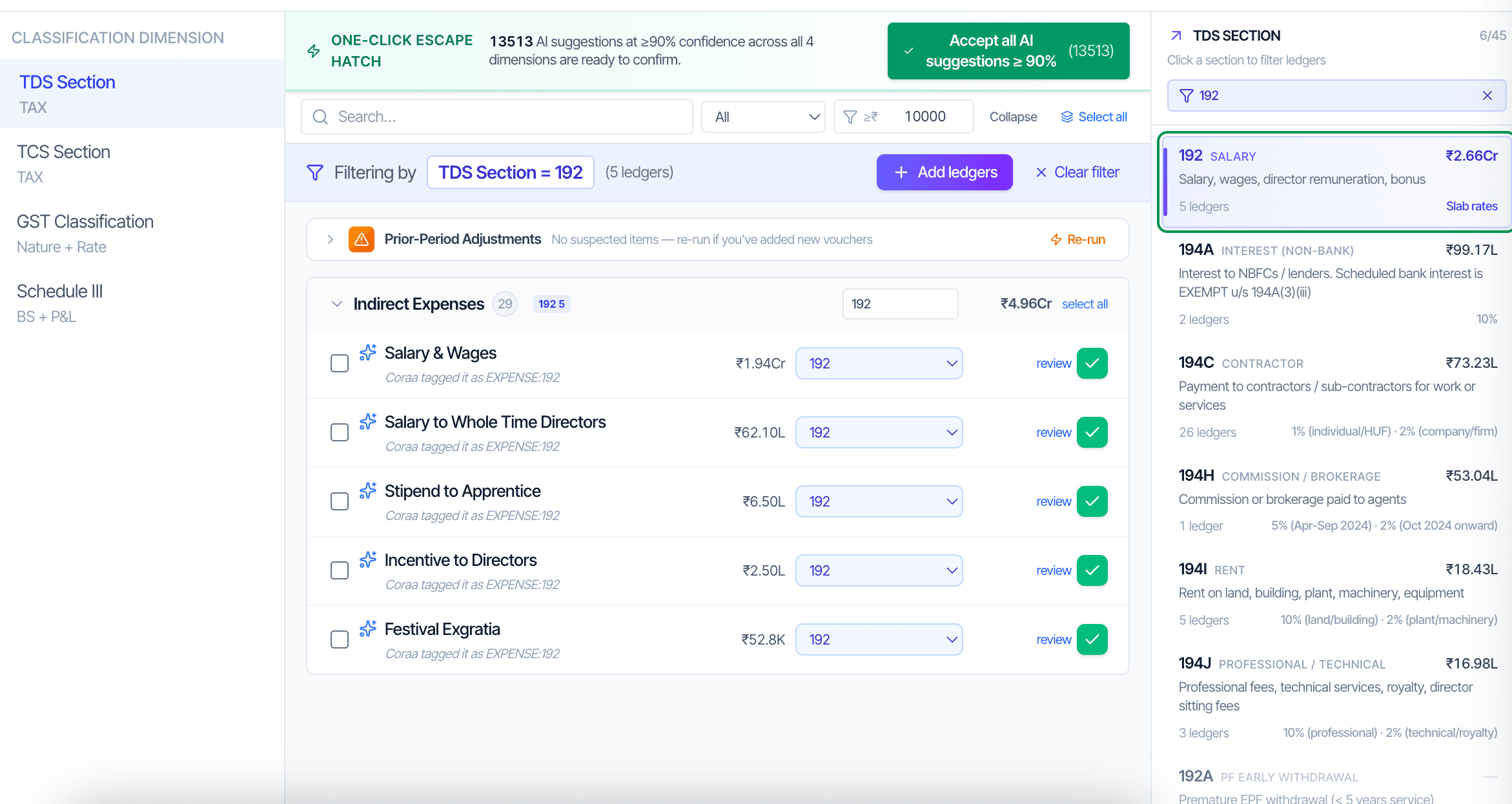
  • Suggested / Confirmed / Overridden / Excluded lifecycle
  • Deterministic statutory heads auto-map unless implausible
  • Flag, never force — ambiguous rows wait for you
  • Full audit trail per SA 230
Frequently asked

Answers, up front.

Three tiers. Tier 1 is deterministic — Tally group, name keywords and standard-group matching resolve the large majority instantly at high confidence. Tier 2 sends the unresolved ledgers to an LLM that reads a sample of voucher narrations and proposes a value with its reason. Tier 3 checks how auditors on other entities confirmed similar ledgers. Every suggestion shows its reason; none is treated as final until the auditor acts or the engine's confidence clears the auto-map bar.
That is exactly why GST classification no longer lives on this screen. The GST verification paper reads each voucher's own tax legs — so a ledger carrying both taxable and exempt supplies is handled at the voucher level, where the truth is, instead of forcing one ledger-level label to cover both.
If the GL code is the same and only the name changed, the mapping persists by code. If a new GL code appears, it shows up as Unmapped and the auditor maps it once — Copy from prior FY handles everything that carried over.
No — the engine only ever suggests, it never confirms. Whatever the auditor stamps is the truth every working paper and Schedule III aggregation reads. Ambiguous rows are flagged, never forced.
No — these are lean, payroll-relevant dimensions only. A ledger with no row here is simply out of scope; there's no need to tag ledgers that aren't payroll-relevant.
Yes. Exclusion is per-taxonomy — you can mark a ledger exempt from PF, for example, while it keeps its Schedule III line, since the two dimensions are tracked independently.
For AI suggestions at 90%+ confidence, accept-all shows a confirmation modal listing exactly how many rows it will touch before you commit — so a bulk action is never a blind one.
See it on a real ledger

Run ledger mapping on one of your engagements.

Bring a Trial Balance and a General Ledger. We'll walk through engagement setup end-to-end on your data, not a sandbox.

Run your first audit free →
Ledger Mapping AI | Schedule III + PF/ESI/PT in One Worksheet | CORAA