CORAA
Features/Scrutiny/Intelligence
Intelligence

Intelligence

Money flow as a graph. Executive vitals and the business's DNA — all computed from the vouchers, all drillable.

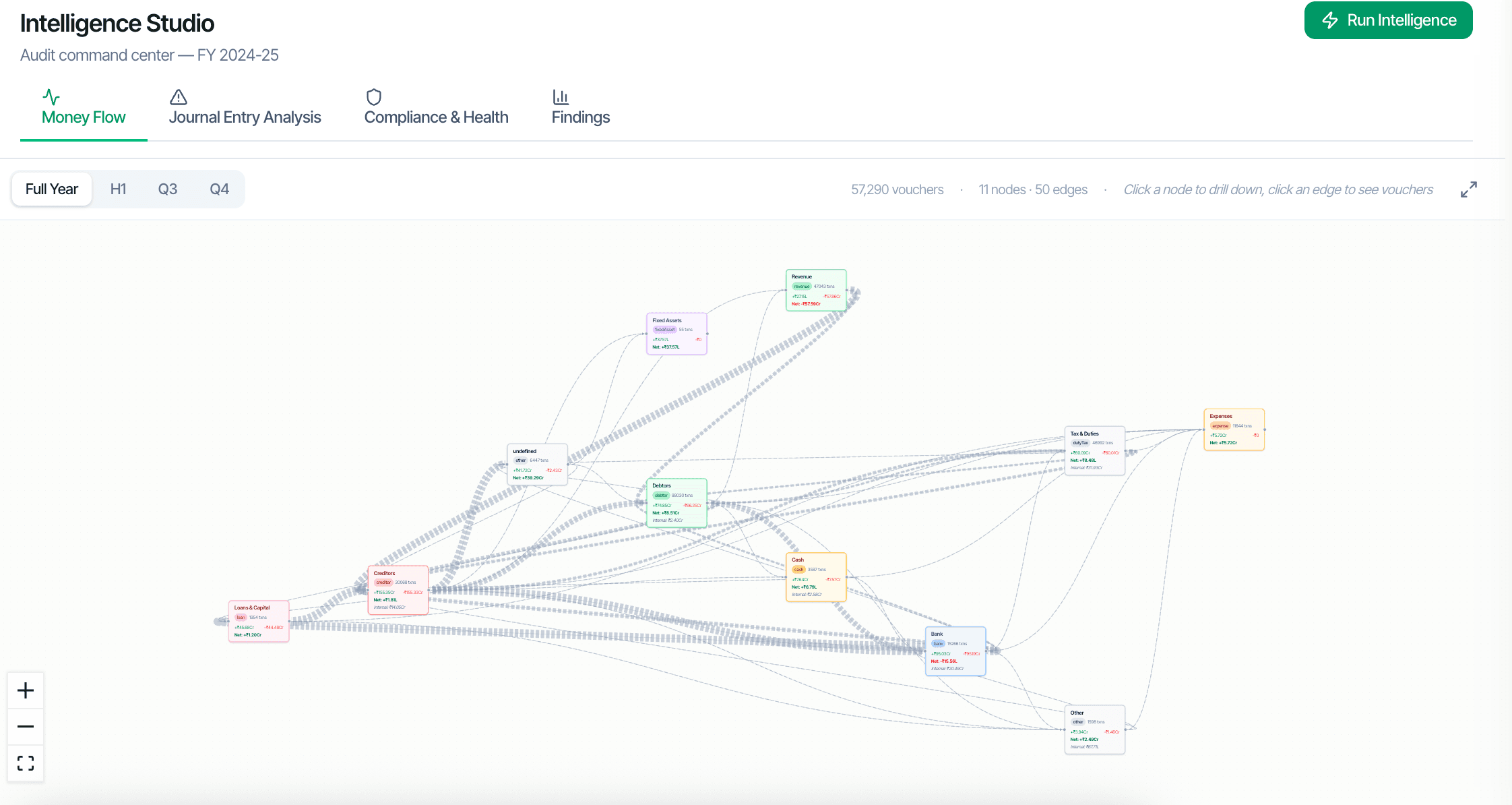
CORAA Intelligence — money flow graph

Auditors don't think in tables; they think in relationships. The Intelligence workspace shows where the money actually went: a ₹-weighted flow graph of the entity's ledgers and parties, an Executive view of the engagement's vitals, and a Business DNA read of how this client actually operates — every figure computed from the vouchers, nothing re-derived.

  • Three tabs: Executive, Money Flow, Business DNA
  • Tens of thousands of vouchers render as a readable ₹-weighted flow graph
  • Click any node to drill into its ledger or party
  • Click any edge to see the vouchers between two parties
  • Digraph, Sankey and cash-waterfall reads of the same flow data
  • Cash-in and cash-use categories reconciled through the Cash/Bank nodes
Two paths, one ledger

The old way, and ours.

Two paths to the same audit conclusion. One leaves traces; the other doesn't.

Traditional

The old way

  • -Audit data viewed in Excel tables, one ledger at a time
  • -Cross-party flows require manual VLOOKUPs across multiple sheets
  • -Money flow patterns rarely surface unless an article explicitly looks
  • -The business's shape assembled by reading separate reports
ଆ ।
CORAA

On the Ledger

  • Entity rendered as a single navigable graph
  • Top money-flow paths surface automatically
  • Sankey and waterfall views re-read the same node/edge payload — one computation, three lenses
  • Executive vitals summarise the engagement at a glance
  • Business DNA profiles how the client actually operates, year over year
ଆ ।
How it works

Three steps. Every trace logged.

Step 01

Money Flow tab

Shows the dominant money flows across the entity as a ₹-weighted graph — top suppliers by outflow, top customers by inflow, the paths between them. A Sankey view and a cash waterfall re-read the same nodes and edges, so the three lenses can never disagree.

Step 02

Executive tab

The engagement's vitals in one view — the headline financials, movements and flags an engagement partner wants before opening a single working paper.

Step 03

Business DNA tab

A profile of how this client actually operates — the patterns in its trading, seasonality and counterparties, computed from the books and comparable across years.

Step 04

Drill to the voucher

Every node and edge drills to the ledgers, parties and vouchers behind it — the graph is a navigation surface over the books, not a picture.

Inside the module

What you actually get.

Graph rendering

Nodes are ledgers and parties; edges are aggregated vouchers between them, weighted by rupee value. The flow graph tolerates the messiness of real books — Cash and Bank contra flows, back-edges — rather than forcing a clean hierarchy.

  • ₹-weighted nodes and edges from the voucher graph
  • Edge weights by aggregate transaction value
  • Sankey and waterfall views of the same payload
  • Zoom and pan supported

Drill-down

Click any node to drill into that ledger's transactions or that party's voucher list. Click any edge to see the specific vouchers between two parties.

  • Node click: ledger or party detail
  • Edge click: voucher list between two parties
  • Three levels deep: graph, voucher list, source voucher
  • Back to graph in one click

One computation, three lenses

The digraph, the Sankey and the cash waterfall all read the same server-computed nodes-and-links payload. Nothing is re-derived per view, so the numbers agree by construction.

  • Digraph for structure
  • Sankey for magnitude
  • Waterfall for cash-in vs cash-use
  • Same payload, zero drift

Audit-trail aware

Every figure in the Intelligence workspace traces to the vouchers that produced it, in line with the engagement's SA 230 documentation trail.

  • Every figure computed from vouchers
  • Drill preserved to source
  • Consistent with the working papers
  • SA 230-aligned trail
Frequently asked

Answers, up front.

Ledger Scrutiny and Transactional Scrutiny generate the findings; Intelligence shows the shape of the business those findings live in. The three tabs surface different cuts of the same books — the flow graph, the executive vitals, and the business's DNA.
No. The standard scrutiny report is a tabular working paper for the audit file. Intelligence Studio is a review interface for the audit team. Both are produced from the same data; they serve different needs.
No. The nodes, edges and totals are computed server-side from the vouchers, and every view — digraph, Sankey, waterfall — reads that same payload. What you drill into is what the working papers read.
See it on a real ledger

Run intelligence on one of your engagements.

Bring a Trial Balance and a General Ledger. We'll walk through scrutiny end-to-end on your data, not a sandbox.

Run your first audit free →
Intelligence Studio | Graph-based Audit Command Centre | CORAA