CORAA
AI Modules/Findings/வாடிக்கையாளர் Portal
மேஜிக்-லிங்க் Questionnaire· निष्कर्ष

வாடிக்கையாளர் Portal

AI-drafted questions from findings. வாடிக்கையாளர் uploads ஆதாரம் via மேஜிக்-லிங்க், no signup.

CORAA வாடிக்கையாளர் Portal questionnaire

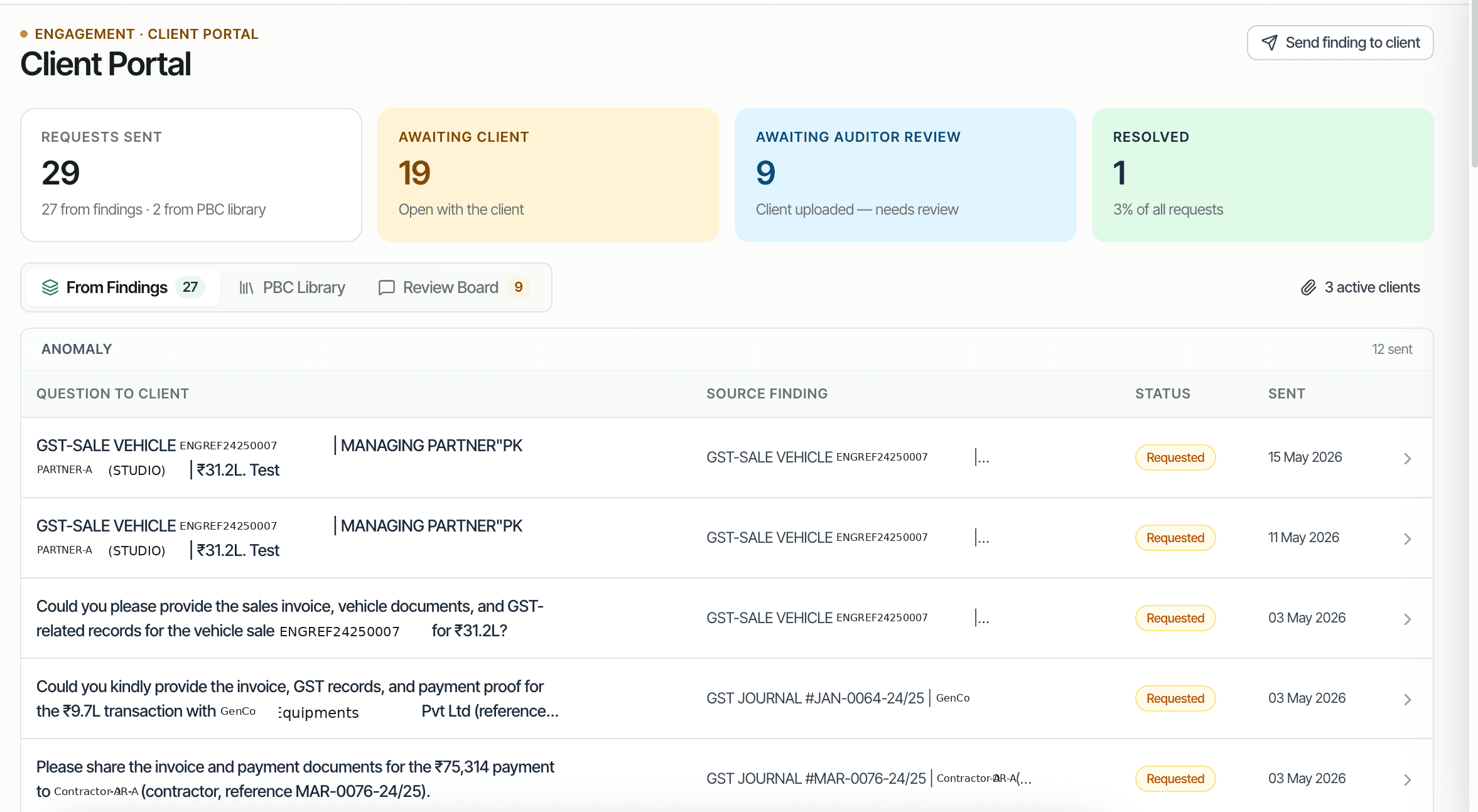
Audit findings often require ஆதாரம் from the வாடிக்கையாளர்: a missing invoice, a board resolution, a bank statement, an MSME declaration. The traditional path is email back-and-forth with attachments that the audit குழு has to organize. CORAA's வாடிக்கையாளர் Portal converts findings into AI-drafted questions, delivered via மேஜிக்-லிங்க் email to the வாடிக்கையாளர். The வாடிக்கையாளர் opens the link, uploads files or types responses, and the response routes back to the originating finding.

  • AI-drafted questions from findings
  • Bundle multiple findings into one questionnaire
  • மேஜிக்-லிங்க் delivery, no வாடிக்கையாளர் account creation
  • Expected response: file upload, text answer, or both
  • Status tracking: Requested, Awaiting வாடிக்கையாளர், Awaiting கணக்காய்வாளர் Review, Resolved
  • Response routes back to the originating finding தானாகவே
Two paths, one ledger

The old way, and ours.

Two paths to the same audit conclusion. One leaves traces; the other doesn't.

Traditional

The old way

  • -கணக்காய்வாளர் emails the வாடிக்கையாளர் with attached findings list
  • -வாடிக்கையாளர் replies with attached files (sometimes wrong files)
  • -Audit குழு manually organizes responses against findings
  • -Follow-up emails chase missing items
வாடிக்கையாளர் communication: email chaos. Response tracking: spreadsheet.
CORAA

On the Ledger

  • Findings turned into structured questions தானாகவே
  • Single மேஜிக்-லிங்க் sent to வாடிக்கையாளர்; no signup
  • Responses route to source finding with கணக்காய்வுத் தடம்
  • Reminder emails sent தானாகவே for unanswered questions
  • Status visible per question and per questionnaire
வாடிக்கையாளர் communication: structured. Response tracking: automatic.
How it works

Three steps. Every trace logged.

Step 01

Select findings, send

From the Findings inbox, the கணக்காய்வாளர் selects one or more findings that need வாடிக்கையாளர் ஆதாரம் and clicks Send to வாடிக்கையாளர். CORAA drafts a question per finding (AI-suggested, editable), lists the expected attachment, and bundles them into one questionnaire.

Step 02

வாடிக்கையாளர் receives மேஜிக்-லிங்க்

The வாடிக்கையாளர் gets an email with a மேஜிக்-லிங்க் to the questionnaire. No account, no signup. Click the link, see the questions, upload files or type responses, click Submit.

Step 03

Response routes back

Each response routes to the originating finding. The audit குழு sees the response inline on the finding record. If the response resolves the finding, the கணக்காய்வாளர் marks it Resolved; if not, sends a follow-up question.

Inside the module

What you actually get.

AI-drafted questions

CORAA reads the finding's description, the linked voucher, and the audit context, then drafts a polite, specific question for the வாடிக்கையாளர். Example: 'Could you please share the GST invoice and bill of sale for vehicle ENGREF24250007, sold for ₹31.2 lakh, for our audit records?'

  • Context-aware drafting
  • Polite and specific tone
  • கணக்காய்வாளர் edits inline before sending
  • Re-draft with AI button for alternates

மேஜிக்-லிங்க் delivery

Email delivery via a unique மேஜிக்-லிங்க் per questionnaire. The link expires after the configured period (default 7 days). The வாடிக்கையாளர் opens the link in any browser, no signup.

  • Unique link per questionnaire
  • Configurable expiry
  • Email delivery via transactional email
  • Mobile-responsive வாடிக்கையாளர் view

Status tracking

Per-question status: Requested, Awaiting வாடிக்கையாளர், Awaiting கணக்காய்வாளர் Review, Resolved, Closed. The questionnaire-level status aggregates across questions.

  • Requested: sent, awaiting வாடிக்கையாளர் open
  • Awaiting வாடிக்கையாளர்: opened, response pending
  • Awaiting கணக்காய்வாளர் Review: வாடிக்கையாளர் responded, குழு to review
  • Resolved: response accepted, finding resolved
  • Closed: questionnaire closed without resolution

Response routes to finding

Every response (file, text, or both) routes back to the originating finding. The audit குழு sees the response inline on the finding record. The audit log preserves who sent the question, when, and what response came back.

  • Response on finding record
  • கணக்காய்வாளர் accepts or rejects the response
  • Rejection triggers follow-up question
  • கணக்காய்வுத் தடம் complete per SA 230
Frequently asked

Answers, up front.

Never. The Findings inbox is internal to the கணக்காய்வு நிறுவனம். The வாடிக்கையாளர் Portal is a curated outbound: the audit குழு selects which findings become வாடிக்கையாளர் questions. Internal triage (Resolve, Dismiss, Pin) remains inside CORAA. வாடிக்கையாளர்கள் see only the questions explicitly sent to them.
Reminder emails are sent தானாகவே at configurable intervals (default: day 3 and day 7 after initial send). After the configured expiry (default 7 days), the questionnaire closes; the கணக்காய்வாளர் can re-send if needed. Unresponded questions surface as Opinion sign-off blockers if they relate to Above-PM findings.
Yes. Multiple recipients (multiple email addresses on the வாடிக்கையாளர் side) can receive the same மேஜிக்-லிங்க். Common when the questionnaire spans different departments (finance, ops, legal). Responses from any recipient route to the questionnaire; the audit குழு sees who responded with what.
See it on a real ledger

Run வாடிக்கையாளர் portal on one of your engagements.

Bring a Trial Balance and a General Ledger. We'll walk through findings end-to-end on your data, not a sandbox.

Start the free trial →Book a walk-through
Audit Client Portal AI | Magic-link Questionnaire for CA Firms | CORAA | CORAA