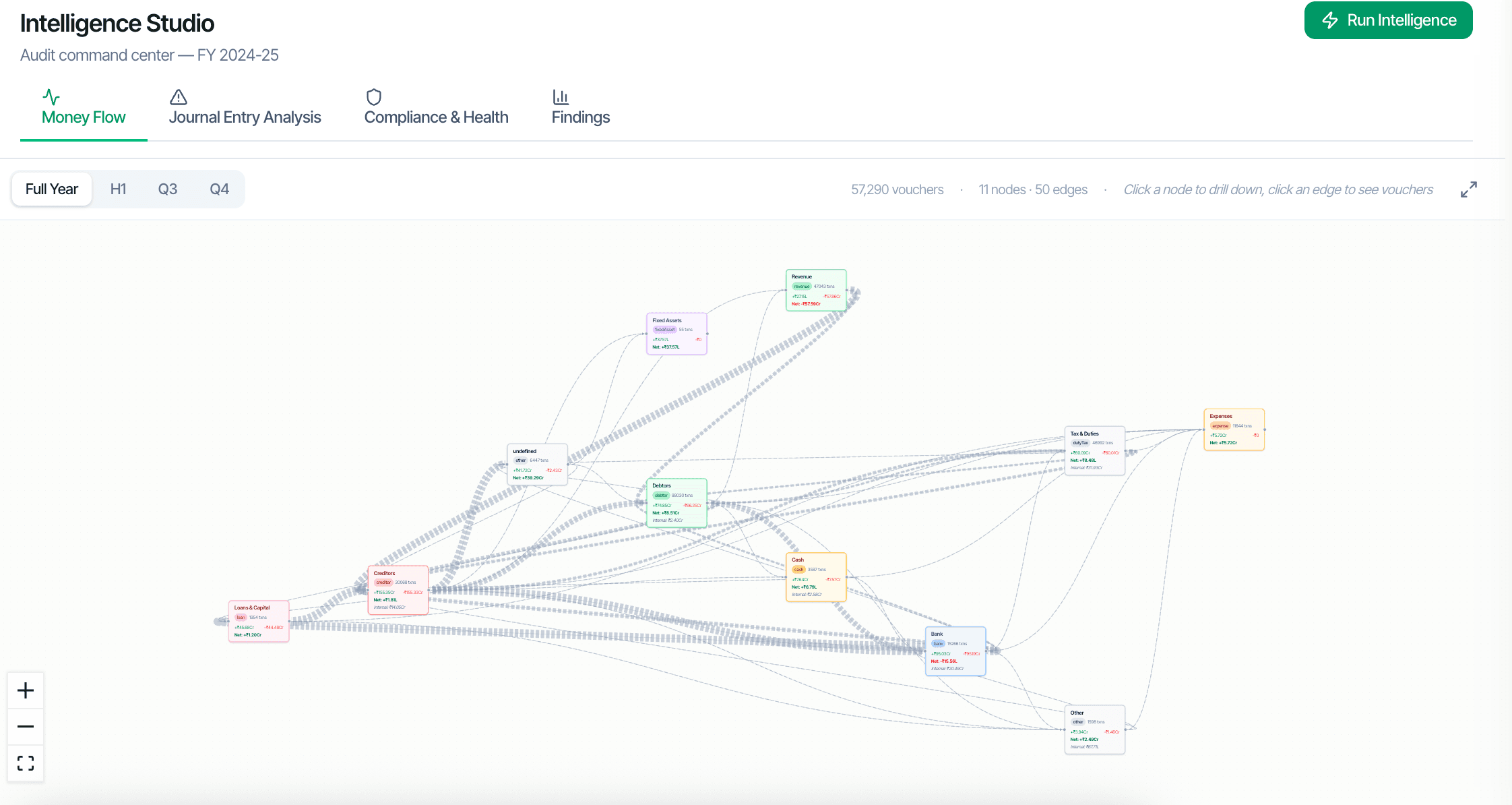
கணக்காய்வாளர்கள் அட்டவணைகளில் சிந்திப்பதில்லை; உறவுகளில் சிந்திக்கிறார்கள். Intelligence பணியிடம் பணம் உண்மையில் எங்கே சென்றது என்பதைக் காட்டுகிறது: நிறுவனத்தின் லெட்ஜர்கள் மற்றும் தரப்புகளின் ₹-எடையிடப்பட்ட ஓட்ட வரைபடம், எங்கேஜ்மென்ட்டின் முக்கியக் குறிகாட்டிகளின் Executive காட்சி, மற்றும் இந்த வாடிக்கையாளர் உண்மையில் எப்படிச் செயல்படுகிறார் என்பதன் Business DNA வாசிப்பு — ஒவ்வொரு எண்ணும் வவுச்சர்களிலிருந்து கணக்கிடப்படுகிறது, எதுவும் மறு-தருவிக்கப்படுவதில்லை.
Two paths to the same audit conclusion. One leaves traces; the other doesn't.
நிறுவனம் முழுவதுமான ஆதிக்கப் பண ஓட்டங்களை ₹-எடையிடப்பட்ட வரைபடமாகக் காட்டுகிறது — வெளியோட்டம் வாரியாக முதன்மை சப்ளையர்கள், உள்ளோட்டம் வாரியாக முதன்மை வாடிக்கையாளர்கள், அவர்களுக்கு இடையிலான பாதைகள். Sankey காட்சியும் cash waterfall-உம் அதே nodes மற்றும் edges-ஐ மீண்டும் படிக்கின்றன, எனவே மூன்று லென்ஸ்களும் ஒருபோதும் முரண்பட முடியாது.
எங்கேஜ்மென்ட்டின் முக்கியக் குறிகாட்டிகள் ஒரே காட்சியில் — ஒரு பணிக்காகிதத்தைத் திறக்கும் முன்பே ஒரு எங்கேஜ்மென்ட் partner விரும்பும் தலைப்பு நிதி எண்கள், நகர்வுகள் மற்றும் கொடிகள்.
இந்த வாடிக்கையாளர் உண்மையில் எப்படிச் செயல்படுகிறார் என்பதன் விவரக்குறிப்பு — அதன் வர்த்தகம், பருவநிலை மற்றும் எதிர்-தரப்புகளின் முறைகள், புத்தகங்களிலிருந்து கணக்கிடப்பட்டு ஆண்டுகள் முழுவதும் ஒப்பிடக்கூடியவை.
ஒவ்வொரு node-ும் edge-ும் அதன் பின்னுள்ள லெட்ஜர்கள், தரப்புகள் மற்றும் வவுச்சர்களுக்கு drill செய்கிறது — வரைபடம் புத்தகங்களின் மீதான ஒரு வழிசெலுத்தல் மேற்பரப்பு, வெறும் படம் அல்ல.
Nodes என்பவை லெட்ஜர்களும் தரப்புகளும்; edges என்பவை அவற்றுக்கு இடையிலான தொகுக்கப்பட்ட வவுச்சர்கள், ரூபாய் மதிப்பால் எடையிடப்பட்டவை. ஓட்ட வரைபடம் உண்மையான புத்தகங்களின் குழப்பத்தைப் பொறுத்துக்கொள்கிறது — Cash மற்றும் Bank contra ஓட்டங்கள், back-edges — சுத்தமான படிநிலையைக் கட்டாயப்படுத்துவதற்குப் பதிலாக.
எந்த node-ஐயும் கிளிக் செய்து அந்த லெட்ஜரின் பரிவர்த்தனைகள் அல்லது அந்தத் தரப்பின் வவுச்சர் பட்டியலுக்குள் drill செய்யுங்கள். எந்த edge-ஐயும் கிளிக் செய்து இரு தரப்புகளுக்கு இடையிலான குறிப்பிட்ட வவுச்சர்களைப் பாருங்கள்.
Digraph-ும், Sankey-யும், cash waterfall-உம் அதே server-கணக்கிடப்பட்ட nodes-and-links payload-ஐப் படிக்கின்றன. காட்சி வாரியாக எதுவும் மறு-தருவிக்கப்படுவதில்லை, எனவே எண்கள் கட்டமைப்பாலேயே ஒத்துப்போகின்றன.
Intelligence பணியிடத்திலுள்ள ஒவ்வொரு எண்ணும் அதை உருவாக்கிய வவுச்சர்கள் வரை தடம் காட்டுகிறது — எங்கேஜ்மென்ட்டின் SA 230 ஆவணத் தடத்துடன் இணங்கி.