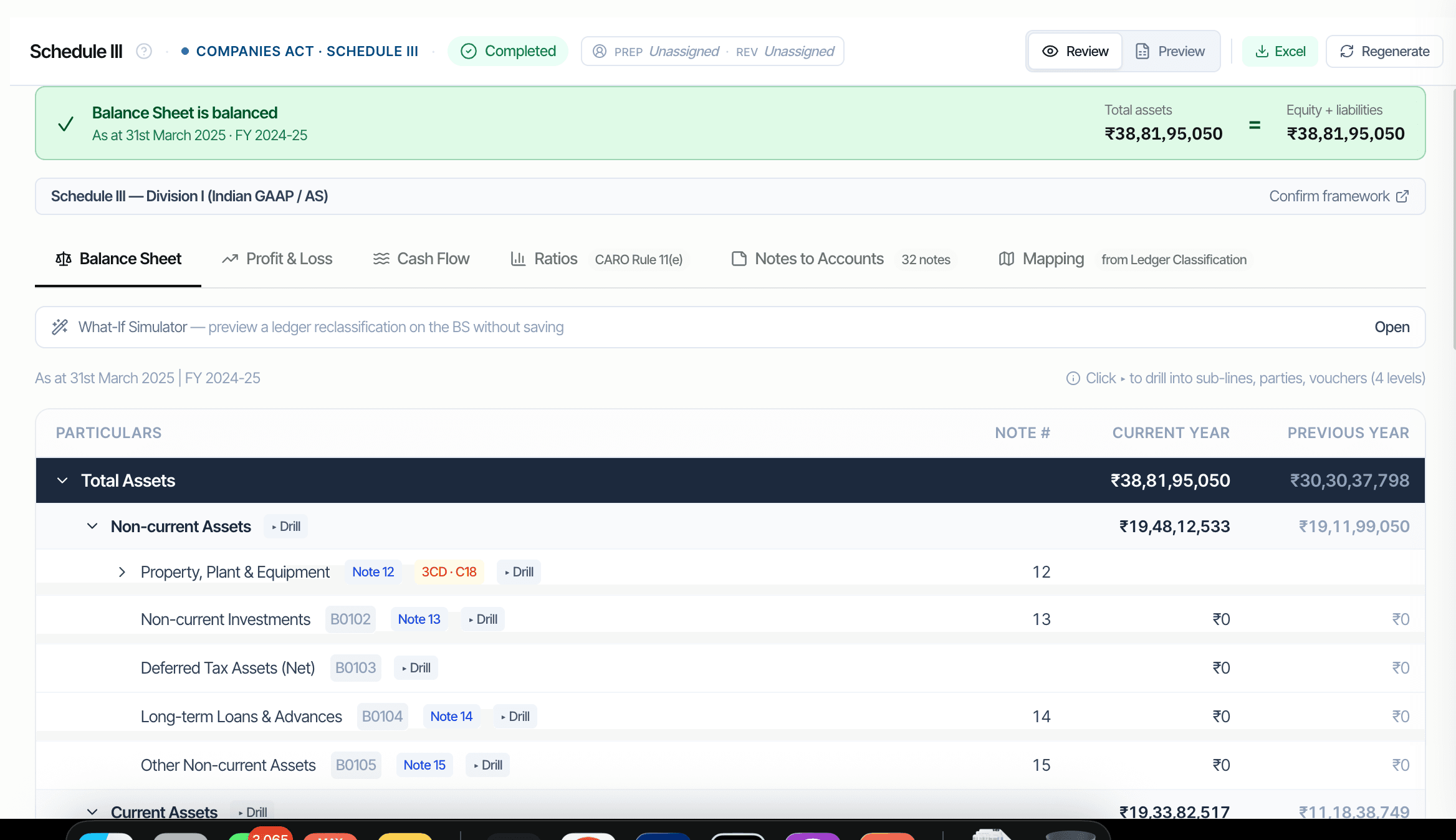
लीड शेड्यूल हर Balance Sheet और P&L हेड के लिए ऑडिटर का प्राथमिक वर्किंग पेपर हैं। CORAA इन्हें मैप्ड लेजर डेटा से अपने आप रचता है। हर शेड्यूल variance विश्लेषण समेत CY और PY कॉलम दिखाता है। तीन-स्तरीय ड्रिल: बैलेंस हेड, उसके नीचे के लेजर, लेजर के नीचे की पार्टियाँ, पार्टी के नीचे के वाउचर। रचना पर टाई-आउट लागू: Total Assets = Total Equity + Total Liabilities होना ही चाहिए।
Two paths to the same audit conclusion. One leaves traces; the other doesn't.
Ledger Mapping का Schedule III आयाम सेट होते ही हर लेजर पर Sch III लाइन कोड होता है। लीड शेड्यूल Trial Balance पर SUMIFS से लेजरों को लाइन कोड के हिसाब से एग्रीगेट करते हैं।
किसी भी Sch III लाइन पर क्लिक कर उसके घटक लेजरों में खोलें। किसी भी लेजर पर क्लिक कर उसमें योगदान देने वाली पार्टियाँ देखें। किसी भी पार्टी पर क्लिक कर सोर्स वाउचर देखें। तीनों स्तरों पर रीड-ओनली; सुधार Ledger Mapping के ज़रिए होते हैं।
CY और PY कॉलम अगल-बगल। 25% से ऊपर के variance स्पष्टीकरण के लिए फ़्लैग, Schedule III रेश्यो-प्रकटीकरण ट्रिगर। variance नोट सीधे Ratios नोट को फ़ीड करता है।
A1 Equity Share Capital से F7 Other Current Assets तक हर लाइन कोड, साथ में P1 Revenue से P9 Other Expenses। AS के लिए Division I; Ind AS के लिए Division II।
तीन स्तर गहरा, सब रीड-ओनली। सुधार Ledger Mapping स्क्रीन पर होते हैं, जो हर निर्भर लीड शेड्यूल में वापस फैलते हैं।
Total Assets = Total Equity + Total Liabilities होना ही चाहिए। टाई-आउट ₹1 से ज़्यादा से चूके तो CORAA लीड शेड्यूल को 'ready' मार्क करने से इनकार कर देता है। Reserves & Surplus को फ़ीड करने वाली P&L बॉटम लाइन के लिए भी वही।
लीड शेड्यूल फ़र्म के अपने टेम्पलेट फ़ॉर्मैट में स्टैंडर्ड Excel में एक्सपोर्ट होते हैं। OneDrive एकीकरण का मतलब Excel फ़र्म के क्लाउड में रहता है, CORAA के नहीं।