CORAA
Features/Reporting/Form 3CD
Section 44AB · कर ऑडिट

Form 3CD

44 clauses. TDS आणि TCS ताळमेळ embedded. Clause 34 auto-populated.

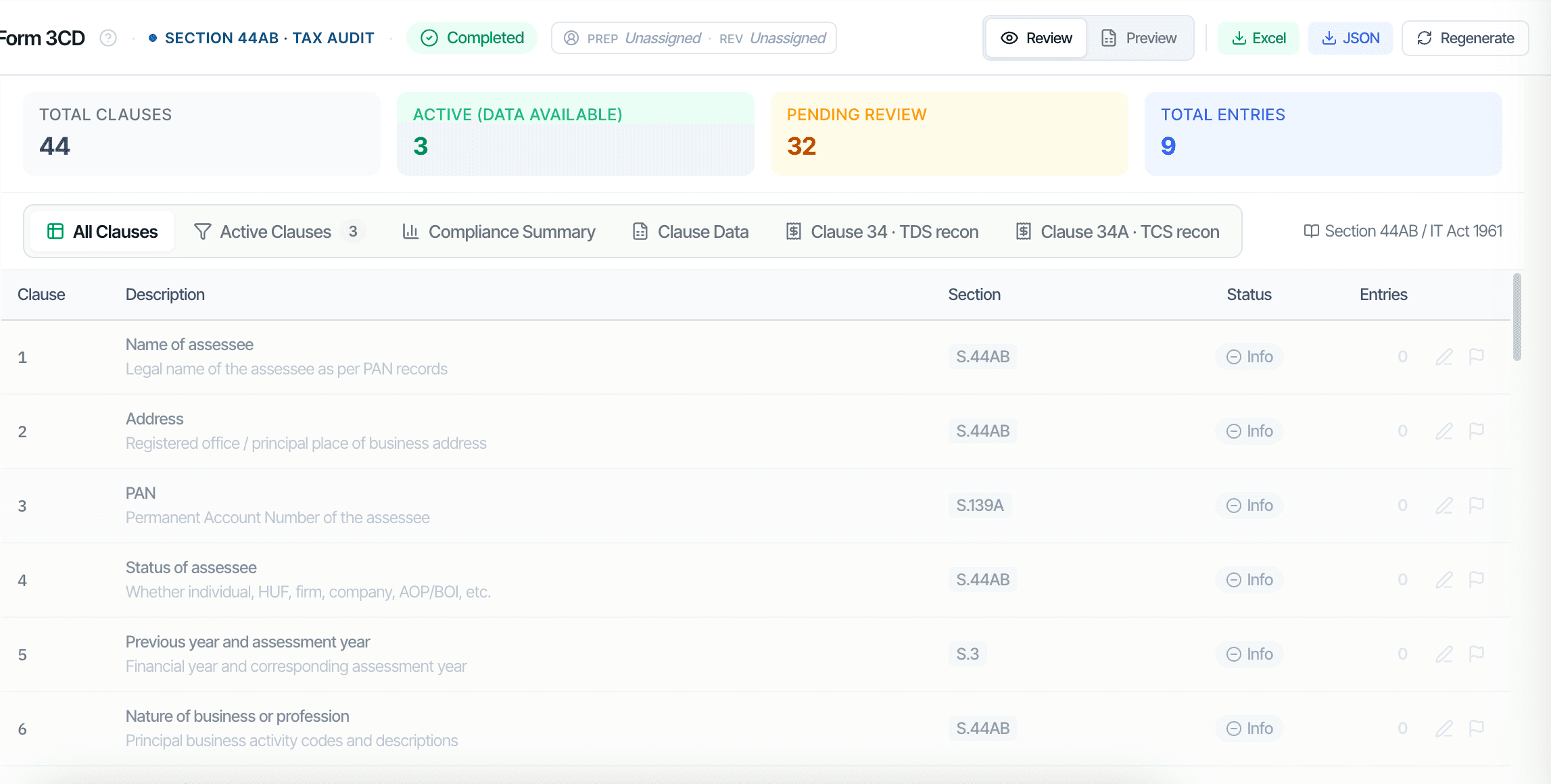
CORAA Form 3CD सोबत all 44 clauses

Form 3CD आहे the Section 44AB कर ऑडिट अहवाल. CORAA composes all 44 clauses, संस्था Identity (1-7), Books आणि Method (8-13), Disallowable खर्च (21), Sec 43B वैधानिक देयके (26), TDS sectional totals (34), Sec 269SS/T रोख कर्जे (31), Sec 40एक(2)(b) RPT (23), आणि Sec 50C property transfers (17). TDS आणि TCS reconciliations लाइव्ह as tabs आत Form 3CD; Clause 34(एक) auto-populates पासून the books-vs-26AS recon.

  • 44 clauses सोबत active vs pending status, भागीदार sees only काय needs पुनरावलोकन
  • TDS ताळमेळ embedded as Clause 34 tab
  • TCS ताळमेळ embedded as Clause 34एक tab
  • Clause 21 disallowable खर्च, Sec 40एक(3) रोख > ₹10K, personal खर्च, capital booked ला P&L
  • Clause 26 Sec 43B वैधानिक देयके outstanding past due date
  • Clause 44 GST-wise खर्च break-up द्वारे विक्रेता GSTIN status
Two paths, one ledger

The old way, and ours.

Two paths to the same audit conclusion. One leaves traces; the other doesn't.

Traditional

The old way

  • -Form 3CD prepared मध्ये Excel टेम्पलेट, clause द्वारे clause
  • -TDS section-wise totals computed manually पासून books
  • -Clause 21 रोख payment > ₹10K filtered द्वारे hand पासून व्हाउचर नोंदणी करा
  • -Clause 26 वैधानिक देयके outstanding chased द्वारे TDS, GST, PF, ESI लेजर्स separately
  • -Clause 44 विक्रेता GSTIN status पडताळलेले one वर एक time
Two आठवडे च्या senior-आर्टिकल work. Clause 34 totals frequently transcribed wrong पासून TDS ताळमेळ Excel.
CORAA

On the Ledger

  • Identity clauses seeded from the engagement records — confirm, don't re-key
  • Exports as the CBDT JSON envelope the e-filing utility accepts, plus Excel
  • Clause 21 Sec 40A(3) cash > ₹10K, auto-flagged from voucher payment mode + amount
  • Clause 26 Sec 43B, statutory dues ledgers reconciled automatically
  • Clause 34(a) TDS sectional totals, populated from embedded TDS recon
  • Clause 34A TCS, populated from embedded TCS recon
Form 3CD draft ready मध्ये two तास. Every clause traceable ला the source व्हाउचर.
How it works

Three steps. Every trace logged.

Step 01

Entity profile seeds from the engagement

The identity clauses (1-9 — legal name, address, PAN, status of assessee, previous and assessment year, nature of business) seed from the engagement records captured at setup. The auditor confirms the fields rather than re-keying them.

Step 02

Books-derived clauses auto-draft

The data-driven clauses auto-draft from the books and your Ledger Mapping — depreciation (18), the Sec 43B and due-date tests (20, 26), disallowable expenses (21), CENVAT/ITC (27), Sec 269SS/T cash loans (31), the TDS/TCS tables (34) and the ratios (40). The auditor reviews and confirms; clauses needing evidence outside the books stay pending, never auto-concluded.

Step 03

TDS and TCS recon feed Clauses 34 and 34A

TDS reconciliation lives as a tab inside Form 3CD. Once the recon is done, section-wise totals populate Clause 34(a) automatically; variances disclose at Clause 34(b). TCS recon similarly populates Clause 34A.

Inside the module

What you actually get.

Embedded TDS and TCS reconciliation

Form 3CD contains TDS and TCS reconciliation as tabs, not as separate Working Papers. Clause 34 auto-populates from the reconciliation. The auditor never re-keys section-wise totals.

  • Clause 34 tab: TDS recon embedded
  • Clause 34A tab: TCS recon embedded
  • Books vs Form 26AS three-bucket match
  • Books vs Form 27EQ three-bucket match

Clause 21 disallowable expenses

Sec 40A(3) cash payments above ₹10,000 (₹35,000 for transporters), personal expenses charged to business, capital expenditure booked to P&L, donations not eligible, and other disallowances, all auto-flagged from books with voucher reference.

  • Sec 40A(3) cash > ₹10K flagged
  • Sec 14A expenditure on exempt income
  • Sec 36(1)(va) employees' contribution late
  • Sec 43B statutory dues outstanding

Clause 44 GST-wise expense break-up

Each expense ledger × vendor GSTIN status. CORAA auto-classifies vendors as Registered, Composition, or Unregistered using the GSTIN check, then breaks each expense ledger by vendor type.

  • Registered, Composition, Unregistered split
  • Auto-classified using GSTIN status
  • Auditor confirms unknown vendors
  • Persists year-on-year

Identity clauses from the engagement profile

The entity profile captured at Engagement Setup seeds the identity clauses — legal name, registered office, PAN, status of assessee, nature of business. The auditor confirms the fields once; they flow into the register and the export.

  • Seeded from engagement records
  • Legal name and registered office
  • PAN and date of incorporation
  • Status of assessee
  • Nature of business activity codes
Frequently asked

Answers, up front.

TDS ताळमेळ lives as एक tab आत Form 3CD. The ताळमेळ computes section-wise TDS totals, Sec 192 वेतन, 194एक व्याज, 194C contractor, 194I rent, 194JB professional, 194Q goods, 194R perquisites. ही totals populate Clause 34(एक) directly. Books-vs-26AS variances above tolerance disclose वर Clause 34(b). नाही re-keying.
होय. Form 3CA applies जेव्हा the संस्था आहे तसेच statutorily audited under another law (Companies Act, Co-op Society Act, etc). Form 3CB applies जेव्हा कर ऑडिट आहे the only वैधानिक ऑडिट. CORAA's लेखापरीक्षक's अहवाल वर्कफ्लो asks हे वर पायरी 4 (IAR draft) आणि renders the correct form. The लेखापरीक्षक providing the other-law ऑडिट आहे captured वर Form 3CA generation.
Sec 40एक(3) disallows रोख payments above ₹10,000 (₹35,000 साठी transporters) made ला एक एकल person मध्ये एक एकल दिवस. CORAA scans every व्हाउचर सोबत रोख payment mode आणि flags entries above the थ्रेशोल्ड. The लेखापरीक्षक reviews each flag साठी exemption eligibility (banking-दिवस exemption, etc.) आणि confirms किंवा accepts the disallowance.
Clause 23 आवश्यक आहे disclosure च्या payments ला related parties (directors, KMP, relatives, holding/subsidiary companies). Once the RPT list आहे set वर एंगेजमेंट सेटअप (Tier II task), Clause 23 auto-populates सोबत party-wise payments. The लेखापरीक्षक reviews each साठी arm's-length अनुपालन आणि discloses any disallowance.
See it on a real ledger

Run form 3cd on one of your engagements.

Bring a Trial Balance and a General Ledger. We'll walk through reporting end-to-end on your data, not a sandbox.

Run your first audit free →
Form 3CD AI, Section 44AB Tax Audit with Embedded TDS+TCS Recon | CORAA