CORAA
AI Modules/Engagement Setup/ERP ସ ।
ERP ସ ।· सेटअप

ERP ସ ।

ପ ।

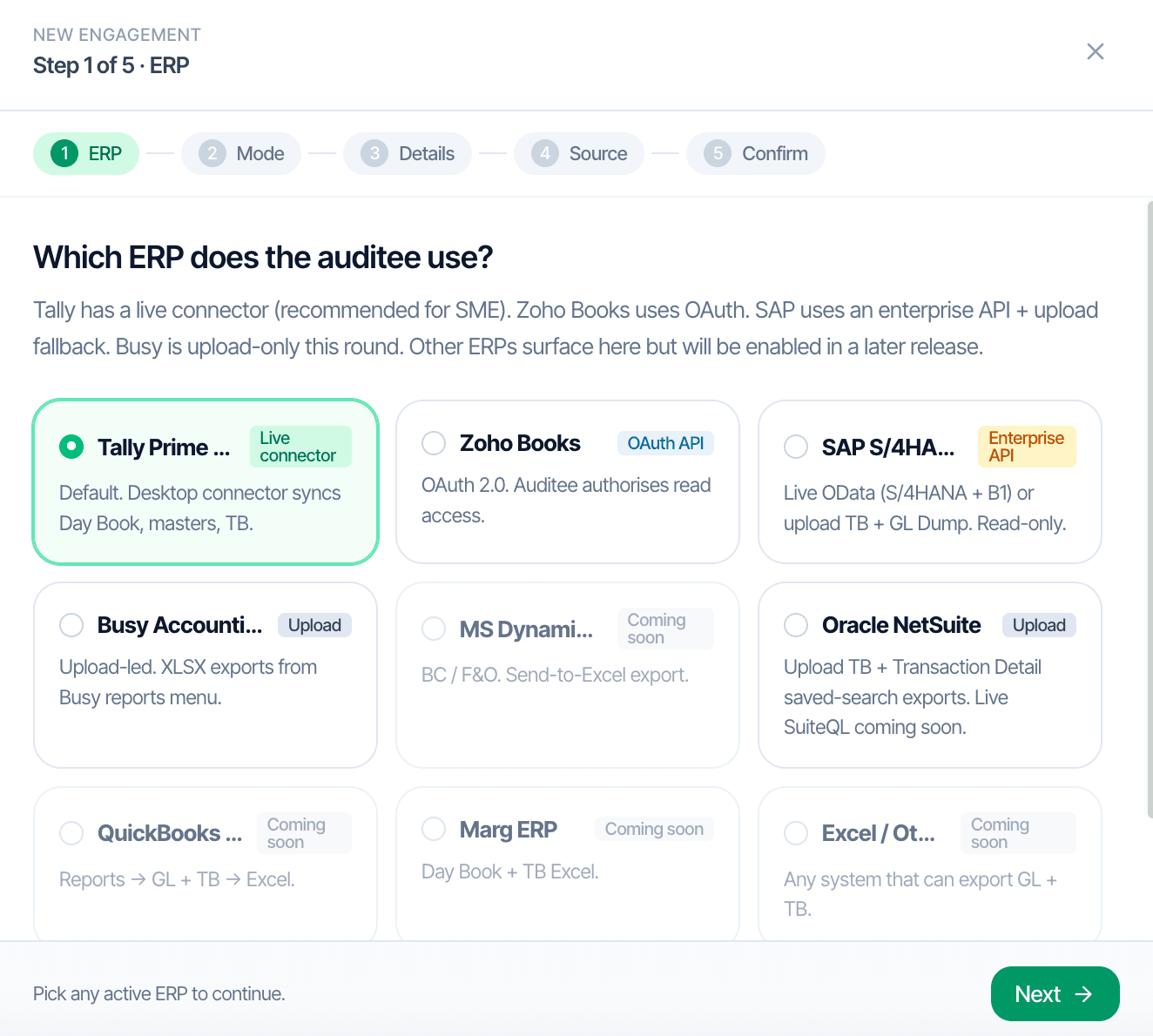
CORAA ଏଙ୍ଗେଜମେଣ୍ଟ୍ Setup, five-step ERP picker

Indian ଅଡିଟ୍ sit on top of seven ERPs in practice. CORAA supports each with the integration model that matches how the auditee actually works. Tally Prime gets a live desktop connector. Zoho Books authorizes once via OAuth. SAP, NetSuite, Busy, and Marg ingest via Excel upload. The downstream user interface and every ୱାର୍କିଂ ପେପର୍ are identical across all paths.

  • ତ ।
  • ଜ ।
  • ସ ।
  • ଓ ।
  • Busy Accounting, Marg ERP: Excel upload from standard ରିପୋର୍ଟ
  • ମ ।
Two paths, one ledger

The old way, and ours.

Two paths to the same audit conclusion. One leaves traces; the other doesn't.

Traditional

The old way

  • -ଅଡିଟର୍ manually downloads Tally backups before each visit
  • -Excel exports for SAP, NetSuite, Busy reconstructed every ଅଡିଟ୍
  • -Different team members trained per ERP, with ନା shared playbook
  • -Connectors lost or corrupted between ଏଙ୍ଗେଜମେଣ୍ଟ୍
Setup ସମୟ per ଏଙ୍ଗେଜମେଣ୍ଟ୍: 2-3 ଦିନ. Connector failures during fieldwork are common.
CORAA

On the Ledger

  • One-ସମୟ setup per client, persisted across financial ବର୍ଷ
  • Tally connector runs locally on the ଅଡିଟ୍ ଟିମ୍'s machine
  • ଜ ।
  • ଏ ।
  • Configuration locked in the ଏଙ୍ଗେଜମେଣ୍ଟ୍ Log per SA 230
Setup ସମୟ per ଏଙ୍ଗେଜମେଣ୍ଟ୍ after ବର୍ଷ 1: under five minutes.
How it works

Three steps. Every trace logged.

Step 01

ଇ ।

Step 1 of the five-step ଏଙ୍ଗେଜମେଣ୍ଟ୍ Setup wizard. Seven supported options today; more arriving.

Step 02

ଅ ।

Zoho Books prompts OAuth. Tally Prime downloads a local connector. SAP, NetSuite, Busy, Marg show the export paths for each ରିପୋର୍ଟ.

Step 03

ଡ ।

15 to 20 minutes for a 500 crore turnover company. Under one ଘଣ୍ଟା at 1,000 crore. Settings persist for next year.

Inside the module

What you actually get.

ତ ।

ଅଡିଟର୍ downloads a Windows or macOS connector that runs on their machine and reads from the auditee's Tally over LAN. ନା exports, ନା email, ନା version drift.

  • ଏ ।
  • Runs locally on ଅଡିଟ୍ ଟିମ୍'s hardware
  • Picks up new ଭାଉଚର୍ continuously

ଜ ।

The auditee grants read access once. CORAA pulls the General ଲେଜର୍, Trial Balance, Chart of Accounts, Customers, ଭେଣ୍ଡର୍, and ଚାଲାନ୍ directly via the Zoho API.

  • One-ସମୟ OAuth grant
  • ଏ ।
  • Bulk extract for high-ପରିମାଣ entities

ସ ।

Standard ରିପୋର୍ଟ exports from each ERP get uploaded to CORAA. The UI presents the data identically to connector-based ingestion; ଅଡିଟର୍ do not learn a new interface per ERP.

  • ସ ।
  • ନ ।
  • Busy: ଦିନ Book, Trial Balance, Account Master
  • ଏ ।

ଏଙ୍ଗେଜମେଣ୍ଟ୍ isolation and ଅଡିଟ୍ ଟ୍ରେଲ୍

Each ଏଙ୍ଗେଜମେଣ୍ଟ୍ is a separate workspace; କ୍ଲାଏଣ୍ଟ ଡାଟା never mixes. Role-based access scopes article assistants, ଅଡିଟ୍ managers, and partners to specific ଏଙ୍ଗେଜମେଣ୍ଟ୍. Every action is logged per SA 230.

  • ଇ ।
  • ନ ।
  • Full activity log per ଏଙ୍ଗେଜମେଣ୍ଟ୍
Frequently asked

Answers, up front.

The Tally connector runs locally on the ଅଡିଟ୍ ଟିମ୍'s machine and reads directly from the auditee's Tally database over LAN; ନା manual exports needed. SAP, NetSuite, Busy, and Marg use Excel upload, where the ଅଡିଟର୍ exports standard ରିପୋର୍ଟ and uploads to CORAA. The user interface and every downstream ୱାର୍କିଂ ପେପର୍ are identical across all paths.
ନା। Client data never leaves India and is never used to train foundation models. CORAA uses open-source LLMs locally hosted in India for semantic understanding (classifying ଲେଜର୍ names, parsing narrations); the models do not generate or ଅଦ୍ୟତନ outputs based on client-specific data.
MS Dynamics 365 and QuickBooks Online are scheduled. In the meantime, any system that produces ଦିନ Book, Trial Balance, and ଲେଜର୍ Master in Excel can ingest as a generic upload.
See it on a real ledger

Run erp ସ । on one of your engagements.

Bring a Trial Balance and a General Ledger. We'll walk through engagement setup end-to-end on your data, not a sandbox.

Start the free trial →
ERP Connectors for AI Audit Automation | Tally, Zoho, SAP, NetSuite | CORAA