CORAA
AI Modules/Engagement Setup/लेजर वर्गीकरण
4-Dimensional वर्गीकरण· सेटअप

लेजर वर्गीकरण

Classify लेजर्स under ICAI guidelines once. वर्ष 2 opens सोबत zero लेजर्स ला reclassify.

CORAA लेजर वर्गीकरण ओलांडून four वैधानिक dimensions

Every व्हाउचर मध्ये the books आहे four वैधानिक consequences: which TDS section applies (192 ला 206), which TCS section (206C variants), which GST nature (Normal, RCM, Composition, Exempt, Nil-rated), आणि which Schedule III line code (एक1 Equity Capital द्वारे P9 Other खर्च). CORAA captures all four classifications मध्ये one लेजर वर्गीकरण exercise. AI auto-classifies roughly 80 percent वर first ingest; the लेखापरीक्षक confirms the residual. Mappings persist वर्षानुवर्ष.

  • Four वैधानिक dimensions मध्ये one exercise: TDS, TCS, GST, Schedule III
  • AI auto-classifies ~80% च्या लेजर्स वर first ingest
  • लेखापरीक्षक confirms किंवा overrides the residual 20%
  • One-click acceptance साठी AI suggestions सोबत ≥90% confidence
  • Mappings persist ओलांडून financial वर्षे
  • Rule weights adapt per क्लायंट एंगेजमेंट
Two paths, one ledger

The old way, and ours.

Two paths to the same audit conclusion. One leaves traces; the other doesn't.

Traditional

The old way

  • -लेखापरीक्षक classifies लेजर्स पासून scratch every आर्थिक वर्ष
  • -TDS section, GST nature, Schedule III line maintained मध्ये separate Excel sheets
  • -Inconsistencies दरम्यान sheets create ताळमेळ effort downstream
  • -Senior भागीदार re-explains वर्गीकरण logic ला आर्टिकल assistants annually
First ऑडिट वर्गीकरण: 4-6 तास च्या भागीदार time. Repeats every वर्ष.
CORAA

On the Ledger

  • एकल लेजर वर्गीकरण screen captures all four dimensions
  • AI pre-classifies लेजर names against ICAI ऑडिटिंगवरील मानके guidance
  • वर्ष 1: 30-45 मिनिट पुनरावलोकन च्या AI suggestions
  • वर्ष 2: typically zero लेजर्स requiring reclassification
  • ऑडिट log preserves कोण classified काय आणि जेव्हा, per SA 230
वर्ष 1 वर्गीकरण: under 45 मिनिटे. वर्ष 2 onwards: typically under 5 मिनिटे.
How it works

Three steps. Every trace logged.

Step 01

AI pre-classifies वर ingest

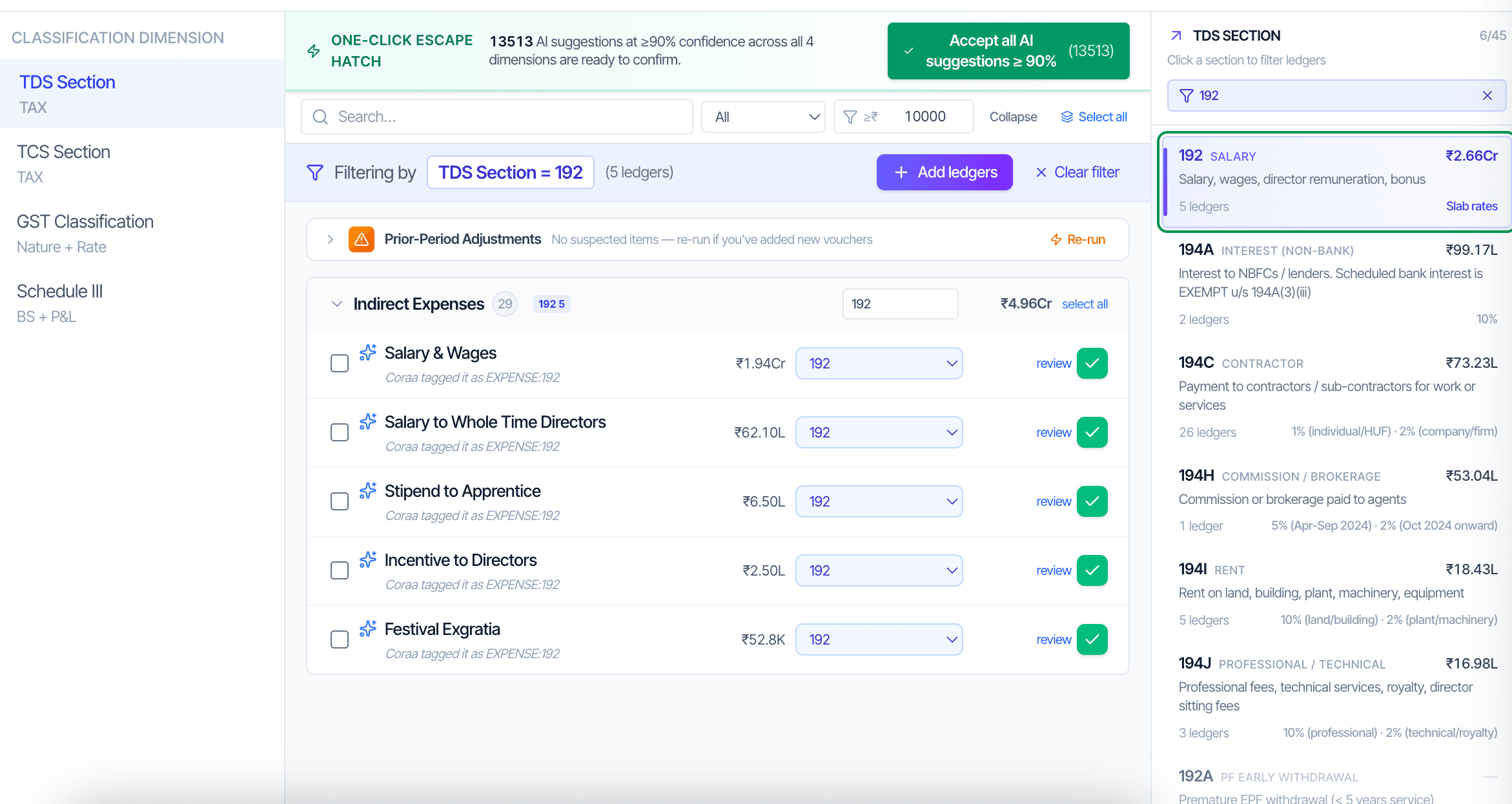
After the ERP data ingests, the AI reads every लेजर name आणि narration पॅटर्न, मग proposes classifications ओलांडून TDS section, TCS section, GST nature, आणि Schedule III line. Each suggestion shows एक confidence score.

Step 02

लेखापरीक्षक reviews आणि confirms

The लेजर वर्गीकरण screen lists लेजर्स grouped द्वारे confidence band. Above 90 percent confidence: one-click accept all. दरम्यान 70 आणि 90 percent: पुनरावलोकन individually. Below 70 percent: आवश्यक आहे explicit लेखापरीक्षक वर्गीकरण.

Step 03

Mappings persist वर्षानुवर्ष

Classifications आहेत stored against the एंगेजमेंट, नाही the वर्ष. पुढे वर्ष's ऑडिट opens सोबत the same लेजर names already classified. The लेखापरीक्षक reviews only काय changed: new लेजर्स, renamed लेजर्स, किंवा लेजर्स कुठे Schedule III mapping shifted.

Inside the module

What you actually get.

TDS Section dimension

Maps every applicable लेजर ला its TDS section under the आयकर Act: Sec 192 वेतन, 194एक व्याज non-बँक, 194C Contractor, 194I Rent, 194JB Professional, 194Q Goods Purchase, 194R Perquisites, 206AB Non-filer higher rate. Drives Form 3CD Clause 34(एक).

  • थ्रेशोल्ड checks per section
  • Rate पडताळणी (10% Bldg, 2% P&M साठी 194I, etc.)
  • Lower-deduction certificate (Sec 197) handling
  • Sec 206AB non-filer flagging

TCS Section dimension

Maps sale लेजर्स ला TCS sections under Sec 206C: 206C(1) Scrap, 206C(1F) Motor Vehicle over ₹10L, 206C(1G) Overseas remittance, 206C(1H) Sale च्या Goods over ₹50L buyer-wise.

  • Buyer-wise cumulative थ्रेशोल्ड tracking साठी 206C(1H)
  • Per-बीजक थ्रेशोल्ड साठी 206C(1F)
  • Form 27C zero-rate declaration handling
  • Sec 206CCA non-filer higher rate

GST Nature dimension

Classifies each लेजर द्वारे GST nature: Normal (ITC eligible), RCM (reverse charge), Composition (no ITC), Exempt, Nil-rated, Zero-rated (exports), Blocked (Sec 17(5)), Non-GST.

  • Section 17(5) blocked credit शोध
  • RCM applicability per Sec 9(3) / 9(4)
  • Rule 36(4) ITC limit feeds पासून हे वर्गीकरण
  • वापरले द्वारे Form 3CD Clause 44 GST-wise break-up

Schedule III Line dimension

Maps every लेजर ला its Schedule III line code per Companies Act 2013 Schedule III. Division I (भारतीय GAAP / AS) साठी बहुतेक संस्था; Division II (Ind AS) साठी listed आणि large unlisted. Drives Balance Sheet, P&L, रोख प्रवाह, Notes ला Accounts, आणि ratios.

  • ~90 line codes पासून एक1 Equity द्वारे P9 Other खर्च
  • फ्रेमवर्क selector toggles दरम्यान Division I आणि Division II
  • Current vs non-current split साठी amendment 2021 एजिंग
  • Mapping tab वर Schedule III WP आहे read-only पासून हे वर्गीकरण
Frequently asked

Answers, up front.

CORAA reads लेजर names, group hierarchy पासून the खात्यांचा तक्ता, आणि narration पॅटर्न्स पासून नमुना व्हाउचर्स. It matches against एक dictionary च्या ICAI-aligned classifications built पासून prior एंगेजमेंट्स आणि ऑडिटिंगवरील मानके guidance. Each proposal carries एक confidence score पासून 0 ला 100. Above 90 आहे high-confidence; the लेखापरीक्षक शकतो accept all such suggestions मध्ये one click.
Mixed-purpose लेजर्स need split वर्गीकरण. CORAA flags ही as 'optional GST वर्गीकरण' आणि lets the लेखापरीक्षक either subdivide the लेजर किंवा apply GST वर the व्हाउचर level rather than the लेजर level. साठी Schedule III mapping, लेजर्स शकतो split दरम्यान two lines सोबत एक percentage allocation.
जर the GL Code आहे the same आणि only the name changed, the वर्गीकरण persists द्वारे code. जर एक new GL Code appears, it shows up as 'unclassified' आणि the लेखापरीक्षक classifies it once. The ऑडिट log captures the rename कार्यक्रम.
See it on a real ledger

Run लेजर वर्गीकरण on one of your engagements.

Bring a Trial Balance and a General Ledger. We'll walk through engagement setup end-to-end on your data, not a sandbox.

Start the free trial →Book a walk-through
Ledger Classification AI | TDS, TCS, GST, Schedule III in One Setup | CORAA | CORAA