CORAA
AI Modules/Reconciliation/व्हाउचिंग
OCR-based व्हाउचिंग· मिलान

व्हाउचिंग

OCR extracts बीजक data, matches ला लेजर entries, flags mismatches.

CORAA व्हाउचिंग सोबत OCR-based बीजक extraction

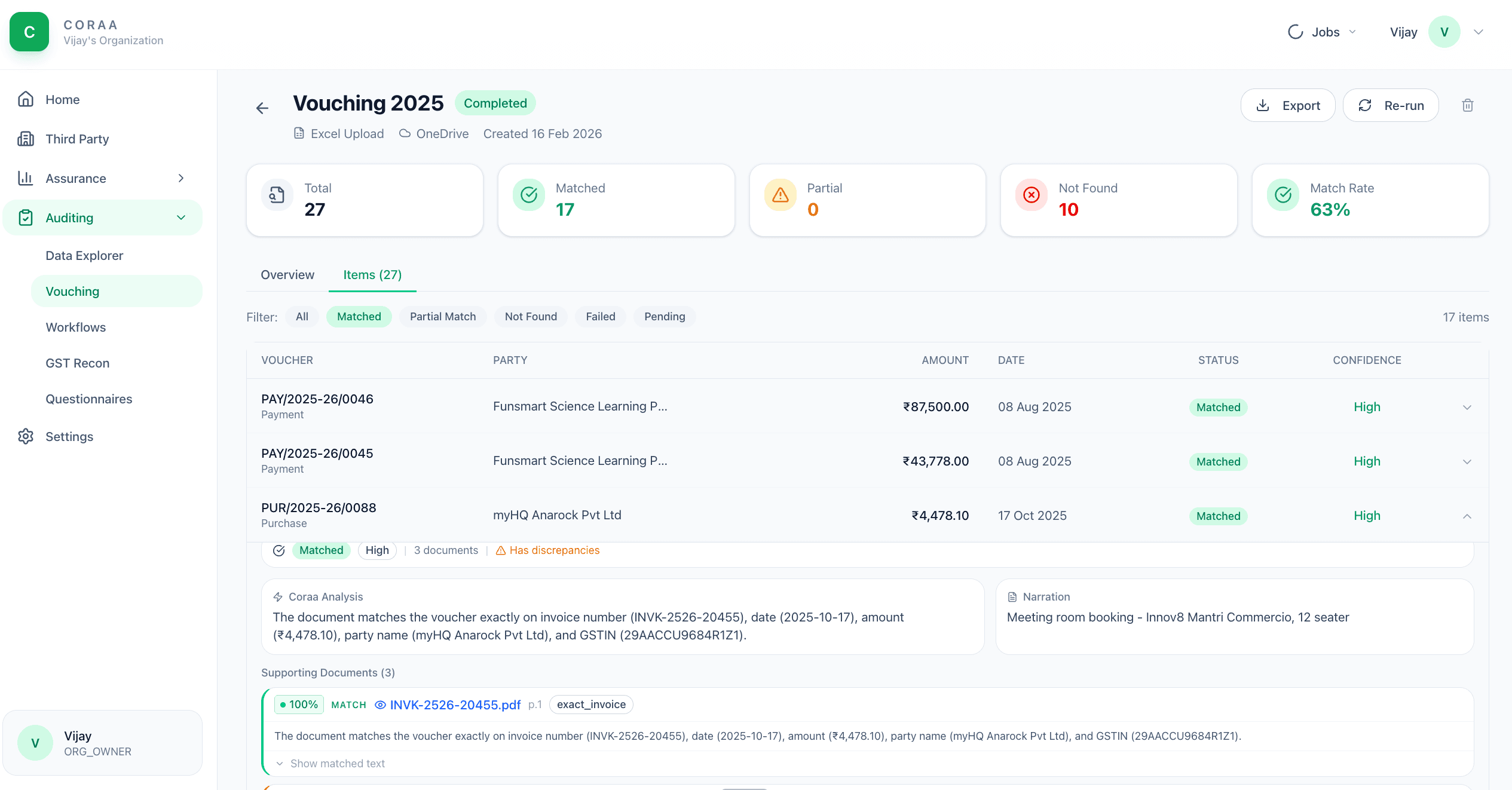
व्हाउचिंग means matching every booked व्यवहार ला its underlying बीजक किंवा supporting दस्तऐवज. The traditional approach आहे three articles, six तास, एक thousand व्हाउचर्स. CORAA's व्हाउचिंग agent वापरते OCR ला extract amount, date, विक्रेता GSTIN, बीजक number, आणि TDS deducted पासून uploaded PDFs आणि images. The extracted data matches against the लेजर entry; mismatches above tolerance get flagged सोबत the source image attached.

  • OCR handles scanned PDFs, photographic images, digital PDFs
  • Extracts amount, date, विक्रेता GSTIN, बीजक number, TDS deducted
  • Matches against लेजर entry वर amount, party, date
  • Mismatch शोध सोबत configurable tolerance
  • Missing-समर्थन flagging साठी व्हाउचर्स विना uploaded बीजक
  • Source image attached ला every flag
Two paths, one ledger

The old way, and ours.

Two paths to the same audit conclusion. One leaves traces; the other doesn't.

Traditional

The old way

  • -लेख vouch 100-200 नमुना व्हाउचर्स manually
  • -Each बीजक opened, amount read, लेजर checked
  • -Mismatches noted वर एक printed नोंदणी करा
  • -Missing बीजक chased द्वारे email सोबत the क्लायंट
कव्हरेज: 2-5% च्या व्हाउचर्स. वेळ: 6-8 तास per ऑडिट. Mismatches missed: typical.
CORAA

On the Ledger

  • Bulk अपलोड all बीजक the क्लायंट प्रदान करते
  • OCR extracts structured data पासून every page automatically
  • Matches against the GL मध्ये सेकंद
  • Mismatches flagged सोबत both the बीजक image आणि the लेजर entry shown side द्वारे side
  • Missing-समर्थन list generated साठी क्लायंट follow-up
कव्हरेज: every बीजक uploaded. वेळ: 10-15 मिनिटे runtime, 30 मिनिटे पुनरावलोकन. Mismatches: every one caught.
How it works

Three steps. Every trace logged.

Step 01

अपलोड बीजक

Bulk अपलोड PDFs आणि images. CORAA accepts ZIP archives, folder uploads, किंवा drag-आणि-drop. Files शकतो come पासून the क्लायंट's email, scanned cabinet, किंवा accounting system attachments.

Step 02

OCR extracts आणि matches

OCR reads every page. Extracted fields: amount, बीजक number, date, विक्रेता GSTIN, विक्रेता name, TDS deducted, GST split (CGST / SGST / IGST). The extracted data matches against the GL वर amount + party + date आत configurable tolerances.

Step 03

पुनरावलोकन mismatches

Mismatches surface मध्ये the व्हाउचिंग कार्यपत्रिका. Each row shows the source image, the OCR extraction, the matched लेजर entry, आणि the variance. The लेखापरीक्षक accepts the match, flags साठी क्लायंट clarification, किंवा rejects.

Inside the module

What you actually get.

OCR field extraction

Trained वर भारतीय बीजक formats: GST बीजक, Bill च्या Supply, debit notes, credit notes. Extracts the मानक 7-8 fields per बीजक सोबत high accuracy.

  • Amount, बीजक number, date
  • विक्रेता GSTIN, विक्रेता name
  • TDS deducted (कुठे applicable)
  • GST split: CGST, SGST, IGST
  • Bill च्या Supply शोध (non-GST बीजक)

Three-way match

बीजक amount, लेजर entry amount, आणि PO amount (जर Bill नोंदणी करा loaded) matched three ways. Variances surface वर any leg.

  • बीजक vs लेजर amount
  • लेजर vs PO amount
  • बीजक vs PO amount
  • Configurable tolerance per leg

Missing-समर्थन शोध

साठी every लेजर entry विना एक matched बीजक मध्ये the अपलोड set, CORAA lists it as missing-समर्थन. The लेखापरीक्षक sends हे list ला the क्लायंट द्वारे क्लायंट Portal as एक एकल questionnaire.

  • Per-व्हाउचर missing-समर्थन flag
  • Bulk क्लायंट request via क्लायंट Portal
  • Magic-link delivery ला क्लायंट
  • क्लायंट response tracked back ला the व्हाउचर

ऑडिट-trail per व्हाउचर

Every व्हाउचर carries its match history: कोण uploaded the बीजक, जेव्हा OCR चालवले, काय होता extracted, कोण accepted the match, कोण flagged it. Preserved per SA 230.

  • अपलोड timestamp + वापरकर्ता
  • OCR extraction snapshot
  • लेखापरीक्षक acceptance / flag
  • Source image versioned
Frequently asked

Answers, up front.

होय. The OCR handles scanned PDFs (300 DPI किंवा above), photographic images पासून phone cameras, आणि digital PDFs. Quality varies सोबत input: एक well-scanned PDF achieves >95% field accuracy; एक low-light phone photo achieves 75-85%. Flagged matches always show the source image म्हणून the लेखापरीक्षक शकतो पडताळणी करा.
The लेखापरीक्षक शकतो edit any extracted field inline before accepting the match. Corrections आहेत logged आणि वापरले ला improve OCR confidence वर future बीजक पासून the same विक्रेता. विक्रेता बीजक टेम्पलेट्स आहेत learned per एंगेजमेंट.
होय, हे आहे the recommended वर्कफ्लो. Once व्हाउचिंग आहे चालवा, the matched लेजर entries flow into TDS आणि GST ताळमेळ as 'बीजक-समर्थित' व्यवहार. Unmatched entries flow as 'pending बीजक' आणि surface मध्ये Form 3CD Clause 21 किंवा Clause 44 जर appropriate.
See it on a real ledger

Run व्हाउचिंग on one of your engagements.

Bring a Trial Balance and a General Ledger. We'll walk through reconciliation end-to-end on your data, not a sandbox.

Start the free trial →Book a walk-through
AI Vouching for Audit | OCR Invoice Matching for CA Firms | CORAA | CORAA