CORAA
Features/Reporting/Notes ला Accounts
Schedule III · Notes to Accounts

Notes ला Accounts

Notes auto-drafted from the locked statements. CY vs PY toggle, version history per Note.

Notes ला Accounts सोबत CY vs PY toggle

Companies Act 2013 Schedule III requires extensive Notes to Accounts — the exact set depends on the Division and what the books contain. CORAA composes each Note from the locked statement figures and the mapped ledgers behind them; each Note carries its CY and PY columns, edit history, and reviewer trail.

  • Notes auto-drafted from the locked statement figures
  • CY vs PY toggle per Note (side-by-side comparison)
  • Version history captures every edit with reason
  • Ledger-level breakdown beneath each Note
  • Reviewed and Final state lock per Note
  • Direct cross-reference to Schedule III BS / P&L line
Two paths, one ledger

The old way, and ours.

Two paths to the same audit conclusion. One leaves traces; the other doesn't.

Traditional

The old way

  • -Notes drafted manually मध्ये Word every ऑडिट
  • -CY figures pulled पासून current चाचणी balance; PY पासून prior-वर्ष ऑडिट file
  • -Cross-references ला Schedule III line manually maintained
  • -पुनरावलोकक comments left as track-changes मध्ये the Word file
Notes drafting: 1-2 दिवस. Re-drafting after BS changes: common.
CORAA

On the Ledger

  • Every Note auto-drafted from the locked faces with structured fields
  • CY and PY pulled from the current and prior-year books respectively
  • Re-map a ledger and re-lock — the dependent Notes regenerate
  • Reviewer comments captured inline with versioning
  • Reviewed and Final state machine prevents post-sign-off edits
Notes drafting: 30 मिनिटे पुनरावलोकन per टीप साठी वर्ष 1, मिनिटे साठी वर्ष 2.
How it works

Three steps. Every trace logged.

Step 01

Composition from the locked faces

Each Note has a template tied to its Schedule III line, specifying which mapped-ledger data populates which field — the Borrowings note pulls from the ledgers mapped to the borrowings lines of the locked Balance Sheet, with its maturity and security columns structured, not free-typed.

Step 02

Review per Note

The Notes tab on the Schedule III Working Paper lists every Note for the framework. Click any Note to see the Current Note, vs PY, and Edit History. The reviewer adds comments inline, accepts the figures, and the trail is preserved.

Step 03

Mark Final and lock

When all Notes are Reviewed, the partner marks the entire Notes pack Final. Further edits after Final require a documented re-evaluation note per SA 230 and create a new version.

Inside the module

What you actually get.

Structured Note templates

Every Schedule III Note has a structured template that maps to the ledger data behind the locked faces. Examples below.

  • Note 1 Corporate Information
  • Note 5 Long-term Borrowings (with security terms)
  • Note 8 Trade Payables (MSME split)
  • Note 11 PPE roll-forward
  • Note 19 Trade Receivables (ageing buckets)
  • Note 23 Contingent Liabilities
  • Note 30 Related Party Disclosures

CY vs PY side-by-side

Every Note carries a CY vs PY toggle. The disclosure is rendered for both years simultaneously so the reviewer compares without switching files.

  • Same Note template for both years
  • Variance highlight inline
  • PY pulled from prior-year audit
  • Reclassification adjustments captured

Version history per Note

Every edit creates a new version of the Note. The Edit History tab shows who changed what, when, and the reason. Reverts supported until Final state.

  • Per-edit versioning
  • Edit reason captured
  • Revert supported pre-Final
  • Audit log preserves all versions

Reviewed and Final state machine

Notes flow through Draft → Reviewed → Final. Articles draft, partner reviews and marks Reviewed, partner finally marks the pack Final. Post-Final edits require documented re-evaluation per SA 230.

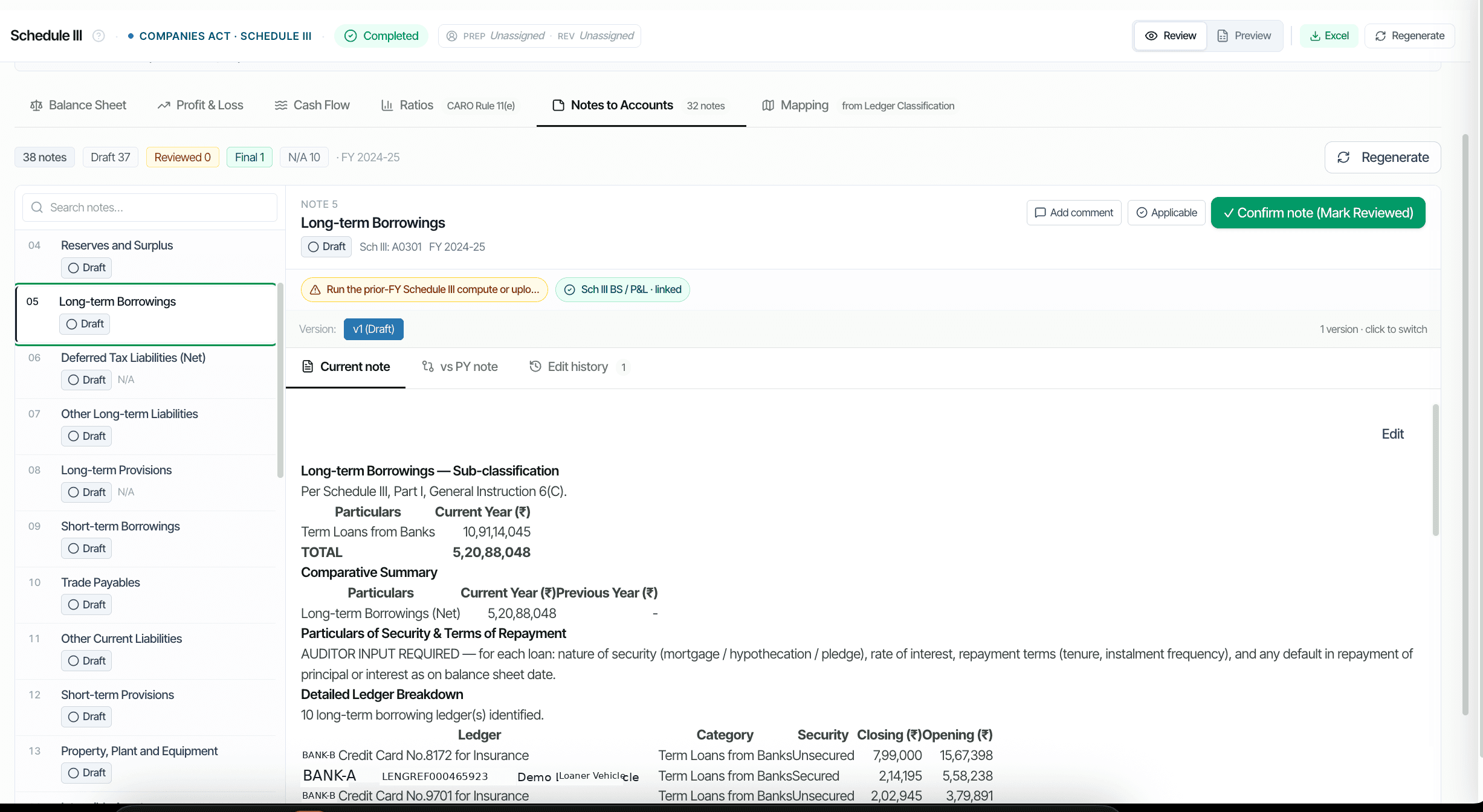
  • Draft, Reviewed, Final states
  • State transitions logged
  • Post-Final edit requires re-evaluation note
  • Final state lockable per Note or pack
Frequently asked

Answers, up front.

The auditor marks the Note as 'N/A' with a brief reason. The Note still appears in the Notes pack but renders with 'Not Applicable' instead of figures. Some Notes (e.g., RPT for entities with no related parties) are auto-marked N/A based on mapped ledger data.
Division II (Ind AS) has additional Notes not in Division I: ECL on Trade Receivables (Ind AS 109), Right-of-Use Assets (Ind AS 116), Financial Instruments classification (FVTPL / FVOCI). The Framework selector at Engagement Setup loads the appropriate Division-II templates.
Yes. Each Note supports inline reviewer comments visible to the audit team. Comments flow into the Engagement Log and are accessible to peer reviewers. Resolved comments are archived but not deleted.
See it on a real ledger

Run notes ला accounts on one of your engagements.

Bring a Trial Balance and a General Ledger. We'll walk through reporting end-to-end on your data, not a sandbox.

Run your first audit free →
Notes to Accounts AI for Schedule III Statutory Audit | CORAA