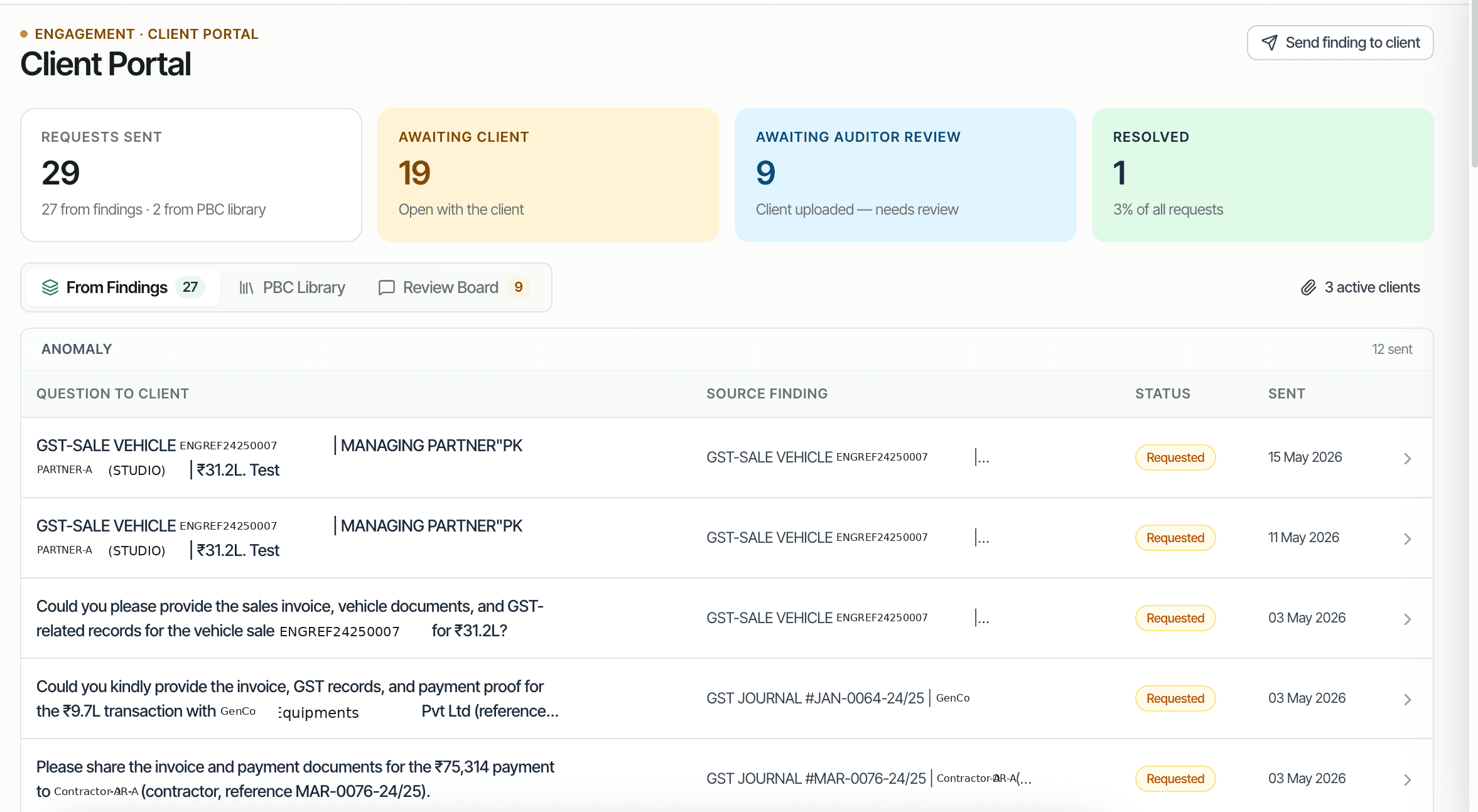
Audit findings often require evidence from the client: a missing invoice, a board resolution, a bank statement, an MSME declaration. The traditional path is email back-and-forth with attachments that the audit team has to organize. CORAA's Client Portal converts findings into AI-drafted questions, delivered via magic-link email to the client. The client opens the link, uploads files or types responses, and the response routes back to the originating finding.
Two paths to the same audit conclusion. One leaves traces; the other doesn't.
From the Findings inbox, the auditor selects one or more findings that need client evidence and clicks Send to Client. CORAA drafts a question per finding (AI-suggested, editable), lists the expected attachment, and bundles them into one questionnaire.
The client gets an email with a magic-link to the questionnaire. No account, no signup. Click the link, see the questions, upload files or type responses, click Submit.
Each response routes to the originating finding. The audit team sees the response inline on the finding record. If the response resolves the finding, the auditor marks it Resolved; if not, sends a follow-up question.
CORAA reads the finding's description, the linked voucher, and the audit context, then drafts a polite, specific question for the client. Example: 'Could you please share the GST invoice and bill of sale for vehicle ENGREF24250007, sold for ₹31.2 lakh, for our audit records?'
Email delivery via a unique magic-link per questionnaire. The link expires after the configured period (default 7 days). The client opens the link in any browser, no signup.
Per-question status: Requested, Awaiting Client, Awaiting Auditor Review, Resolved, Closed. The questionnaire-level status aggregates across questions.
Every response (file, text, or both) routes back to the originating finding. The audit team sees the response inline on the finding record. The audit log preserves who sent the question, when, and what response came back.