CORAA
AI Modules/Scrutiny/జర్నల్ ఎంట్రీ టెస్టింగ్
SA 240 · ICAI Standard· परख

జర్నల్ ఎంట్రీ టెస్టింగ్

SA 240 testing on the complete journal universe, not a sample.

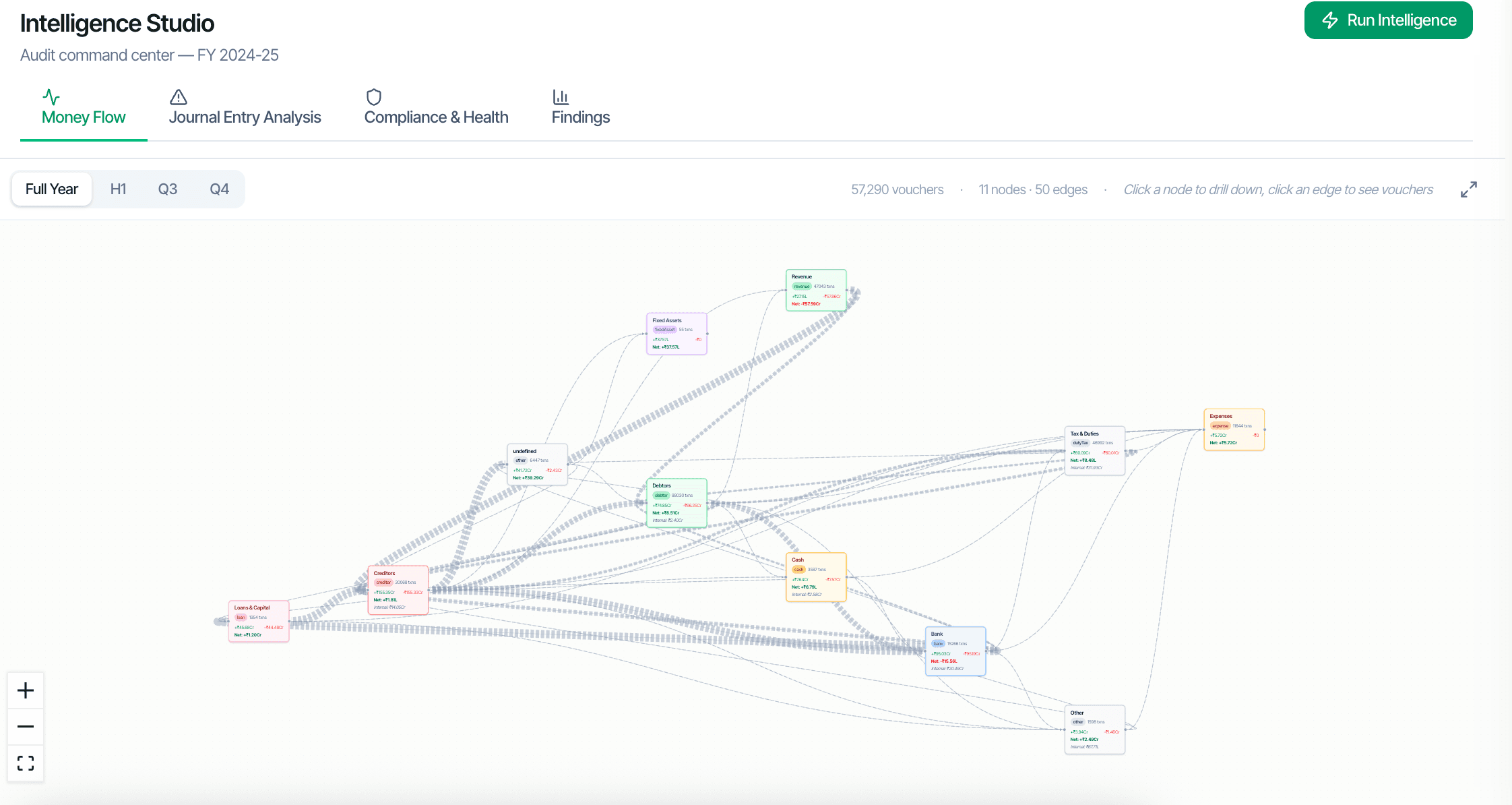
CORAA ఇంటెలిజెన్స్ స్టుడియో for SA 240 జర్నల్ ఎంట్రీ టెస్టింగ్

SA 240 requires the ఆడిటర్ to test journal entries with three specific risk areas: last-minute manual journals (often the final fortnight of the financial year), unusual debit-credit pairings that may signal earnings management, and related-party transaction rings. CORAA tests the complete journal universe against all three, not a sample. The SA 240 వర్కింగ్ పేపర్ documents the procedure with source వౌచర్‌లు attached.

  • Complete journal universe tested, never sampled
  • Last-minute manual JE detection (configurable window, default last 14 days)
  • Unusual debit-credit pairing detection
  • Related-party transaction ring detection
  • Source వౌచర్ one click from every flag
  • వర్కింగ్ పేపర్ documents the procedure per SA 240
Two paths, one ledger

The old way, and ours.

Two paths to the same audit conclusion. One leaves traces; the other doesn't.

Traditional

The old way

  • -SA 240 covered through manual journal sampling on year-end
  • -Article reviews 50-100 manual JEs against an internal checklist
  • -Related-party ring detection requires manual cross-referencing
  • -Documentation often consists of 'reviewed and accepted' notes
Coverage: limited. Risk of missing earnings-management patterns: real. Documentation: thin.
CORAA

On the Ledger

  • Every journal entry tested, regardless of count
  • Manual JE filter surfaces user-created entries (vs system-posted) automatically
  • Debit-credit pairing analysis flags unusual reversals and circular flows
  • Related-party graph identifies transaction rings between related entities
  • ఫలితాలు linked to source వౌచర్‌లు with full ఆడిట్ ట్రెయిల్
Coverage: 100% of journal entries. Pattern detection: deterministic. Documentation: complete.
How it works

Three steps. Every trace logged.

Step 01

Sub-requirement 1: Last-minute manual JEs

CORAA filters the journal for entries created manually (user-posted, not system-generated) within a configurable window before year-end. Default is the last 14 days. The ఆడిటర్ sees every such JE, its amount, the లెడ్జర్‌లు debited and credited, and the source వౌచర్.

Step 02

Sub-requirement 2: Unusual debit-credit pairings

Some లెడ్జర్ pairs are red flags: Bank debited with Revenue credited (unusual; revenue typically goes to Debtors first), Suspense లెడ్జర్ debited with Other Income credited, etc. CORAA's pairing rules flag these patterns across the complete journal.

Step 03

Sub-requirement 3: Related-party rings

Once the Related Party list is set in ఎంగేజ్‌మెంట్ సెటప్, CORAA builds a graph of transactions between related parties. Circular flows (Entity A pays B, B pays C, C pays A) surface as rings. The graph is shown in ఇంటెలిజెన్స్ స్టుడియో.

Inside the module

What you actually get.

Manual vs system-posted JE filter

Tally and SAP both distinguish user-created journals from system-posted ones (system journals are typically depreciation, accrual reversals, etc.). CORAA reads the entry's origin and filters the journal universe accordingly.

  • User-posted JE detection
  • Configurable year-end window (default 14 days)
  • Auto-discards system journals from SA 240 review
  • Source ERP user captured in ఆడిట్ ట్రెయిల్

Debit-credit pairing rules

Rules anchored to common earnings management patterns: revenue recognition shortcuts, expense deferrals, suspense లెడ్జర్ usage, late-period reclassifications. Each rule has an SA 240 paragraph reference.

  • Revenue recognition shortcuts
  • Expense deferral patterns
  • Suspense లెడ్జర్ usage
  • Late-period reclassifications

Related-party ring graph

ఇంటెలిజెన్స్ స్టుడియో renders the related-party transaction graph. Each related entity is a node; each transaction is an edge weighted by amount. Circular flows are highlighted automatically. Click any node to drill into transactions.

  • Visual graph of RPT flows
  • Circular ring detection
  • Drill from node to వౌచర్ list
  • Filter by amount, period, party

SA 240 వర్కింగ్ పేపర్

The SA 240 Working Paper documents the procedure performed: which window was tested, which rules were applied, which entries were flagged, which were dismissed with ఆడిటర్ rationale.

  • Window and rule set documented
  • Flagged entries listed with ఆడిటర్ disposition
  • Dismissed entries carry rationale
  • ఆడిట్ trail preserved per SA 230
Frequently asked

Answers, up front.

Both Tally and SAP tag every journal entry with its origin (user-posted vs system-generated). Tally distinguishes via వౌచర్ Type. SAP tags via Document Type (e.g., SA for system, AB for accounting documents posted manually). CORAA reads these tags and filters accordingly. For ERPs without explicit tagging, CORAA uses heuristics (round amounts, posting in the last 14 days, etc.) to identify likely-manual entries.
The default window is the last 14 days of the financial year. The ఆడిటర్ can extend (e.g., last 30 days for higher-risk engagements) or shorten as appropriate. ICAI guidance suggests a window proportional to the entity's normal posting cadence.
From the Related Party list set as part of ఎంగేజ్‌మెంట్ సెటప్ (టైర్ II task). For each related party, CORAA queries the GL for transactions where that party appears as Debit or Credit. Edges between related parties are aggregated; circular flows highlighted.
See it on a real ledger

Run జర్నల్ ఎంట్రీ టెస్టింగ్ on one of your engagements.

Bring a Trial Balance and a General Ledger. We'll walk through scrutiny end-to-end on your data, not a sandbox.

Start the free trial →Book a walk-through
SA 240 Journal Entry Testing AI for Statutory Audit | CORAA | CORAA