CORAA
AI Modules/Working Papers/EQR Readiness Cockpit
SA 220 · SQM 1 · EQR Readiness· पत्र

EQR Readiness Cockpit

A hard 'Ready for Opinion' gate for Engagement Quality Review that names its specific blockers, sitting alongside the firm's SQM 1 / SQC 1 quality-management workbook.

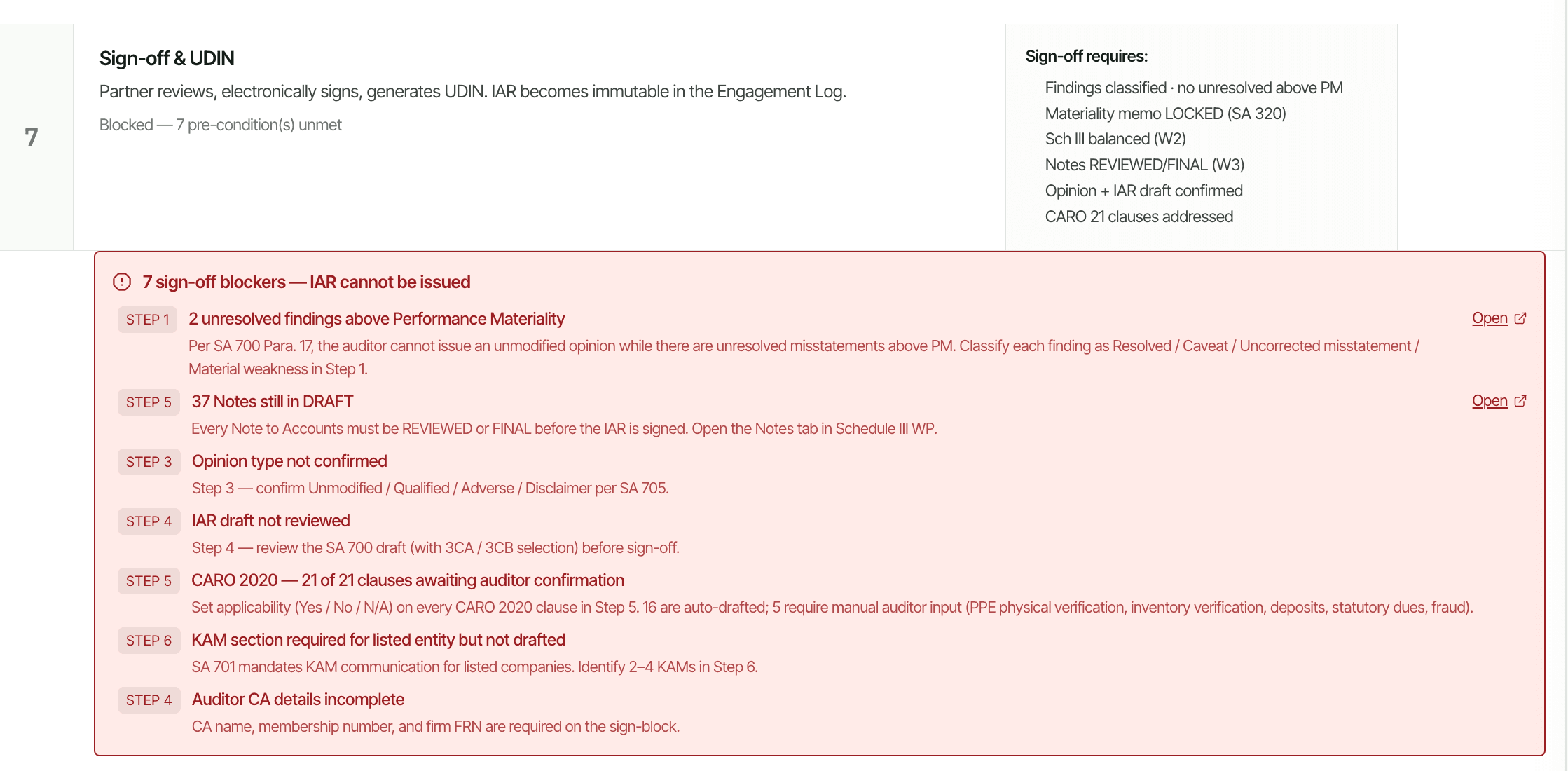
CORAA seven-step sign-off interface

An Engagement Quality Review gate that just shows a generic red status until every item is perfect tells the reviewing partner nothing about what to chase. CORAA's EQR Readiness Cockpit names its blockers instead, Going Concern conclusion not yet drafted, 3 findings above materiality not yet resolved, so the reviewer knows exactly what is outstanding before opening the file. It sits alongside the firm's SQM 1 / SQC 1 quality-management workbook, the SOQM components, the quality risk register, independence declarations, client-acceptance records, and the activity log, so engagement-level readiness and firm-level quality management are visible from the same place.

  • Named blockers, not a generic red status, e.g. 'Going Concern conclusion not yet drafted'
  • Surfaces unresolved above-materiality findings by count, e.g. '3 findings above materiality not yet resolved'
  • Sits alongside the SQM 1 / SQC 1 quality-management workbook
  • SOQM components, quality risk register, independence declarations, client-acceptance records, activity log
  • Gate updates as each blocker clears, never a single all-or-nothing flip
  • Cited to SA 220 and SQM 1
Two paths, one ledger

The old way, and ours.

Two paths to the same audit conclusion. One leaves traces; the other doesn't.

Traditional

The old way

  • -EQR readiness checked by chasing team members individually for status
  • -A single pass/fail flag with no detail on what is still open
  • -The SQM 1 / SQC 1 quality workbook maintained in a separate folder, disconnected from the engagement file
  • -Independence declarations and client-acceptance records tracked outside the engagement, easy to miss at review time
A red status with no detail means the reviewing partner starts by reconstructing what is even missing.
CORAA

On the Ledger

  • Cockpit names each outstanding blocker by what it is, not just that something is outstanding
  • Going Concern, unresolved findings, and other gate conditions each surface individually
  • SQM 1 / SQC 1 workbook wired to the same engagement data, not a separate file
  • Activity log captures readiness changes automatically as the engagement progresses
The reviewing partner opens the file already knowing what is left, not what is even missing.
How it works

Three steps. Every trace logged.

Step 01

Every required conclusion and finding is checked

The cockpit checks the engagement's required gate conditions, Going Concern conclusion drafted, findings above materiality resolved, and other sign-off prerequisites, against the current state of the engagement file.

Step 02

Blockers named individually

Instead of one generic red status, each unmet condition is listed by name with its own specific detail, for example the exact count of unresolved above-materiality findings, so the reviewer sees precisely what remains.

Step 03

SQM 1 / SQC 1 workbook alongside

The firm's quality-management workbook sits next to the engagement gate, SOQM components, the quality risk register, independence declarations, client-acceptance records, and the activity log, all wired to the same underlying data.

Inside the module

What you actually get.

Named-blocker readiness gate

The 'Ready for Opinion' gate lists its specific outstanding items instead of a single pass/fail status.

  • e.g. Going Concern conclusion not yet drafted
  • e.g. 3 findings above materiality not yet resolved
  • Gate updates live as each blocker clears

Findings and conclusion tracking

Unresolved above-materiality findings and undrafted required conclusions are tracked as individually named gate conditions.

  • Counts and identifies each unresolved item
  • Links back to the working paper carrying it
  • Clears automatically once the item is resolved

SOQM component workbook

The System of Quality Management components sit in a workbook alongside the engagement gate, per SQM 1.

  • Quality risk register
  • Independence declarations
  • Client-acceptance and continuance records

Activity log

Readiness status changes and quality-workbook updates are captured in an activity log as they happen.

  • Timestamped record of gate-condition changes
  • Firm-level and engagement-level entries in one place
  • Supports the SA 220 documentation trail
Frequently asked

Answers, up front.

No. The cockpit surfaces which required conditions are met and which are not. Whether the engagement is actually ready for the partner to sign the opinion remains the engagement quality reviewer's and the partner's decision.
It clears from the gate automatically once the underlying condition is met, for example once the Going Concern conclusion is drafted or a flagged finding is resolved. There is no separate manual step to mark it done.
The gate is per-engagement, it tracks whether this specific file is ready for opinion. The SQM 1 / SQC 1 workbook is firm-level quality management, the risk register, independence declarations, and acceptance records that apply across the firm's engagements. They sit alongside each other, not merged into one.
See it on a real ledger

Run eqr readiness cockpit on one of your engagements.

Bring a Trial Balance and a General Ledger. We'll walk through working papers end-to-end on your data, not a sandbox.

Start the free trial →
EQR Readiness Cockpit | SA 220, SQM 1, Named Blockers | CORAA