CORAA
AI Modules/Working Papers/Misstatements Summary
SA 450 · Misstatements Summary· पत्र

Misstatements Summary

The SA 450 findings terminus. Every finding above and below performance materiality, across every working paper, aggregated into one formula-chained Excel export.

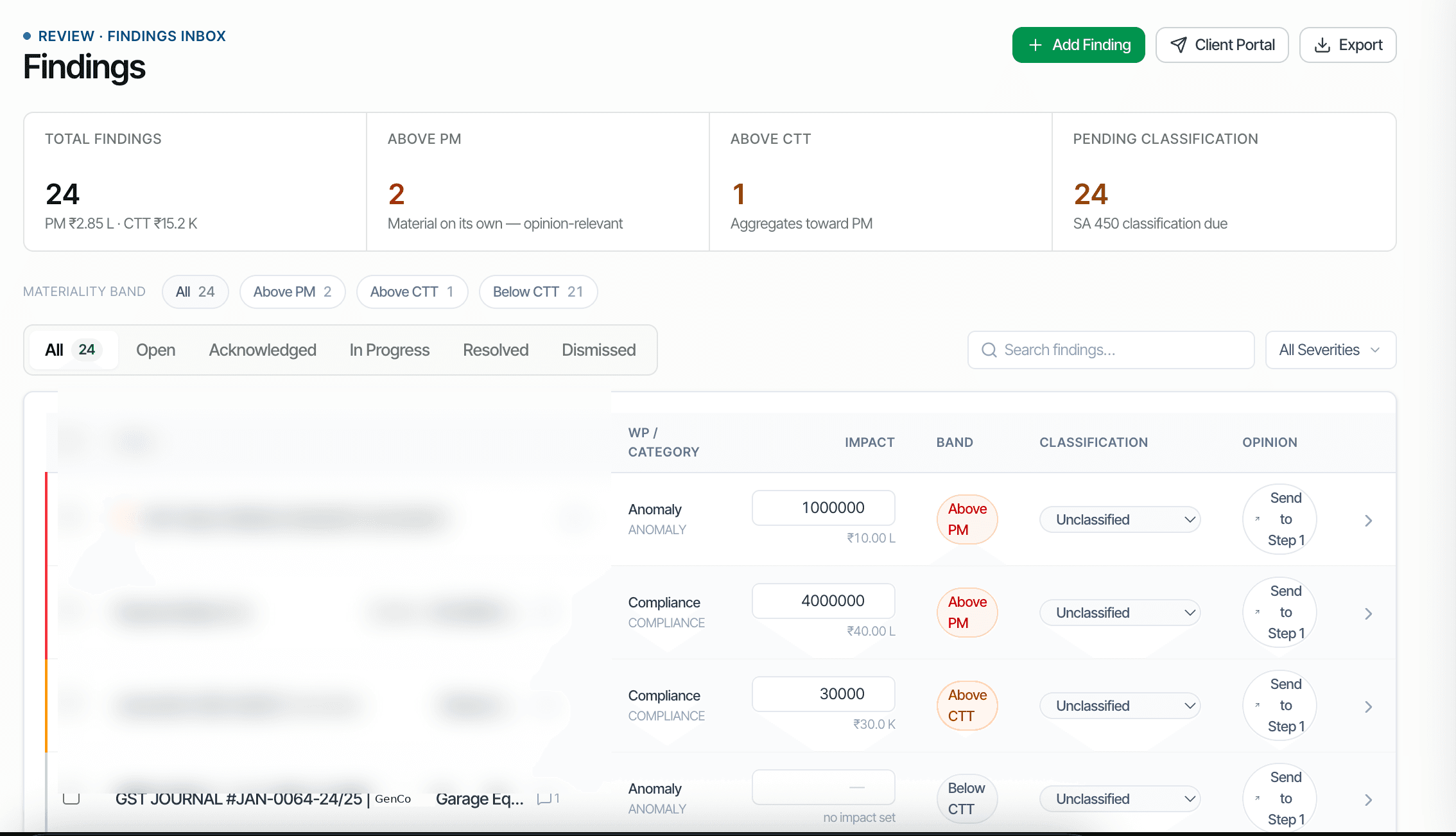
CORAA findings inbox with materiality-banded misstatements

SA 450 requires every misstatement identified during the audit to be accumulated and evaluated, individually and in aggregate. CORAA builds the terminus working paper for that requirement: every finding raised on every caption paper, Trade Receivables, Trade Payables, Fixed Assets, and the rest, rolls up into one summary, banded against the locked SA 320 materiality. The export is formula-chained rather than typed, each cell in the summary traces back to the working paper and the procedure that raised it, so the partner signs off on one number instead of chasing fifty scattered flags across different papers.

  • Every finding from every working paper aggregates into a single SA 450 summary
  • Findings banded above and below performance materiality using the same locked SA 320 figure everywhere
  • Formula-chained Excel export, every cell traces back to its source working paper
  • Recomposes automatically when a source paper's findings change
  • Partner reviews one summary instead of fifty scattered flags
  • Cited to SA 450
Two paths, one ledger

The old way, and ours.

Two paths to the same audit conclusion. One leaves traces; the other doesn't.

Traditional

The old way

  • -Findings copied by hand from each caption paper into a master misstatements tracker
  • -Materiality bands re-typed per finding, easy to apply an outdated figure
  • -Formula links between the tracker and the source paper break the moment a paper is edited
  • -The one-number summary is assembled the night before sign-off
A misstatements summary rebuilt by hand is only as current as the last time someone copied it.
CORAA

On the Ledger

  • Every finding, on every working paper, feeds the summary automatically as it is raised
  • Bands are computed against the one locked SA 320 materiality figure, never re-typed
  • Excel export is formula-chained, cells resolve back to the originating paper and procedure
  • Summary recomposes the moment a source finding changes
The one number the partner needs is always current, because it is never retyped.
How it works

Three steps. Every trace logged.

Step 01

Every finding is captured where it is raised

A finding raised on Trade Receivables, Trade Payables, Fixed Assets, or any other caption paper is captured with its quantum, its materiality band, and a link back to the procedure that raised it, at the moment it is raised, not batched up later.

Step 02

Aggregation against locked SA 320 materiality

Every finding is banded, above performance materiality, above the clearly-trivial threshold, or below it, against the same locked materiality figure regardless of which working paper it came from, so the bands are always comparable across the file.

Step 03

Formula-chained Excel export

The exported summary is not a snapshot of typed numbers. Each cell is a formula resolving back to its source working paper, so the export stays traceable and recomposes when the underlying finding changes.

Inside the module

What you actually get.

Cross-paper aggregation

Every finding raised anywhere in the engagement, across every caption working paper, rolls into one SA 450 summary.

  • No manual copy-paste between papers and the tracker
  • Aggregation re-runs whenever a source finding changes
  • Covers findings above and below performance materiality

One materiality, applied everywhere

Every finding is banded against the same locked SA 320 materiality figure, so bands are comparable however different the source papers are.

  • Above PM, above CTT, below CTT bands applied consistently
  • No per-paper re-derivation of the materiality figure
  • Below-CTT findings retained, not silently dropped

Formula-chained Excel export

The exported workbook is built from live formulas, not typed totals, each cell traces back to its originating paper.

  • Cell-level traceability to the source working paper
  • Standard Excel, opens in the firm's own template
  • Recomposes automatically as findings change

One number for sign-off

The partner reviews a single aggregated summary instead of reopening every working paper to re-collect its flags.

  • Single terminus view across the whole engagement
  • Drill from the summary back to any individual finding
  • Ready for the SA 700 sign-off conversation
Frequently asked

Answers, up front.

No. The bands are computed against the materiality figure the auditor already locked in the SA 320 memo. CORAA aggregates and bands the findings; whether the aggregate misstatement affects the opinion is the auditor's conclusion.
The summary recomposes from the live findings the next time it is opened or exported. Because the Excel export is formula-chained rather than typed, re-exporting always reflects the current state of every source paper.
The Findings Inbox is the live triage tool auditors work from day to day, raising, assigning, and resolving individual findings as the engagement runs. Misstatements Summary is the working paper terminus, the formula-chained Excel evidence pack that rolls every one of those findings up into the one aggregated number the partner signs off on.
See it on a real ledger

Run misstatements summary on one of your engagements.

Bring a Trial Balance and a General Ledger. We'll walk through working papers end-to-end on your data, not a sandbox.

Start the free trial →
Misstatements Summary Working Paper | SA 450, One Number | CORAA